• This forum is the machine-generated translation of www.cad3d.it/forum1 - the Italian design community. Several terms are not translated correctly.

export indecent render revit

  • Thread starter Thread starter ocraM999
  • Start date Start date

ocraM999

Guest
unsatisfied with the cloud I performed a revit rendering (the result is better not excellent but patience), except the image and the quality goes to make..... .
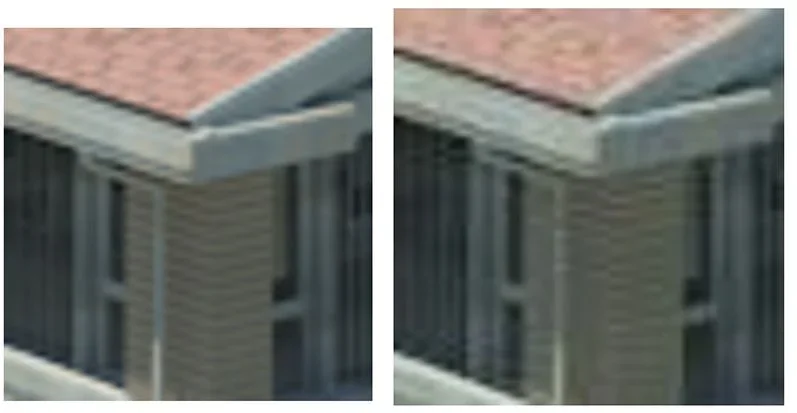
below a close comparison between two screen-shots showing evidence of data loss.

Can you do better?

Mar
 

Attachments

  • a.webp
    a.webp
    159.3 KB · Views: 16
  • b.webp
    b.webp
    122.8 KB · Views: 9
  • Senza titolo-1.webp
    Senza titolo-1.webp
    14.3 KB · Views: 8
you have too small frame size (10mm x 10mm) so that something decent can come out
If you look at the two figures well, despite the small size of the sample, there is a remarkable difference in image definition.
actually the two images belong to the same rendering generated by revit; the first is as it appears immediately at the end of the rendering process, the second is as it appears after the image is recalled by the project browser.
malauguramente the program in the process of saving the image burns, so to speak, some pixels (some graphics say with a bad term jpegizza the image).
in other words revit first shows the result of rendering but then saves it in a poor way.
revit exports poorly in any format, jpg, tiff...etc... and in any size 150, 300... pixels.
all this is particularly evident if the starting image is rendered as optimal....
Perhaps someone, more experienced than me, will have noticed and solved this inconvenience. .
Mar
 

Forum statistics

Threads
44,997
Messages
339,767
Members
4
Latest member
ibt

Members online

No members online now.
Back
Top