• This forum is the machine-generated translation of www.cad3d.it/forum1 - the Italian design community. Several terms are not translated correctly.

export surfaces in obj format

  • Thread starter Thread starter Shotfree
  • Start date Start date

Shotfree

Guest
Good morning to all, my name is my first real poast, so you will forgive me if I make some mistakes. I have been using for several years, I have recently found myself faced with the need to export in obj format some of my assemblies/models, so far no problem. Today, in exporting a set containing some imported components (igs received by commercial suppliers, etc.), I found that I create incomplete files. to explain better, exporting my set and reopening the exported file to the Ukrainian parts of the received component in the form of igs disappear. I noticed that the same happens if I use surfaces in models made directly with creo. I hope some of you can tell me a way out of this "pitfall"! thanks in advance for answers and help.
 
can be a case of assembly that houses parts with large dimensions and small parts.
If this is the case, think about changing accuracy of the various parts before export.
 
hi, question: do the files that come to you like igs, solidify them all?, or do you still leave them as groups of surfaces?
 
Save, while thanks for the answers, the files can not solidify them, moreover they are part of a set consisting of about fifteen pieces, the problem is manifested also by attempting the export of every single component and the feedback even if it tries to export to stl.
As far as solidification is concerned, how would you advise me to proceed?
 
I should see the file.
basic, unless there are fundamental surfaces (but also you can avoid them), all import can be solidified, it was difficult with wildfires, much more feasible with creo.
I recommend sending maths from suppliers in standard step 214a or 214b (very stable below these points of view).

said this, the stl does not manage surfaces, only solids (this by definition of the format).

with creo (it would be useful to know the version you have), you can enter the import sub-programme, correcting errors, rebuilding missing surfaces, repairing tangences etc.
It is not an intuitive part, but it is sufficient to fix any situation, it is not parametric (but explicit), there are no features, but only entities (surface and reference).
If you have experience of shaving surfaces, you should not have great difficulty learning how to use this mode, otherwise... Things get complicated. . .
 
unfortunately we are in the situation "in case otherwise", not model with surfaces so I am not very practical, however I try to search the "import sub-programme", I don't know if you can help me at least identify it, in the future I will ask the models exported in 214a or 214b format as recommended by you, in the meantime (since it was an odysea to have these geometries sent already) I try to solve and see.
 
unfortunately we are in the situation "in case otherwise", not model with surfaces so I am not very practical, however I try to search the "import sub-programme", I don't know if you can help me at least identify it, in the future I will ask the models exported in 214a or 214b format as recommended by you, in the meantime (since it was an odysea to have these geometries sent already) I try to solve and see.
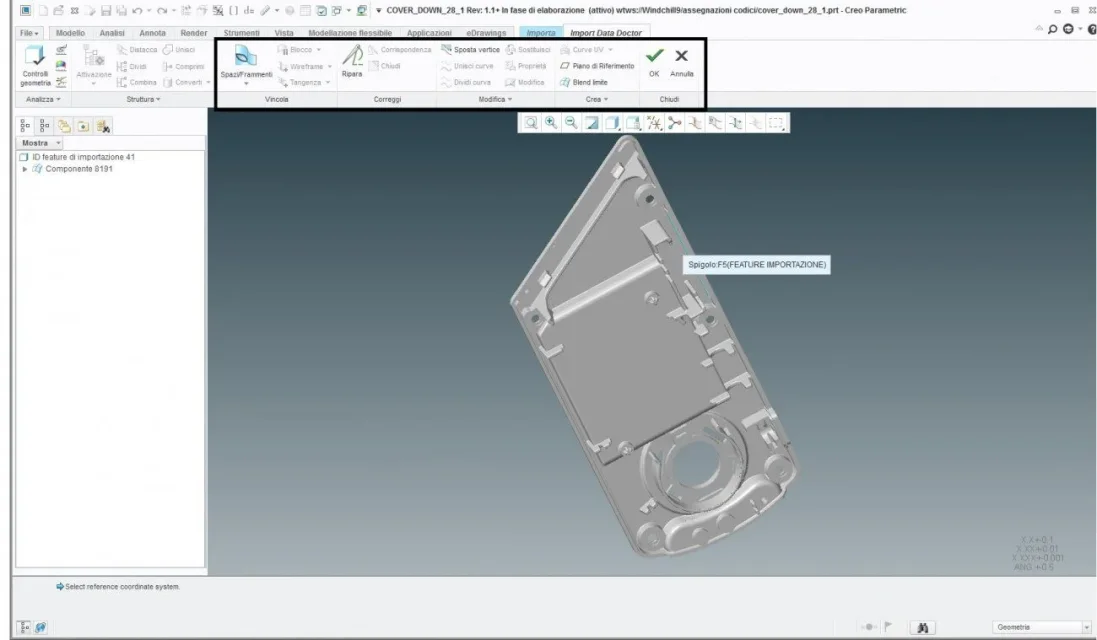
Just that on the import feature, redefine, and click on the button with the sign of the "red cross", you open the program above (eye that to save the progress made, you have to exit).
 
Thanks again for the answer, I entered but I can't figure out how to use the auto repair tool, I see that I can select a set of tools, but I can't figure out which I need to use for automatic surface repair.Immagine.webp
 
good day, I also continue not to understand how to solidify the geometries that amount.... the command is not activated also by selecting the import feature.
 
automatic repair serves in very rare cases, because already the program has used the same algorithms and to insist, you risk that mathematics undergo important changes from the program (as regular rays, which become irregular).

in the photo you have attached, you have in the model tree a domain of surfaces only, so it is already a good starting point (the assemblies united in one part have more domains, one for each component and often more than one).
if you pass in wireframe, see immediately the unrespected tangences and the missing surfaces in light purple color, while in dark purple are the edges, in light grey the verified tangences.

in the controls in the display area, the third icon from the right of the active/unactive center of rotation, displays the segments definition points, (or knots) a segment can be interrupted, or needs to be interrupted to respect the tangence with the adjacent surface, the "unisci" and "divid" commands, serve to join the segments or divide them into multiple nodes.

if the nodes are verified, then the "replace" command must be tried to replace a segment of a surface, with its counterpart of the other adjacent surface (with the right button, you can decide which segment to replace, if the first selectable or the second).

these are the first 2 basic commands in this mode.
when math is all dark purple and light gray, then you can attempt solidification.
solidification can be set by giving ok to this mode and before giving further ok, there is the icon to switch between solid surfaces.

If you want to try and put pictures of the work-in progress, I can try to help you, but know that the cases can be so many and it takes some time, but believe that you can solve all the problems of import and have solid manageable then.

n.b. in this mode works egregiamente the ctrl-z and ctrl-y to go back with the commands, eye on complicated maths, that the system can crash losing all the work (so go out and save often) and that if you are not sure how much done, just go out by canceling.
 
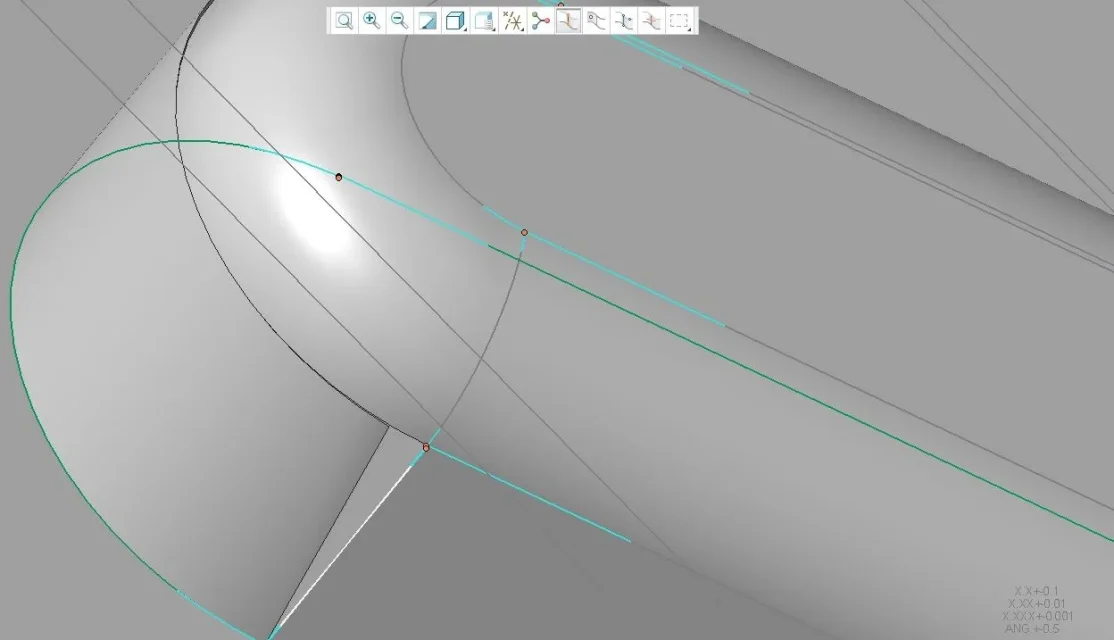
hi 321i s, in the display in wireframe I see some edges of brown color (maybe I have something different set for managing views:
VISUALIZZAZIONE WF.webphours I'm trying to use the commands you described me, screwing the point where I see the brown edge I actually see that the surfaces don't match:
VISUALIZZAZIONE WF 1.webpAt this point I just need to understand how to treat edges or vertices to be joined, the only problem is that the joint command remains disabled.
 
the surface you see interrupted (according to photo), first remove it and put it back, you still have everything you need to recreate it correctly.

then delete the surface and create a "hole", then command "blend limit" the command requires in this case 2 directions (and you have 2 collection menus), in the first direction select the 2 curved edges with ctrl, in the second direction the other 2 edges always with ctrl.
if you have done correctly, preview the resulting surface in yellow that closes the hole.
once given ok, the surface appears in the tree, outside the domain of the other surfaces, do nothing but drag it to the entire domain.
If you did everything correctly, the tangences show you dark purple or light gray, then zone closed in tangence.
If there are clear purple areas, there is some problem.

n.b.
when selecting the edges, with shift you can select edges in tangency is continued, either by clicking on one by one.
any entity you create, is not parametric in this environment, so if you have to repair something, it must be remade as a leader.
 
selecting the two curved edges I see a superifcie preview:
blend_limite_1.webpbut if I go to seglezion the second collector, then the edges the processing fails:blend_limite_2.webpfinishing the surface in the first case I still get a tangency error:blend_limite_3.webpIs that okay?
 

Attachments

  • 1531401189105.webp
    1531401189105.webp
    59.2 KB · Views: 3
the second direction would be better, because if there is a tangency problem, you report it when you bring the surface to the domain.

probably there is still a mistake on the edges of other surfaces (which are the errors that have ruined the original surface you have erased (but you couldn't do otherwise)

other command I command you, is geometry control, where it gives you all the errors detected in the tangence.
errors on the nodes and tangences however verified (the ones in dark violet) are negligible (the solid does the same), instead of unchecked tangences and holes, they must be settled, but this command also finds the microscopic ones.
Maybe put an image of the diagnosis with the errors detected.
 
hi 320i s, sorry if I answer you only now (I am very much taken dol work for some deadlines...:giggle:), now I need to check another model, maybe I continue to "break the boxes" with that, I do some tests and I will take you, I also try to understand where the command is located " geometry control" that you have indicated me. thank you very much!
 
ok, the new model is more problematic, because it is the axieme composed of more mesh, however now I make some try and see what comes out
 
to better understand the model, initially hide the domains and show them one at a time, so as to understand where van settled.
can be that a single model, has been divided into multiple domains, at this point select the surfaces of one domain and drag them into another.
If you need to work inside a single domain, hide others and right-click on the domain you work on, and "active" command, otherwise some commands will not be available.
 
perfect, however I have difficulty repairing the "holes", I think it is only a question of experience, while I arrive the domains and cersco to repair everything, let's see what comes out.
 
Unfortunately the situations are many, but until now I have never found impossible situations to solve, unfortunately it takes a long time.
 

Forum statistics

Threads
44,997
Messages
339,767
Members
4
Latest member
ibt

Members online

No members online now.
Back
Top