• This forum is the machine-generated translation of www.cad3d.it/forum1 - the Italian design community. Several terms are not translated correctly.

export together as solid full

  • Thread starter Thread starter Shotfree
  • Start date Start date

Shotfree

Guest
Good morning to all,
I would have the need to export a full solid assembly, in particular the axieme is composed of several empty components and I would like to export a completely full version (like a cast of the outer surfaces of the model). I tried with shrinkwrap, but then I can't export it all to obj (final format) without having to select every single surface (over long and slender operation), someone would know how to give me some ideas to solve quickly and painlessly?
Thank you.
 
Good morning, it is not clear if with shrinkwrarp you can get the solid closed.
Good morning % 1 ,
First of all thanks for the answer, with shrinkwrarp carrying out a series of selections in manual of components present below axiemi I can, only I would like to be able to export my models without having to do a certain work of component selection. Moreover in the selection for single component risk of leaving out someone and having to start over (it is not very clear what has actually been taken and what is not in the preview).
 
but for shrinkwrap you mean the saveas or the envelope? excuse the questions but I create is a complex program (as you will understand) and then according to the functions used the answer is different.
 
I imagine that with the automatic closing option of the holes (which are the features but all the cavities) you cannot optimize the interior.
 
I imagine that with the automatic closing option of the holes (which are the features but all the cavities) you cannot optimize the interior.
I can but only if I select a set of items manually, I would like to avoid manual selections of various components
 
ok .. then you have to try to make an envelope of the simplified representations that asks you to delete the internal components.
 
ok .. then you have to try to make an envelope of the simplified representations that asks you to delete the internal components.
Can you give me some extra indication? What do you mean by making evelopes of simplified representations?
 
in the simplified representations, among the various voices, there is the evelope that generates a simplified prt model of the axieme. simplification is made with feature shrinkwrap that among the various options you can tell him to delete the internal components. But be careful how he interprets the internal components according to your set.
 
in the simplified representations, among the various voices, there is the evelope that generates a simplified prt model of the axieme. simplification is made with feature shrinkwrap that among the various options you can tell him to delete the internal components. But be careful how he interprets the internal components according to your set.
% 1 when I generate the prt and save it I keep having a solid with the unfilled interior, if then I try to export a further shrinkwrap tells me no selected geometry. I don't know how to use simplified representations very well, so maybe I'm wrong.
 
Excuse me but without seeing the steps you've done and the model becomes difficult to explain where you're wrong. the function I told you does not fill the inside but eliminates the defined internal components. in the save as with the fill holes you could fill the inside.
 
Excuse me but without seeing the steps you've done and the model becomes difficult to explain where you're wrong. the function I told you does not fill the inside but eliminates the defined internal components. in the save as with the fill holes you could fill the inside.
is exactly what I try to do, only that some details are not recognized and therefore are not exported unless I select them all one by one. I can not lay the model for corporate policy (forgive me), maybe after I make screen at the various steps without showing the maths. Thank you for your help!
 
is it not by chance that the components that are not selected are surface? or have such complex geometry that can't simplify it.
 
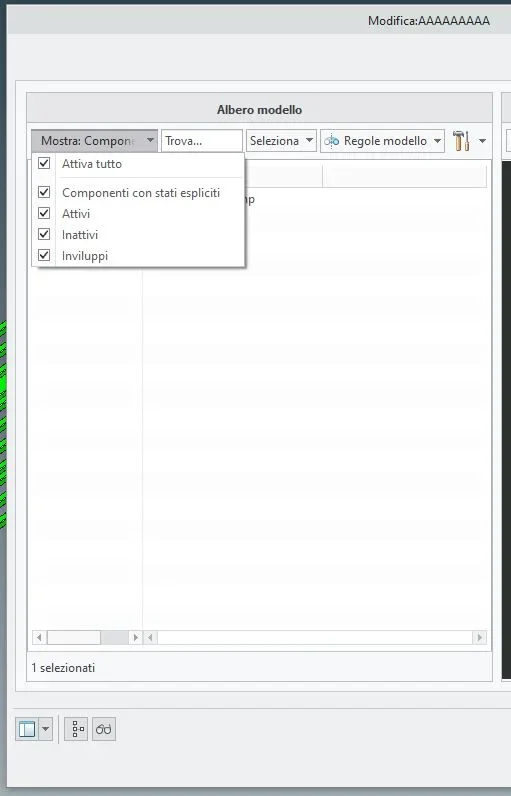
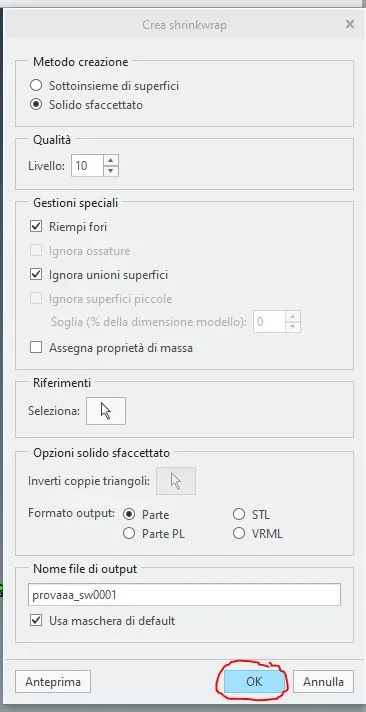
% 1 here is the step by step sequence
 

Attachments

  • 1.webp
    1.webp
    11 KB · Views: 10
  • 2.webp
    2.webp
    11.2 KB · Views: 10
  • 3.webp
    3.webp
    13.3 KB · Views: 11
  • 4.webp
    4.webp
    18.7 KB · Views: 11
  • 5.webp
    5.webp
    25.3 KB · Views: 10
  • 6.webp
    6.webp
    8.3 KB · Views: 10
  • 7.webp
    7.webp
    5 KB · Views: 10
  • 8.webp
    8.webp
    3.2 KB · Views: 10
  • 9.webp
    9.webp
    3.7 KB · Views: 11
  • 10.webp
    10.webp
    22.4 KB · Views: 13
the models are very old, but they were opened and saved with the version currently in use of creo (5.0.5.0)
 
Good morning % 1 Is the info above enough? is the step by step understandable? Do you have any mistakes that I create doesn't export the details I was talking about? Thanks again.
 

Forum statistics

Threads
44,997
Messages
339,767
Members
4
Latest member
ibt

Members online

No members online now.
Back
Top