• This forum is the machine-generated translation of www.cad3d.it/forum1 - the Italian design community. Several terms are not translated correctly.

external references outside context

  • Thread starter Thread starter genesis1975
  • Start date Start date
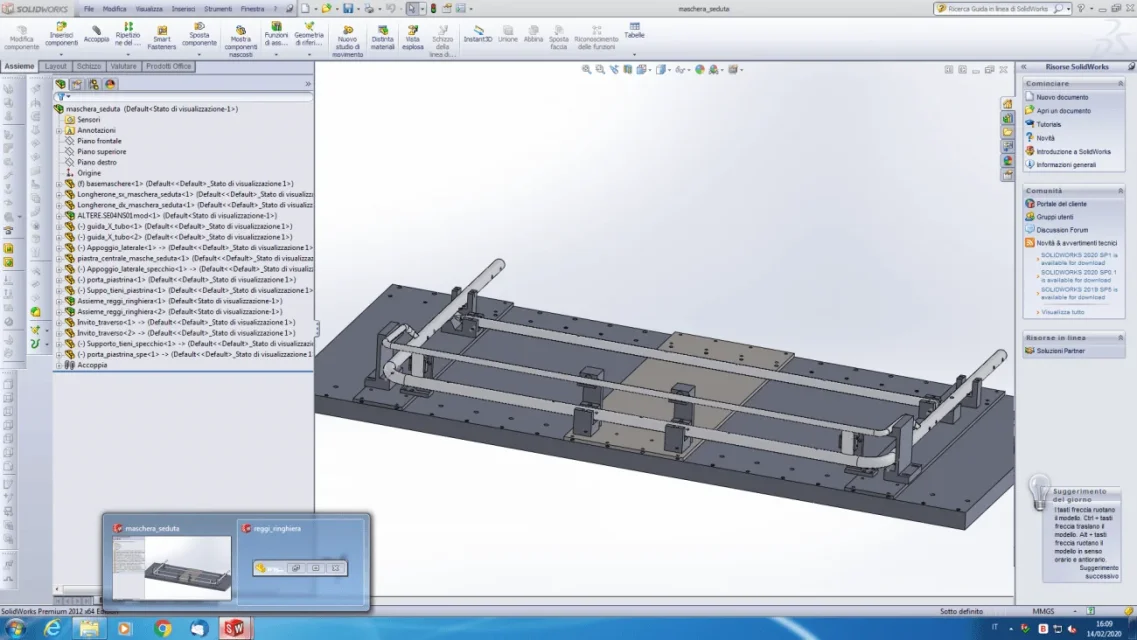
because I did it again this morning. ..between the other identical to what made me mistake... did you see that in the bottom bar there were two overlapping sw icons? the other is that of a part I divided

 
I try to respond to the discussions, but I don't have time, or great desire to tell the truth, to enter the head of the applicants to understand what they are looking at and what they have in their head.
You have to give clear information. Can't explain to you tie a crap image
 
means you opened two files.
does not have to fit solid, but it is a functionality of windows the grouping of the cards
 
I know, but I thought that having inside the group of parts derived from that group loaded me also that because it is father of those inside...
 
and in fact, I will be wrong but even if I close the window to the right and I close everything, when I go to reopen, I still open two windows
 
obvious because as you wrote in post #4 you set in options
1.all(i.e. opens all documents reported externally)
then qunado opens the axieme opens any file to which there are references. those inside the axieme does not open them because they are already loaded while braking in the axieme is not physically present therefore comes
 
then I see that the discussion was as always interesting and I think you have been explained x well the principle of operation of sw for this type of problem. Now I want to add a xche board, as you said, not enough a life to find them all. I share in full and therefore recommend you to use the software with maximum simplicity and logic without going to use "advanced" functions that you may not have the ability to manage yet. It's better to do a more secure operation than you do, rather use a function that allows you to do a lesser operation, but that could complicate your life in case of model changes, as you happened.
 
I exhume this discussion to ask you how you can quickly understand, when it happens, what are the references of a sketch out of context, with the fact that they do not color differently from others, brown for example when references are disconnected.

If I right-click on the sketch and select the item "external references" I open a list, but the individual entries in the list are not selectable individually, and if I filter only those out of context, selecting the list these are not highlighted.

Therefore I have nothing but to click on the individual sketch lines and look for which references have the point of question side by side. .
the problem is when none of the lines has references with question mark, but the sketch continues to present a reference out containment and I miss half an hour to find it.
 
I exhume this discussion to ask you how you can quickly understand, when it happens, what are the references of a sketch out of context, with the fact that they do not color differently from others, brown for example when references are disconnected.

If I right-click on the sketch and select the item "external references" I open a list, but the individual entries in the list are not selectable individually, and if I filter only those out of context, selecting the list these are not highlighted.

Therefore I have nothing but to click on the individual sketch lines and look for which references have the point of question side by side. .
the problem is when none of the lines has references with question mark, but the sketch continues to present a reference out containment and I miss half an hour to find it.
if there are external references there is the text "->". if the references are not resolved there is the text "->?". the first advice I give you and not to make multiple references and not to wrong, disable this possibility in the options. In this way the work is cleaner and the references of a part will be within a single set. If you have questions, to see if it's a problem, you need to open the reference aid. to do so simply click the incriminated sketch on the feature manager with dx key and select "contextual display". If after opening the axieme the references settle and disappear the "?" means that it's okay. If you don't solve, you have to investigate and there are 2 things to do for sketches:
1- check the sketch plan (it could be external, but never use this mode)
2- Enter the sketch, press shows/delete reports and in the first feature manager curtain select "defined in context". with this filter only see those with external references and you can investigate one to which are the reference entities or delete the relationships that for some reason cannot be repaired.
external references are extremely useful and powerful, but you have to understand how they work and be very ordered in modeling, otherwise they are a boomerang!
 
external references in sketches is unfortunately the basis of my work, I realize piping on skid, and reporting the sketches of the structural to piping allows me to have a skid that automatically adapts to the change of piping.
each frame has at least 2 or 3 sketches for the structural elements with a total of 10-20 references to the piping that is in an external set.
to derive similar plants work always of pack and go, but it can happen that some references present the point of question and it is not always simple what is the quota or relationship that is "hijacked"

I will try to use this, but the nose still lacks something to the software to be very helpful in this sense.

2- Enter the sketch, press shows/delete reports and in the first feature manager curtain select "defined in context". with this filter only see those with external references and you can investigate one to which are the reference entities or delete the relationships that for some reason cannot be repaired.
 
external references in sketches is unfortunately the basis of my work, I realize piping on skid, and reporting the sketches of the structural to piping allows me to have a skid that automatically adapts to the change of piping.
each frame has at least 2 or 3 sketches for the structural elements with a total of 10-20 references to the piping that is in an external set.
to derive similar plants work always of pack and go, but it can happen that some references present the point of question and it is not always simple what is the quota or relationship that is "hijacked"

I will try to use this, but the nose still lacks something to the software to be very helpful in this sense.

2- Enter the sketch, press shows/delete reports and in the first feature manager curtain select "defined in context". with this filter only see those with external references and you can investigate one to which are the reference entities or delete the relationships that for some reason cannot be repaired.
I use the top down based on skeletons for 20 years and I have to say that once I fully understand the mechanism, the software never behaves abnormally, it is very reliable. the tools to manage external references there are and the axioms in topdown are manageable, even in the case of clones, partial clones, rename, etc... for each situation there is its command or we have developed a procedure that allows us to maintain external references without disconnecting them. Obviously there must be the conditions for their maintenance.
 
for me it's only 3-4 years that I work like this, and I usually don't find problems, it happens fortunately infrequently. But when it happens, I don't want to put too much time on the sketch, that's the point out instead of trying.
Yesterday I was touched to break them all and give them back, as they were just a 20ine.
 

Forum statistics

Threads
44,997
Messages
339,767
Members
4
Latest member
ibt

Members online

No members online now.
ciao
Back
Top