
• This forum is the machine-generated translation of www.cad3d.it/forum1 - the Italian design community. Several terms are not translated correctly.

extracad

  • Thread starter Thread starter diliiimamo
  • Start date Start date

diliiimamo

Guest
Hi.
I am trying to use extracad of the graphics finson.
Is someone an expert?
I always worked with autocad and with this extracad I feel super prevented!
An example... you cannot pull a horizontal or vertival line without having to insert each time the coordinates;
is there not the automatic perpendicular line function where you simply insert the length value after having decided the first point?

Thank you!
 
Hi.
I am trying to use extracad of the graphics finson.
Is someone an expert?
I always worked with autocad and with this extracad I feel super prevented!
An example... you cannot pull a horizontal or vertival line without having to insert each time the coordinates;
is there not the automatic perpendicular line function where you simply insert the length value after having decided the first point?

Thank you!
I don't know this cad... but did you try to look at the help/manual if there are specifics on this command?

is it a free or paid program?
Are there any learning exercises?

Hi.
 
I remember finson since the '80s. he made paid but very low price plans, if I'm not mistaken also on the totocalcio etc.

I think that cad clings if they can try more.... if in the meantime finson has not become an international software house. ...
 
Hi.
I am trying to use extracad of the graphics finson.
Is someone an expert?
I always worked with autocad and with this extracad I feel super prevented!
An example... you cannot pull a horizontal or vertival line without having to insert each time the coordinates;
is there not the automatic perpendicular line function where you simply insert the length value after having decided the first point?

Thank you!
Bye to you too! I hope you're using version 6.0, at least.
is the free version, but you can also find the paid version with a minimum investment of a few hundred euros.
Don't feel prevented, you just have to help us. has a philosophy different from autocad, and often requires moments of reflection on how to get the desired result.
I haven't used it for years, but I didn't remember having to enter the command line data; some commands are mandatory, but the length of the lines didn't seem to me.
Try to look under "instruments", "perpendicular point" and see if it helps you.
Hi:redface:
 
Bye to you too! I hope you're using version 6.0, at least.
is the free version, but you can also find the paid version with a minimum investment of a few hundred euros.
Don't feel prevented, you just have to help us. has a philosophy different from autocad, and often requires moments of reflection on how to get the desired result.
I haven't used it for years, but I didn't remember having to enter the command line data; some commands are mandatory, but the length of the lines didn't seem to me.
Try to look under "instruments", "perpendicular point" and see if it helps you.
Hi:redface:
Thank you.
I honestly have to use it to teach technical drawing in a professional institute.
Maybe all these steps favor the reasoning by the students. Yes, they have version 6 for a fee.
interested students will never go to design by profession so it's ok... but really extracad has a different philosophy!
I'll work parallel lines (offset) and extreme union... this is what's simpler and faster I found to pull a line of a choice length... .
 
Well, if you have to teach it good wishes!
Yes, the biggest difference I've encountered with autocad is the greater demand for confirmation that the software requires to run a command.
It's a simple, intuitive cad, sometimes even banal. But when you want to make him do complex operations, well take patience and go get a coffee you do first.
There is also option 3d, but I haven't been cuffed so much.
useful symbols function, symbol library.
if I can help you are available for further info.
hi ezio:finger:
 
Well, if you have to teach it good wishes!
Yes, the biggest difference I've encountered with autocad is the greater demand for confirmation that the software requires to run a command.
It's a simple, intuitive cad, sometimes even banal. But when you want to make him do complex operations, well take patience and go get a coffee you do first.
There is also option 3d, but I haven't been cuffed so much.
useful symbols function, symbol library.
if I can help you are available for further info.
hi ezio:finger:
Thank you.
the drawings to relaise are very simple so it is okay that you ask confirmation. . .
Hello!
 
I wonder why to use a paid cad (both modest) when today it is possible to have freed the educational versions of autocad (the current standard).
go to the autodesk website and see how to get licenses.
 
I wonder why to use a paid cad (both modest) when today it is possible to have freed the educational versions of autocad (the current standard).
go to the autodesk website and see how to get licenses.
already done... I wait for the answer.
However, the 12th school starts, I don't think the institute will be able to start with an educational autocad version.
 
I wonder why to use a paid cad (both modest) when today it is possible to have freed the educational versions of autocad (the current standard).
is free for students and teachers but not for educational institutions or institutions. edu versions for institutions, although they cost much less than versions for professionals and companies, are not free.
 
is free for students and teachers but not for educational institutions or institutions. edu versions for institutions, although they cost much less than versions for professionals and companies, are not free.
In fact, the principal had already told me...
thanks for the confirmation.. .
 
I on autocad 2.6 (then called autocad 8) for dos ... in 1989 (!) I used kiosk followed by length axis x, length axis y (e.g. @100,200) or e.g. @100<45 i. length 100 angle 45°.
.... maybe it's something like that.

.... computer prehistory: autocad was on a floppy disk!
 
... in 1989 (!)
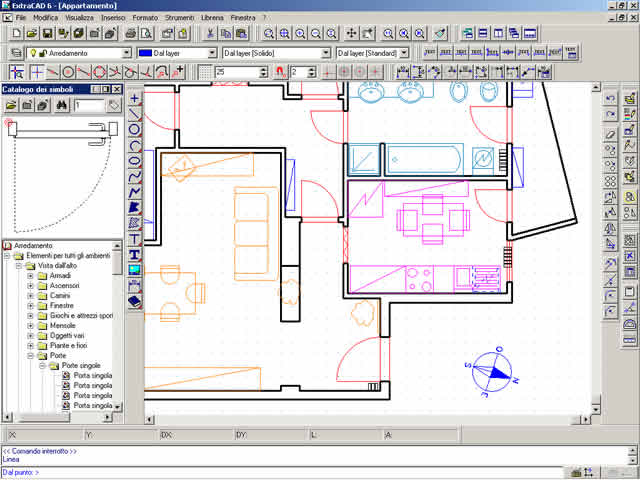
looking at the extracad interface, we are not far from 1989...
cd1195-1.jpg
 
... well no is already for windows (maybe the 3.1!): reminds me autocad 12 for windows!
Nobody used it! and also version 13 did not have much success among the designers of my knowledge... the first really well done and light was version 14.
 
autocad 12 was still only for dos; the first to run on win 3.11 was the 13. I still remember that you could install it simultaneously on the 2 systems (dos and/or win).
However, we are in the second half of the 1990s, so not so far from 1989;)
 
You're right! the 13 was the first for windows nt. passed from 11 to 13, never try the 12
 

Forum statistics

Threads
44,997
Messages
339,767
Members
4
Latest member
ibt

Members online

No members online now.
Back
Top