• This forum is the machine-generated translation of www.cad3d.it/forum1 - the Italian design community. Several terms are not translated correctly.

face inclination

  • Thread starter Thread starter stefer
  • Start date Start date

stefer

Guest
Good morning, everyone! Here I am asking for help! I have a solid, an extruded rectangle with two faces gathered.
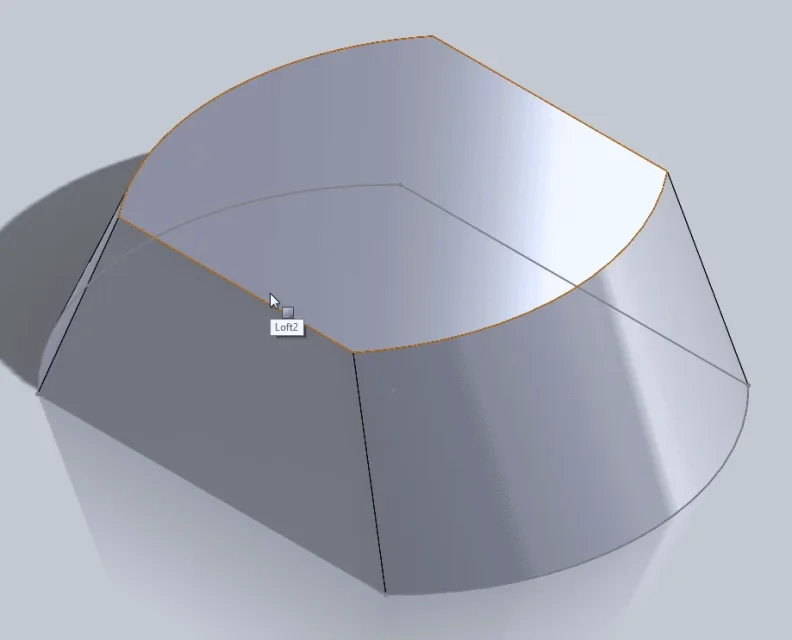
in the image that I attach you, you see the two faces already tilted, with the deformed command.
the result is perfect, but I have the problem that when I disform, the command does not keep me the size of the rectangle width set by sketch, but it breaks out by widening the base. I need to respect the initial measure without having to correct it. Is there a way? I don't feel like I've found anything between the sform command options. Thank you! !
steak
screen.webp
 
extrusion must start from the known size.
know something more than from that image you don't understand like: what is the basis, in which direction the extrusion has been made and in which the deform, what size should be maintained... try to put you in the shoes of who knows nothing about what you did and how it can interpret that image because if you say that
the command does not keep me the size of the rectangle width set by sketch, but it does not extend the base
it is thought that you did the extrusion from the sketch and this will be the basis of the extruded and the deformed, both external and internal will not change the departure but only the final geometry.
recreating these situations is difficult and frustrating, attaching the file or putting clear information (e.g. active sketch and preview of the function with the parameters of the feature manager) makes life easier
 
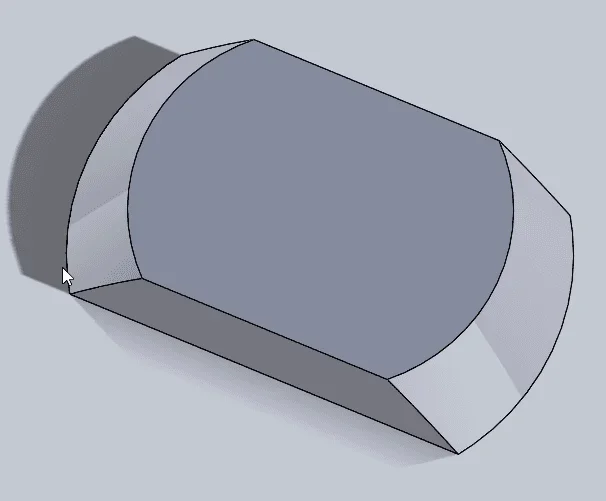
I'm sorry, you're right. I'll get you the file. the extrusion of 35 was made by a base of 104x75 and then applied the 25-degree sform to the external faces!
 

Attachments

when you do the deform you have to select the neutral plane (which would be the plan that remains unchanged as measures and from there the deform of the walls). in your case select the plan below, then with darts in part to the neutral plane change the sform from the opposite direction
 
I'm sorry, you're right. I'll get you the file. the extrusion of 35 was made by a base of 104x75 and then applied the 25-degree sform to the external faces!
if you want base 104 and I'll break 25° you get this
 

Attachments

He has, I had assumed that I was doing the deform directly from the extrusion function.
inter alia the posted file does not even reflect the image you have attached where it seems that the sform is applied to all faces.
eros gave you the correct solution
 
Forgive me, I've just confused your ideas. indeed, I have confused ideas and I confused them to you too.
I asked you the question in totally wrong terms, giving you a design that did not correspond to the final result that I wanted to get as I unfortunately do not have an image of the final result that I want to get to post to you.
at this point I stopped thinking... and I got the result creating a sketch equal to the base of the parallelepiped that I want to get. then I created an offset plan equal to the height of the extrusion I want to get, I projected the base on the new floor and with an offset I reduced the sketch to create the upper face. After creating the upper face I did an extrusion with loft, I gave the two profiles, adjusted a couple of options and the result is what you see in the pack I attached.
at this point the question is: with the unform command or with another command there is the possibility to tilt the faces without having to do all the steps that I made to get to the solution?
In these terms I hope to have been clearer! Thank you! stefano.
screen.webp
 

Attachments

excuse the three thousand repetitions in the text of the previous post. . I'm very busy at work
 
the loft seems to me the most practical and manageable solution at the level of control of geometry; are not so many steps and not even complicated.
I change the geometry while still keeping the center of constant radiation while in your model this is modified; Moreover you have two different inclinations and you can not do it with the simple sform but you have to use the advanced method not getting the desired result anyway
 

Forum statistics

Threads
44,997
Messages
339,767
Members
4
Latest member
ibt

Members online

No members online now.
Back
Top