• This forum is the machine-generated translation of www.cad3d.it/forum1 - the Italian design community. Several terms are not translated correctly.

factor k for development channels to u

  • Thread starter Thread starter triplix
  • Start date Start date

triplix

Guest
Perhaps the title is not clear, I design canals in sheet that form u with a top edge folded to the ester and I have serious problems with factor k.
so far with autocad I have always calculated the developments of the channels with "paper and pen" but now with inventor it is difficult to me.
I set a k factor value with which I can perform the folds at 90° as I want, but when it comes to performing a cradle at u (background folded as if it were half round tube) with vertical walls and a upper lip coming out with a 90° fold do not return the accounts.
My bottom to u is similar to half a calandered tube so inventor "wans" some kind of factor k and my edges folded to 90° require another one!
Is there someone who has already had a similar problem and managed to solve it?

Thank you.
Palo
 
use folding table. to change the radius also changes k because changes the incrudiment line of the material.
 
use folding table. to change the radius also changes k because changes the incrudiment line of the material.
thanks, I solved by giving a rule for folds from 0 to 180° with factor k 0.293 and a rule for folds with radius greater than 20 up to 200 with factor k 0.5 .cosi seems to work.

Palo
 
so you answered the same question you had put in the previous discussion of christian76. :confused::finger:
can you post an example of how you set the rule?
 
annex there is an example of what we build and for which it served this rule.
are coclee channels, which are our production.
I created a "table folds sp.3" by setting 2 custom equations as attached, in which insert a k factor for the folds and one for the rolling, then I set a sheet rule for the 3mm and as an explanation rule imposed a "table folds sp.3 that you created before.
Obviously you have to set for each thickness a sheet rule with a phieghe table with k factor calculated for that thickness.
I hope I've been clear

Palo
 

Attachments

annex there is an example of what we build and for which it served this rule.
are coclee channels, which are our production.
I created a "table folds sp.3" by setting 2 custom equations as attached, in which insert a k factor for the folds and one for the rolling, then I set a sheet rule for the 3mm and as an explanation rule imposed a "table folds sp.3 that you created before.
Obviously you have to set for each thickness a sheet rule with a phieghe table with k factor calculated for that thickness.
I hope I've been clear

Palo
I don't see the equations. .
 
It's not like he understands us a lot, so I'm asking for advice:redface:
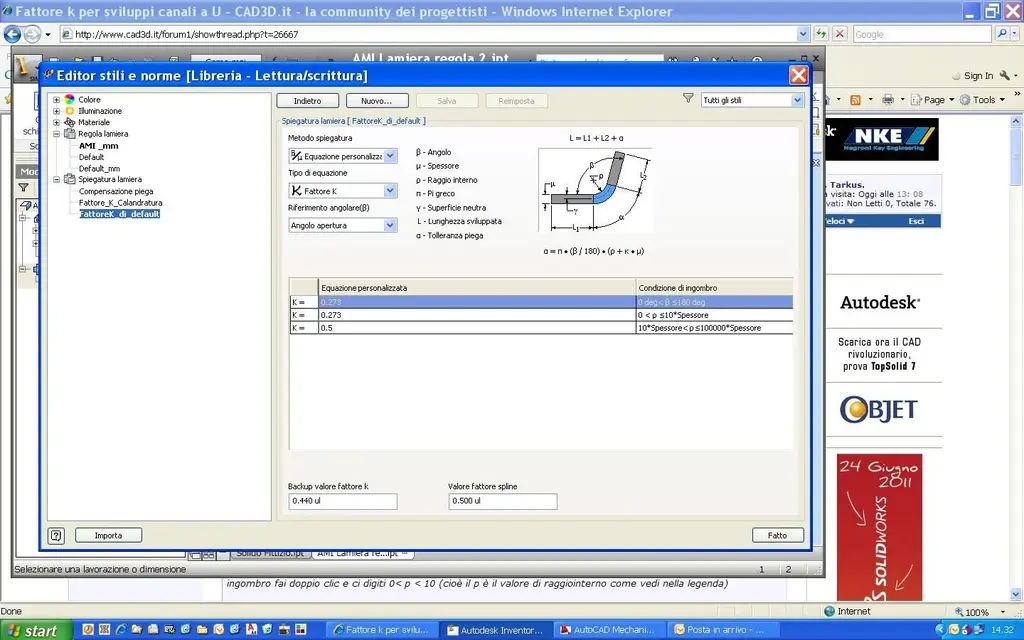
as it is set (always that you can) a sheet rule where the k factor is equal to 0.273 for internal rays from 0 to 10*spessore, and is equal to 0.5 for internal rays over 20*spessore.
this, because I'm hardly going to be bending a radius of 30 on a sheet of 3 mm; While it's certain that if I need such a wide radius, I'll use the grille and then factork= 0.5...
 
What is not clear? Pasted image or explanation?

Anyway, I think what you need is something like this:

create your own custom fold table where you set:
explanation method=custom equation
type of equation= factor k
angular reference=what you need, I set opening angle

create a line in the table below
in the custom equation column double click and type your 0.273 value and in the encumbrance condition column double click and type us 0< p < 10 (i.e. p is the radius value as you see in the legend)

I don't understand what your " *spessore " means

create another row and impose k value as 0.5 and as encumbrance condition put 20< p < maximum value to which you could get

with these two equations but you have a hole for the inner rays ranging from 10 to 20

I hope it's clear otherwise I'm here. :finger:

Palo
 
What is not clear? Pasted image or explanation?

Anyway, I think what you need is something like this:

create your own custom fold table where you set:
explanation method=custom equation
type of equation= factor k
angular reference=what you need, I set opening angle

create a line in the table below
in the custom equation column double click and type your 0.273 value and in the encumbrance condition column double click and type us 0< p < 10 (i.e. p is the radius value as you see in the legend)

I don't understand what your " *spessore " means

create another row and impose k value as 0.5 and as encumbrance condition put 20< p < maximum value to which you could get

with these two equations but you have a hole for the inner rays ranging from 10 to 20

I hope it's clear otherwise I'm here. :finger:

Palo
I thank you for the fantastic tip:finger::finger::finger:
 
What is not clear? Pasted image or explanation?
I just don't know how to do it.
Anyway, I think what you need is something like this:

create your own custom fold table where you set:
explanation method=custom equation
type of equation= factor k
angular reference=what you need, I set opening angle

create a line in the table below
in the custom equation column double click and type your 0.273 value and in the encumbrance condition column double click and type us 0< p < 10 (i.e. p is the radius value as you see in the legend)

I don't understand what your " *spessore " means
means that the k value must be taken for rays less than 10 times the thickness i.e. up to 30 radius if I have a 3 mm sheet
create another row and impose k value as 0.5 and as encumbrance condition put 20< p < maximum value to which you could get

with these two equations but you have a hole for the inner rays ranging from 10 to 20

Palo
if the feature accepts the first formula= 0< p < 10* thicker and the second formula = 10* thicker< p < 100000* thicker (to have an infinite value), I should not have a hole...
 
tried with a profile like the cochlea cradle.
It works!:biggrin:
thanks to the right
 

Attachments

  • Fattore K multiuso.webp
    Fattore K multiuso.webp
    111.2 KB · Views: 63

Forum statistics

Threads
44,997
Messages
339,767
Members
4
Latest member
ibt

Members online

No members online now.
Back
Top