
• This forum is the machine-generated translation of www.cad3d.it/forum1 - the Italian design community. Several terms are not translated correctly.

failed geometric series, i tried them all

  • Thread starter Thread starter andr34
  • Start date Start date

andr34

Guest
hello to all, is the first tutorial with creo parametric 5, for the exact I am following this:
e2 creo parametric 4.0 - basic modeling 2 tutoriaI can only make the first polar series with reference to the axis and using the original non mirrored herb.
I always miss the mirrored herb series, also in the preview wireframe that shows me when I miss the last element delal serei because they should be 7 and not 6 . I put elements 7 and angle 360/7
Thank you very much
 

Attachments
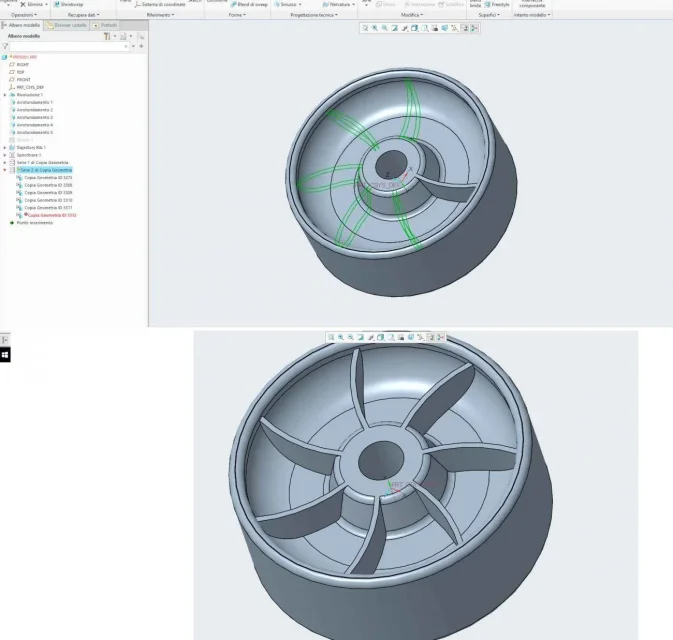
  • serie-fallita.webp
    serie-fallita.webp
    95.5 KB · Views: 17
Last edited:
I also attach the part file with error, I tried in several ways: first mirroring only one fin and then making the series, but I also tried to mirror all the fins that in the first face had managed to do with the series. fails in all ways
 

Attachments

Have you tried first to make the mirror of the rib and then put both in series?
even better: finish the wheel on one side and then mirror the wheel on its halfway.
 
hi 320, thank you very much for the answer, the problem was in accuracy , I reopened the file and set the accuracy to 0.0001 in file, prepares , model property ,automatically solved the error and the model formed correctly
 
then if you had to set such a precision, you have a tangency between feature, so limited, that the system performs calculations susceptible to errors.
Such precision is used only in rare cases and involves an increase of the necessary calculations also in combination.
I suggest you find what this entails and solve it.
I'll throw it there, did the ribs do the sketch by taking the bottom of the wheel as a copied edge?
 
Thank you, I understand, I didn't know.
premitting that as a unit I am using second, exact libra thumb, to do the rib I created a sketch on the upper hole plane, then I used the reference command to take the two curves on the sketch plane to the bottom of the wheel (I attached the screenshot where you see well) , then I drew a stretch between these two curves, then with the nervation command I did the complete rib
 

Attachments

  • sketch.webp
    sketch.webp
    71.5 KB · Views: 6
try to complete the closed profile, give a depth from the sketch plane, beyond the base surface (so a simple protrusion, not ribbing and not from a projected curve), this should eliminate the above problem.
 

Forum statistics

Threads
44,997
Messages
339,767
Members
4
Latest member
ibt

Members online

No members online now.
Back
Top