• This forum is the machine-generated translation of www.cad3d.it/forum1 - the Italian design community. Several terms are not translated correctly.

families revit

  • Thread starter Thread starter Monte Baldo
  • Start date Start date

Monte Baldo

Guest
Sorry ignorance about matter. I have to work with a firm that works with revit. I work with allplan, so I gave him a ifc file. everything works perfectly but... the collaborator tells me that my walls, while being all equal in allplan, generate n families in revit. small example: design 10 identical walls in allplan beating m1. the collaborator finds all the walls but at the same time tells me that 10 different families are created (1 for each wall).

I attach an example ifc file generated by allplan.

Is there any way to merge all these families or to make a kind of substitution directly in revit?

In the meantime, I see if I've done something wrong in my export settings.

thanks to all
 

Attachments

It's true. each wall is a different type. But, I don't see why this would be a problem for your collaborator. he or she must use the tùo file as a connected file. not to be open me connected, as you do with other models of revit of other disciplines.
 
"Is there any way to merge all these families or to make some kind of substitution directly in revit?"


collaborating with many studies, sometimes I get into this topic too. If we do not know revit, perhaps the question is insensitive, but does not exist in revit a function like that which asks Monte baldo ?

Thank you.
 
If we do not know revit, perhaps the question is insensitive, but does not exist in revit a function like that which asks Monte baldo ?
Of course! you select the walls with common features and the type selector you choose the type of wall. it takes more time to write it than to do it
 
thanks to the cold & tristan... now maximum contact (my collaborator revit)

Thanks again
 
[MENTION=9930]sadan[/MENTION]: maximum is all happy. Thank you! He did what you said in seconds. then deleted "anomal" families following this advice: http://help.autodesk.com/view/rvt/2017/enu/?guid=guid-4ebbde76-e019-486e-bfbf-ee326caae2c4
@alfredo: Your solution is also interesting. However, trying to insert the ifc link does not appear anything. if maximum try to insert the same ifc file as link appears this message "it could be invisible because the links is unloaded". same thing if you run the operation from manage links
Manage links.webp
 
@alfredo: solved!!! even your solution works! maximum had forgotten to save the project in advance
 
[MENTION=9930]sadan[/MENTION]Don't hate me. But my partner asks me another question and now I've become his secretary... .
then, always starting from our ifc file... to quickly filter all "anomal" families (m1:1040, 1041,... 1048), my collaborator has been thinking of selecting them directly in the browser instead of in the drawing (I attach the image he sent me) and expected to be able to quickly replace them by loading the m1 family (the correct one) after selecting the function type properties. you have idea why the key load is it grey? In fact, this would become even easier. Thanks again
Type Properties.webp)
 
I ask you about developments... not finding a solution to the question above... I and the most have found an alternative way... (the important thing is to reach a result).
premise: Unfortunately, the “select all instance – visible in view / in entire project” function does not work if multiple entries / families are selected in the family browser...
here is how we solved
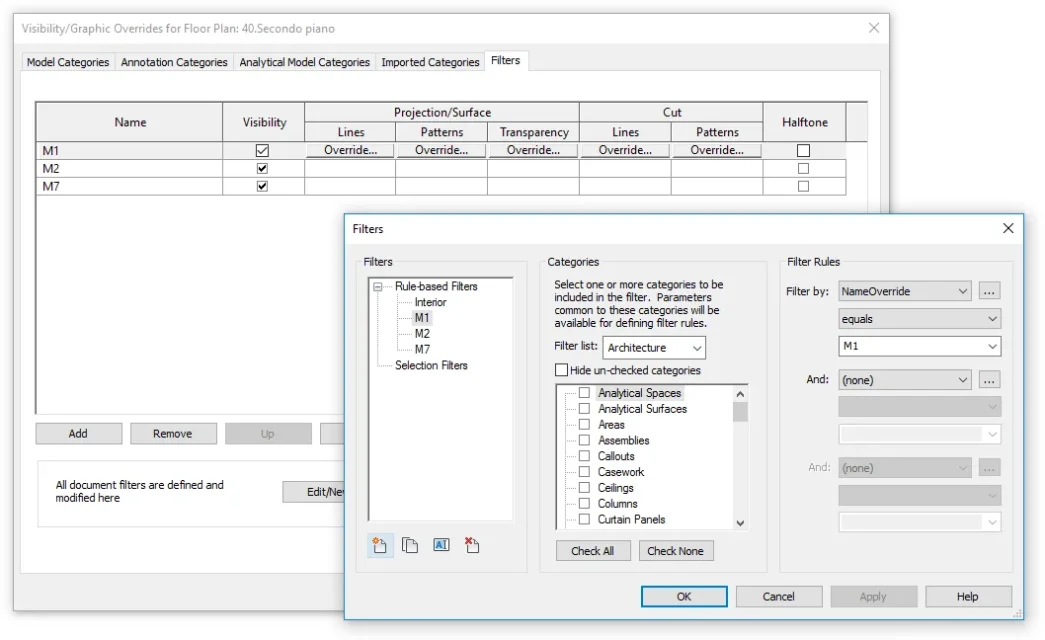
in allplan I beat all my types of walls with a different name (m1, m2, m3, etc.). do not ask me why the following of the import into revit are created anomalous faults of type m1:xxx, m1:yyy, etc. However, by analyzing the properties of the different walls, the correct wall name ends in the “ovveridename” parameter. here is therefore that using the function “visibility/graphic ovveride” + n filters how many types of walls you can turn off and turn on all walls quickly compared to the criterion filter by nameovveride equals <nome parete="">. at that point you can quickly use the technique suggested by tristan in an extremely quick way combined with activation/disactivation of the visibility checkbox. the attached image should clarify your ideas.. the only thing the collaborator did not understand is how to save these parameters for any future projects (even because my wall types are always the same). while saving the job as a template, when importing the ifc files a new project is always generated not based on the one just saved so it tells me that, after every import ifc, you have to create again the different filters.... if you have suggestions... Thank you.
</nome>NameOvverride.webp
 
How not said... just set the custom template with all types of walls in ifc options...

Maybe it's the good time.. .
Default template for IFC Import.webp
 

Forum statistics

Threads
44,997
Messages
339,767
Members
4
Latest member
ibt

Members online

No members online now.
Back
Top