• This forum is the machine-generated translation of www.cad3d.it/forum1 - the Italian design community. Several terms are not translated correctly.

family table pattern

  • Thread starter Thread starter kertus
  • Start date Start date

kertus

Guest
Hello everyone,

I have a problem with the family table of a pattern concerning washer and nut screw. below I try to explain the problem

each of the three elements mentioned above, named under the name of the reference legislation, is a part file inside which I created the various variants by form and size as from its uni rule. (see figure-a for clarification).

now I have a "father" set consisting of various elements welded together. on one of them I have holes arranged on the top of a polygon created with a pattern feature. on one of the holes I performed the assembly of a screw, a nut and a washer, for each element I chose the father element of each familiy table. after whom I created a group of these three elements and made a pattern for me to recreate the assembly also on the other holes. Finally, for this feature, I created a group to call everything as I wanted (figure-b). Therefore, on the axieme of the on which I performed the assembly of the bolts I recalled in family table the following elements (figura-c):
-)the feature group_bulloneria_driver_j1
-) the parameters of the pattern 5 of local group_1 (quantity and pitch)
-) the three components in local_group_1

so doing I hoped to have the right parameters to vary the types of nuts and bolts in the various versions of the assembly on which I performed the assembly

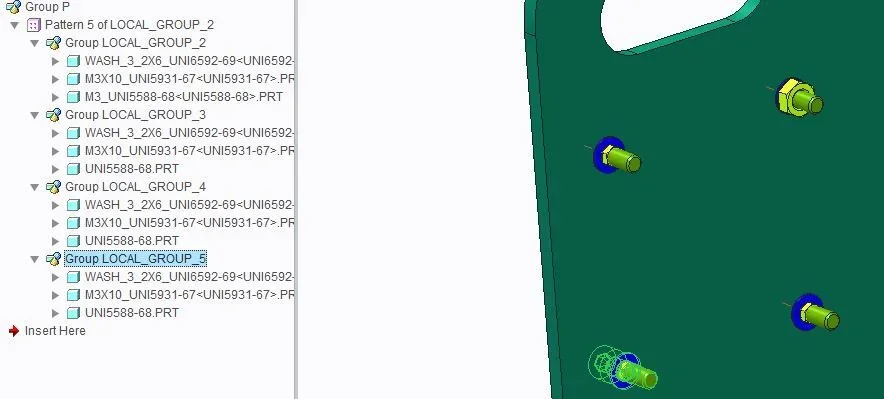
what happens (fugura-d) is instead that when I go to choose nut screws and bolts on the local_group_1 via the replace command makes me a partial and random update on the other elements in the other local groups created by pattern.

Could someone explain why? I also tried to remake the ex-novo procedure by thinking about a bug at the time of the feature creation.

the usual thing does to me also elsewhere (I applied the usual methodology also in other points of the project)

Thank you very much
 

Attachments

  • FIGURA-a.webp
    FIGURA-a.webp
    10.7 KB · Views: 40
  • FIGURA-b.webp
    FIGURA-b.webp
    20 KB · Views: 40
  • FIGURA-c.webp
    FIGURA-c.webp
    11.9 KB · Views: 4
  • FIGURA-d.webp
    FIGURA-d.webp
    27 KB · Views: 37
  • FIGURA-e.webp
    FIGURA-e.webp
    8.8 KB · Views: 36
Hi, dani,

Frankly, I haven't tried because if I grow up it's going into a crisis for something that seems simple and linear, I doubt its potential, don't I? I can try but it is like giving it won to the program, in addition to the fact that I have to put other 4 parameters (2 for each pattern I insert so that it chases the pattern of holes, unless using parametric relationships, which I wanted to avoid to not weigh all)
 
basic questions:
1-Have you assembled the screws in the correct cascade?, that is:
- Washers on the hole in pattern
-dado on washer hole
- screw on the washer hole

2-You assembled the first screws on the "father" hole of the series, because if you assembled the screws on a hole generated by the series, there may be problems of data passage when there are so many variants between family table.

when the program from discomforts like this, is 90% blame for assembly of the first group.
in this case, leave the series of holes, assemble the screws on the father hole of the series, verify that in the variants where you want to change the screws the instances change correctly, then on the generic, put the series of the screws.

creo is not stupid with these functions, personally I made series much more messed up than these, but it is essential to be ordered for a data stream in a single cascade direction for regeneration.
 
carro320i

I assembled the screw using as references the hole on the plate (axis and support surface)
for the washer I used screw axis and offset from the surface of the plate
for the nut I used washer axis and supportive washer-dado

I have always used the father hole of the pattern, but I believe that the thing does not depend on the hole, because it is I who give in family table the parameters to the pattern of the bolt to manulate the pattern of the holes (I did not declare relations on purpose just to stream everything and can control it by hand)

I always try to refer to the hole axis for all three assemblies and tell you

Thanks for now
 
320i,

He doesn't want to know. I tried to refer it to all three pieces the same starting hole axis and the father hole of the pattern of the holes (although with little sense since I disjoin the two patterns using a manual chase) and does not want to know unfortunately. I also tried to remove the most external group by inserting in the family table directing the pattern switch (thinking them boring the too many groups).... the thing irritates me because I think correct the cazzarola procedure
 
Hi, dani,

Frankly, I haven't tried because if I grow up it's going into a crisis for something that seems simple and linear, I doubt its potential, don't I? I can try but it is like giving it won to the program, in addition to the fact that I have to put other 4 parameters (2 for each pattern I insert so that it chases the pattern of holes, unless using parametric relationships, which I wanted to avoid to not weigh all)
the groups are the least necessary, because at least wf5 digests them little well.
 
carro320i

I assembled the screw using as references the hole on the plate (axis and support surface)
for the washer I used screw axis and offset from the surface of the plate
for the nut I used washer axis and supportive washer-dado

I have always used the father hole of the pattern, but I believe that the thing does not depend on the hole, because it is I who give in family table the parameters to the pattern of the bolt to manulate the pattern of the holes (I did not declare relations on purpose just to stream everything and can control it by hand)

I always try to refer to the hole axis for all three assemblies and tell you

Thanks for now
Here is the hiring!, I create if the assembly references are in pattern or not, but if for the only screw, use the hole of the centering plate (first pattern) and the surface of the washer as support (second pattern), creates a problem that often leads to problems, because I create does not know what pattern to follow (if the hole or the washer) if it is in group, even worse.

then, as mentioned above, assemble the washer on the plate and on the hole, then the screw on the washer hole and the surface washer and test, so we exclude that it is the problem mentioned above.

creo has no problem managing many groups, it was the wf5 that had some trouble, but the others never had any kind of trouble.
 
Here is the hiring!, I create if the assembly references are in pattern or not, but if for the only screw, use the hole of the centering plate (first pattern) and the surface of the washer as support (second pattern), creates a problem that often leads to problems, because I create does not know what pattern to follow (if the hole or the washer) if it is in group, even worse.

then, as mentioned above, assemble the washer on the plate and on the hole, then the screw on the washer hole and the surface washer and test, so we exclude that it is the problem mentioned above.

creo has no problem managing many groups, it was the wf5 that had some trouble, but the others never had any kind of trouble.
320i,

Unfortunately it does not work (I would have hoped)... I will send you the confirmation photo where I reversed the assembly order doing as you say....but with creo 2.0 at least it does not work!.... the method of dani 3d I tried it as well and it works.... of each component there is to do the pattern separately so the groups digest them badly (at least with creo 2.0)
a.webp
 
I did a couple of flight tests with 2 identical flanges with 8 holes and connection bolts:

- group assembled in cascade as mentioned above, put in series without change of variants between one instance and the other of together, it works
-single components assembled in cascade, with each one its specific series and change of variants between one instance and the other of the assembly, works

-the mix between the 2 systems as you would like to do, generates a program error on creo 3.0, these errors happen when the ptc function has not been foreseen (until the failed entities are suppressed or eliminated through the menu "repair" feature, does not let go of the same menu).

you can still create a group if, together with the components put in series, you add a component not in series: in my case I made a group with the 4 series of bolts (washers, screw and nut), and one of the flanges of the coupling.
 
very kind 320i s, thank you very much of the test, on creo 2.0 I had to forcibly create a single pattern for every element otherwise I went into crisis all the project.
 
very kind 320i s, thank you very much of the test, on creo 2.0 I had to forcibly create a single pattern for every element otherwise I went into crisis all the project.
so however you are sure that will not trouble the design.
 

Forum statistics

Threads
44,997
Messages
339,767
Members
4
Latest member
ibt

Members online

No members online now.
Back
Top