• This forum is the machine-generated translation of www.cad3d.it/forum1 - the Italian design community. Several terms are not translated correctly.

fasi revit lt 2014

  • Thread starter Thread starter bonf2
  • Start date Start date

bonf2

Guest
good evening to all,I am a first-armed user with revit lt 2014.
I am facing the part related to the stages.
I read everything and more but I can't get out of it.
I ran an exercise of a book and everything ok, I tried to set phases and filters in a new project as in the tutorial but nothing.. .
when in the current view imposed current phase and current filter even disappear the symbols of the prospectus.
Can you help me?
maybe even a pattern with phases and filters.
for now I should make current state and more comparative project.
I don't know what to look at anymore.
Thank you very much.
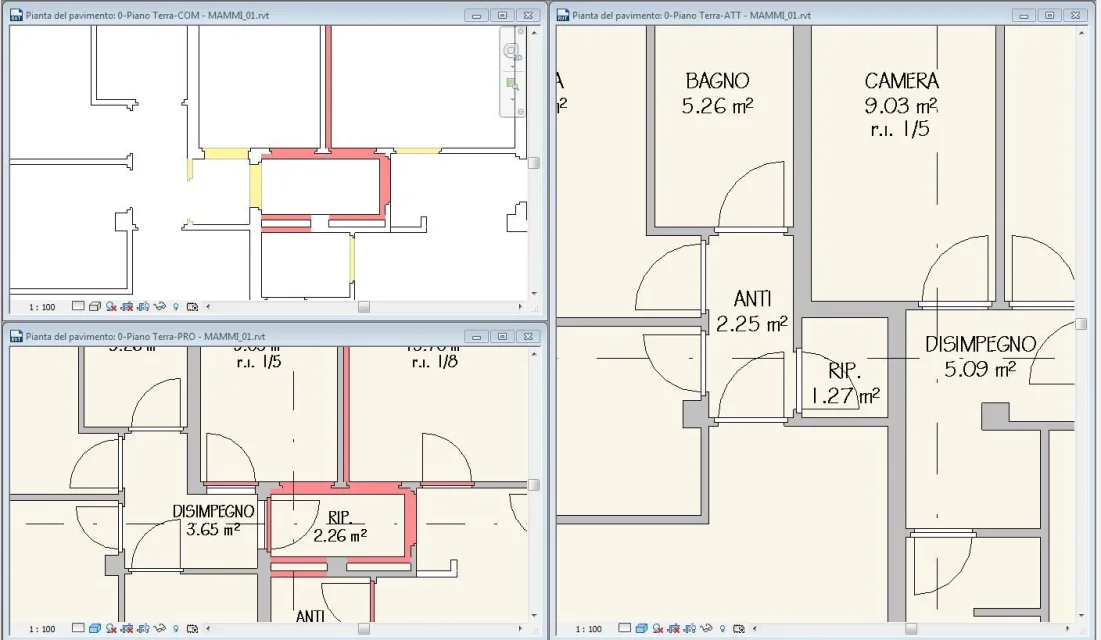
 
...when in the current view imposed current phase and current filter even disappear the symbols of the prospectus.
if the phase combined with the prospectus is following the current it is normal that these disappear
 
You're losing yourself in a glass of water....:biggrin:
the symbols of prospectus represent the views of prospectus. if you start from the default templar these views are set on the project phase then it is normal and correct that disappear from a view of the plant if set on a previous phase.

follow this procedure:

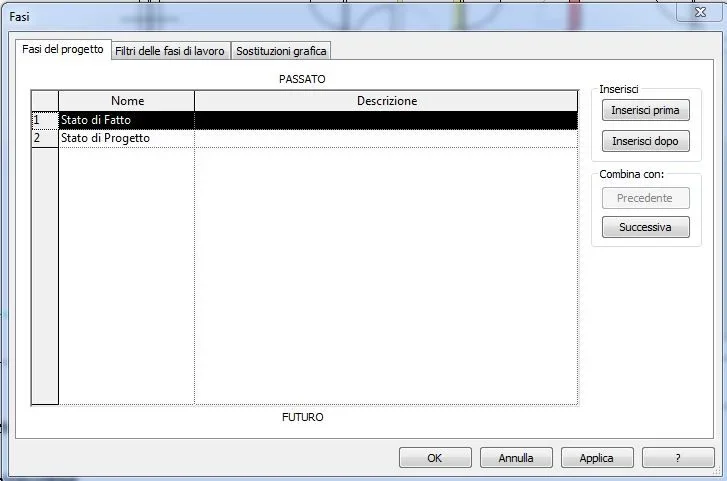
from manage>fasi creates the steps you need (actual status, design and variant).

now from the project browser calmly duplicates the views of the plant and prospect by renameing them and anteposing a code that allows you to recognize the phase (e.g. sf= state of fact pr= project etc.)

assigns phase to each without worrying about symbols disappearing or other... .

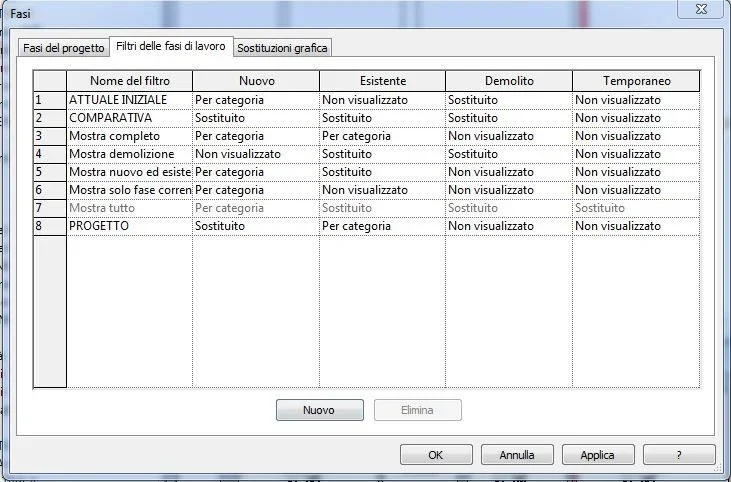
back to manage>fasi look for filter state of fact and in the column new assign by category as a graphic representation style.

now apply filters according to this scheme.

sf= status of fact
pr= project status
var= project status

when you want the comparison simply duplichi a design or variant view and apply the comparison filter.

in last go in view> user interface> organization project browser.

click on new and in order group by phase and then family and type and below where there is order for: choose Associated Level. is the most classic organization but should help you manage things better.

Try to see if you can.. .
Hi.
 
good evening to all,I am a first-armed user with revit lt 2014.
I am facing the part related to the stages.
I read everything and more but I can't get out of it.
I ran an exercise of a book and everything ok, I tried to set phases and filters in a new project as in the tutorial but nothing.. .
when in the current view imposed current phase and current filter even disappear the symbols of the prospectus.
Can you help me?
maybe even a pattern with phases and filters.
for now I should make current state and more comparative project.
I don't know what to look at anymore.
Thank you very much.
the forum, at the bottom of the page of each post, proposes the "like debates" to which you access directly.
in case you see:http://www.cad3d.it/forum1/showthread.php?24942-revit-2009-fasi-e-filtriwhich contain links to refer to other discussions, in which there is also a template to download, and a practical vademecum (referred to version 2008, but still valid)
 
Thank you so much!
with your advice I understood and applied everything!
If I wanted to avoid the comparison table, maybe the project changes are exigue, should I set in the filters of the phases that demolitions and the new are replaced directly in the current phase?
extra phases question if I was allowed: if I wanted to have prospects in hidden line, white and black, but having realistic trees without changing the properties of the walls, which I will need to render etc, do I have to act on the graphic replacement of the view? that I imagine it will be possible to save and call back.
Thanks again, good Sunday to all!
 
If I wanted to avoid the comparison table, maybe the project changes are exigue, should I set in the filters of the phases that demolitions and the new are replaced directly in the current phase?
Maybe I didn't understand but by applying the state filter project you don't get what you ask?
ps: eye that comparison is not a phase but only a different graphic representation of the project phase.

extra phases question if I was allowed: if I wanted to have prospects in hidden line, white and black, but having realistic trees without changing the properties of the walls, which I will need to render etc, do I have to act on the graphic replacement of the view? that I imagine it will be possible to save and call back.
Yes, to save the settings you need to create a view template that you will then apply to other views you want to represent with the same graphic settings.
 
I intend to insert the "yellows" in the table of the current state and the reds in that of project, avoiding the comparison table.
 
Okay.

you can operate as you said by creating new phase-level filters or creating vg-level filters we talked about it in a discussion a few days ago.... .
I still believe that in this case the first solution is more correct.

Hi.
 
I have a problem.
I have designed all the current state of a building, plants, prospect sections, lot etc.
only that if I look at the state and the phase tells me "project" and if I change the setting of the view in the project I disappear everything. . .
I tried to change it in all views and assign the project phase to the duplicate view but the current state continues to remain "invisible".
What can I do? Where am I wrong?
 
start with checking the settings of the filters.. .
then maybe you put some picture of the settings you assigned because so I didn't understand much about what you did.
 
Good morning, I'm in the situation I had hypothesized just above.. .
I'm writing a trail for internal changes and I don't think I should run a comparative table; I would like to insert the "yellows" of demolitions in the current state and the "reds" in the state of project.
in the state of project phase filter constructions are red, perfect;
in the current state with the initial current phase do not color the demolitions constituted by holes to accommodate new doors in the state of project;
if I try with a comparative view everything ok instead...
What's wrong?
other question:Can the door panels be highlighted in red even if they are actually "new"?
allego screenshot current state/project/comparative, vases filter, graphic replacement phases.
Thank you! ! !Cattura.webpCattura2.webpCattura3.webp
 
but the comparative view and the initial view in the screenshots belong to the same phase?
 
then you have already answered... if the two views have different stages and on one it works and on the other not, you should have understood what the problem is
 
would you say that in the present state I cannot see in yellow what I demolish at a later stage?
 
It's obvious:wink:
...and of course it's right! If you demolish an element in the current stage or in the next as you claim to revive it in yellow?
 
Slowly, I'll be there. =)
Okay, so I'm doing "yellows and red" all over the project board. . .
Is it normal that the closures of the new doors on the walls see them like this? idem for where the demolished wall intersects the existing one that I go to maintain...so it is not very correct I would say. .
suggestions? ?Cattura5.webp
 
I solved so: duplichi the view and tramiti the filters show the demolitions of project of the new forometrics ( those that revit considers of project and instead you serve in the previous phase) and then in the final table overlap the view with that of the plant.
 

Forum statistics

Threads
44,997
Messages
339,767
Members
4
Latest member
ibt

Members online

No members online now.
Back
Top