• This forum is the machine-generated translation of www.cad3d.it/forum1 - the Italian design community. Several terms are not translated correctly.

feature "avvolgi"

  • Thread starter Thread starter LuPo_81
  • Start date Start date

LuPo_81

Guest
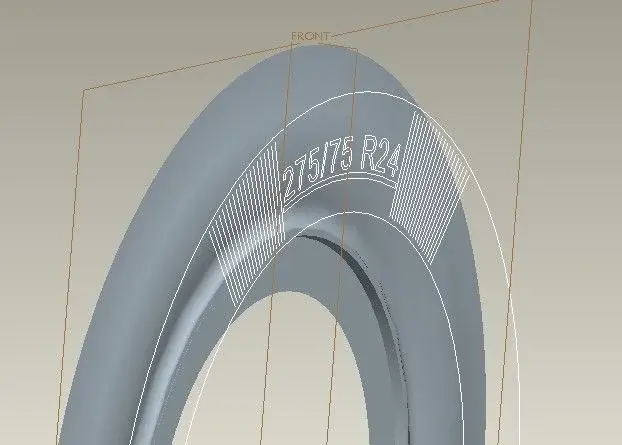
hello to all, I have to realize (with wildfire 3.0) the writings to be applied on the side of a tire, but I don't know how to do.
the writings once imported I have to "salm" (not project) on the surface of revolution, I tried with the command "wrap", but it tells me that the surface in question is not windable. But why? !
with the surface built with extrusion instead of revolution everything works, but I have already made the writings along the whole circumference, how do I do?

but does not exist a manual that exhaustively explains all the features of pro/e?! of tutorials and quick guides there are in bizzeffe, but reference manuals? in the help center the features are explained terrible, you do not understand anything!! !
 

Attachments

  • Senza titolo 1.webp
    Senza titolo 1.webp
    24.8 KB · Views: 49
  • guancia.zip
    guancia.zip
    530.2 KB · Views: 15
if the writing is embossed, use the offset function.
It's always the same last time.
 
I know, but the problem is always the same, that is, that the feature offset projects the sketch on the surface and then offset the projection (in normal direction to the surface or normal to the sketch). I need the profile to be "wraped" on the surface, and not projected, so that the lengths remain identical. For example, radial lines have 200 lengths, projected on the surface become longer, instead they have to remain 200 long.
 
I know, but the problem is always the same, that is, that the feature offset projects the sketch on the surface and then offset the projection (in normal direction to the surface or normal to the sketch). I need the profile to be "wraped" on the surface, and not projected, so that the lengths remain identical. For example, radial lines have 200 lengths, projected on the surface become longer, instead they have to remain 200 long.
So this is not good?
 

Attachments

No, that's not what I need. I know I'm looking for a very specific feature, there are other software that have such functions, but where I work now we only have pro/e and autocad, I have to manage to do it with these two.
 
the project command has two options: long direction and normal to surface. use the second and place the sketch properly and calculates the reduction/enlargement factor along the two directions of the surface on which you have to project the sketch, then build the sketch taking into account the two factors.
in your case you will have a reduction if the sketch the external position to the surface on which you have to project it and the factor will be given by the relationship between the distance of the sketch plan from the plane that contains the trajectory of the "pneumatic" and the curvature radius of the normal surface to the surface of the trajectory. of course the surface section on which you have to project it, if it is not already, you must approach the surface of a "toro").
at this point when you project it on your surface you will get exactly the desired size.

hoping to have been of help and sufficiently clear, I greet all and the next


aminati
 
You were very clear, but it's not exactly what I'm looking for.
first of all the offset of the writings compared to the surface I added only to make it clear that the writings are located on a floor and not on the surface, reducing to 0 the offset of the cyscous for the import of geometry you get the ideal situation.
I will try to explain this with the help of the attached images, hoping to be as clear as you.
I did some checks using an extrusion surface instead of using that of revolution.
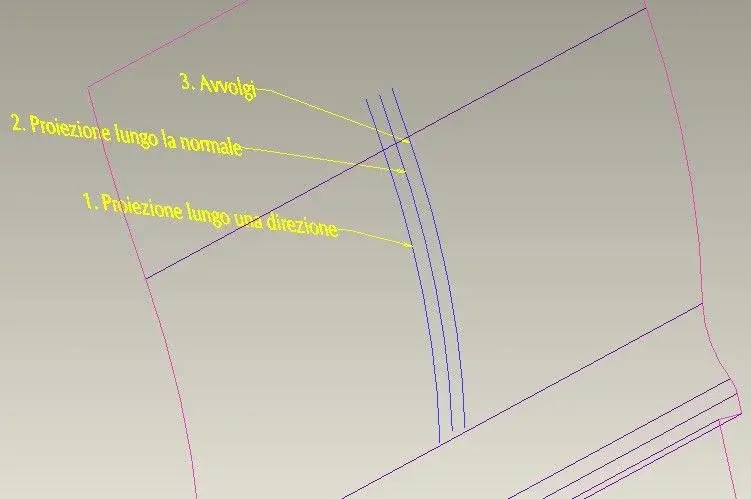
the projection along a direction (number 1, in yellow) extends the size due to the curvature of the surface, and it is not good.
the projection along the normal (number 2, in red), that you advise me, actually shortens the lengths, and not even that.
the "wrap" feature (number 3, in green) does exactly what I want. in the image of autocad I idealized the direction with a green arc, although in reality the geometric construction is different because it takes into account the relationship between the linear lengths and the lengths of the arches.
the length of the segment to wrap has 200 length, so going to measure the lengths obtained, you have:
1. (projection along one direction) 201.8309
2. (projection along normal) 197.1509
3. 200:finger:

the problem is that on an extrusion surface everything works, while on the revolution surface the projections work properly (and get the same lengths as before), but the "wrap" feature just can't do it. :mad:

I'm starting to despair that you can get something like that. :frown:

Thanks anyway for the help.
 

Attachments

  • Senza titolo 1.webp
    Senza titolo 1.webp
    9.8 KB · Views: 29
  • Senza titolo 2.webp
    Senza titolo 2.webp
    24 KB · Views: 12
You were very clear, but it's not exactly what I'm looking for.
first of all the offset of the writings compared to the surface I added only to make it clear that the writings are located on a floor and not on the surface, reducing to 0 the offset of the cyscous for the import of geometry you get the ideal situation.
I will try to explain this with the help of the attached images, hoping to be as clear as you.
I did some checks using an extrusion surface instead of using that of revolution.
the projection along a direction (number 1, in yellow) extends the size due to the curvature of the surface, and it is not good.
the projection along the normal (number 2, in red), that you advise me, actually shortens the lengths, and not even that.
the "wrap" feature (number 3, in green) does exactly what I want. in the image of autocad I idealized the direction with a green arc, although in reality the geometric construction is different because it takes into account the relationship between the linear lengths and the lengths of the arches.
the length of the segment to wrap has 200 length, so going to measure the lengths obtained, you have:
1. (projection along one direction) 201.8309
2. (projection along normal) 197.1509
3. 200:finger:

the problem is that on an extrusion surface everything works, while on the revolution surface the projections work properly (and get the same lengths as before), but the "wrap" feature just can't do it. :mad:

I'm starting to despair that you can get something like that. :frown:

Thanks anyway for the help.
Hi.
the winding command only works on cones or cylinders, not on surfaces in double curvature.
 
So... is there a solution? or desisting?
I'll beat up and declare it to all of Italy... I'm gonna hit the neck and break the neck. !
 

Forum statistics

Threads
44,997
Messages
339,767
Members
4
Latest member
ibt

Members online

No members online now.
Back
Top