
• This forum is the machine-generated translation of www.cad3d.it/forum1 - the Italian design community. Several terms are not translated correctly.

file corruption together

  • Thread starter Thread starter jenuary
  • Start date Start date

jenuary

Guest
I think that more or less everyone happened to go open a file together after working quietly for a long time and without having closed the file abnormally (or without solidworks being closed in a bad way) and you will find the nice message:
solidworks detected a serious problem in the file c.\.....
contact the technical support representative solidworks for assistance in
resolution of the problem.
Obviously no backup has been made for a couple of days... and here the blasphemy runs.

wandering to find a possible solution (if you contact the assistance you make time to remake the project before they give you an answer),
I found this link on youtube and wanted to know if someone ever tested this solution before:https://www.youtube.com/watch?v=fvtkwhyu7muIn reality opening in files in "revision big projects" mode gives me the same error and does not make me proceed.
Do you know another way or do I have to resign?

we talk about solidworks 2017 sp.3.

Thank you.
 
I've been through the same thing lately. I tried to exclude one at a time the components, simply rename them from explorer in order that they were not loaded, and I discovered that it was one of these to prevent the opening of the.assieme. the video I can not see them now, but I hope I have been useful to you equally
 
I think that more or less everyone happened to go open a file together after working quietly for a long time and without having closed the file abnormally (or without solidworks being closed in a bad way) and you will find the nice message:
solidworks detected a serious problem in the file c.\.....
contact the technical support representative solidworks for assistance in
resolution of the problem.
Obviously no backup has been made for a couple of days... and here the blasphemy runs.

wandering to find a possible solution (if you contact the assistance you make time to remake the project before they give you an answer),
I found this link on youtube and wanted to know if someone ever tested this solution before:https://www.youtube.com/watch?v=fvtkwhyu7muIn reality opening in files in "revision big projects" mode gives me the same error and does not make me proceed.
Do you know another way or do I have to resign?

we talk about solidworks 2017 sp.3.

Thank you.
I don't know if it can help you but I tell you my experience: in nx can happen that you cannot open a set for some unknown error. I open the axieme with only the structure (that is, it shows me the tree and the dependencies but does not load the files) and then load to one to one the files until you find what has problems. I open this file outside the axieme and see if I can solve the problem, usually of congruence of geometry (e.g. self intersecting surfaces).
Since I don't know if there is a possibility to open a set with only the structure you could act as follows: move files to another folder, open the file together that will tell you that it does not find the components and then go redirect them one by one until you find the problem.
I hope I've been clear but above all I've given you help.
c.

massivonweizen just posted a very similar solution that I had not seen because I was answering
 
I have seen the video and basically does the same process described by me and baskets, except that if you do not open the assemble even as big projects review the only solution, until otherwise, is to exclude the a priori components.
the method is more efficient as it allows you to load individual files up to the crash; While mine, you have to exclude components until it crashes, which is a much more sleek and long process.
Good luck
 
I think I'm fried. . .
the axieme does not open in any of the solutions.
it would be interesting at least to understand what created this condition, but for now I have not been able to narrow the circle so much.

Thank you.
 
if you can help from what new 2017 (pag 33) I read that there is automatic repair of corrupt files.
Report quqnto writtenrepair of corrupt filesSolidworks software provides an option for repairing corrupt files. the function
Automatic correction attempts to identify which segments are damaged in files
corrupt and, if possible, remove them.
when you encounter a corrupt file, a dialog box asks if you want to repair
the file. if the answer is yes, the software automatically copies the corrupt file and attempts to repair
the copied file instead of working on the original. if you open the copied file, the software alerts
the user that the repair was performed correctly and indicates which segment of the
corrupted file was removed and the impact of that segment on the file. therefore, if the result
is acceptable, you can save the repaired file.
33Axioms or drawings that refer to damaged parts open without files
Let's go. to repair these files, you need to open the parts in your window. I'll help you
or the original design is not modified by the repair process. after repair,
you can replace the damaged original files with repaired files.
if a file is not opened or the result is not acceptable, you need to recover a
Recent backup copy of the file. if a backup copy is not available or if the damage
to the file is a repeated problem, contact your local support representative for
receive assistance.
 
Hello Masses,
in the opening stage I do not appear any message of choice of repair, I give myself the message
solidworks detected a serious problem in the file c.\.....
contact the technical support representative solidworks for assistance in
resolution of the problem.
I tried to look if in the options there is a check for activation of this tool, but I do not see it.
it would be interesting to deepen, because sooner or later it will happen again.

In the meantime, thank you very much, if I find something more, I will show you.
 
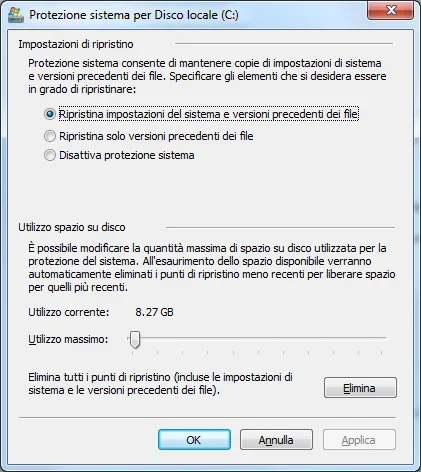
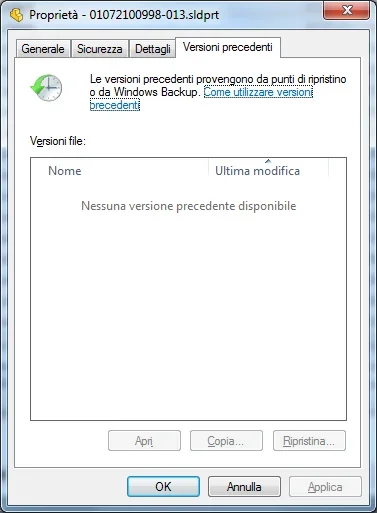
did you activate shadows copies on your pc? in that case going to the properties of the file and "previous versions" you can resume the file of previous saves.
 
solidworks detected a serious problem in the file c.\.....
contact the technical support representative solidworks for assistance in
resolution of the problem.
try opening the file individually to see if there is something to do.
you can then rename the file and open the axieme (which will not love it) and see if you can somehow remake it.

Hi.
 
I had the hope that they were one or more corrupt components that prevented the opening of the file together,
so I zipped parts and erased in the director.
opening the file together I hoped it would open with the suspended parts because you don't find it, but in reality I always give myself the same message.
I deduce that you have corrupted both the assist, and the contained parts, worse than so....

Thank you.
 
did you activate shadows copies on your pc? in that case going to the properties of the file and "previous versions" you can resume the file of previous saves.
Hello, King.
I tried to look but it seems to me to be active, I attach the shields saved so you tell me even if the spuns are ok.
as you see it gives me no previous version available.
Is it because maybe I crossed the threshold of 10 giga?

Thank you.
 

Attachments

  • Ripristino.webp
    Ripristino.webp
    33.1 KB · Views: 20
  • Versione precedente.webp
    Versione precedente.webp
    17.6 KB · Views: 20

Forum statistics

Threads
44,997
Messages
339,767
Members
4
Latest member
ibt

Members online

No members online now.
Back
Top