marcofa
Guest
new by:
the total or partial reuse, after modification, of part and product is very useful
this command cannot be executed by pointing to an open document: close the document and try again.
if you point a part opens a window where a new part number is proposed (or instance) : old part number_1 (can be changed)
photos1
Confirming ok is created and displayed a new part that will have the new part number and file name as set in the mask above.
save by name will save by default with the new filename = part number.
you get to all effects a new part.
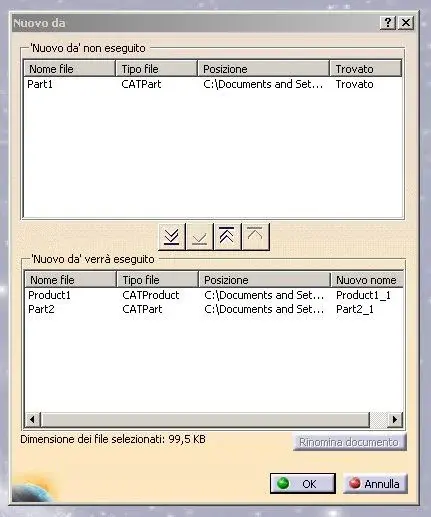
if you point to a product you will open the following window
photos
moves under what you want to duplicate with the command
in the first colon the instance or number part that is not modified and is mistakenly called file name instead of number part
in the last column the old filename_1 with which the file will be saved, which can be changed highlighting it and “rename document”. only the last column will be modified.
How do you edit the first column?
the result is the following in order from above
product1_1.catproduct = file name with extension although not yet saved
product1 = part number or instance equal to source
part2 = part number (equal to the source) that will be saved as part2_1.catpart
not saved after rescue
photo3 photos4
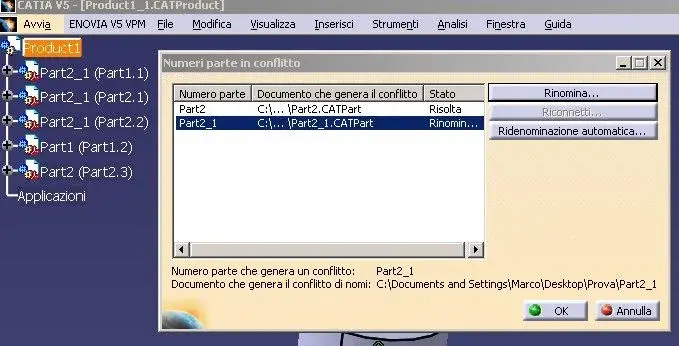
this is an inconsistency of behavior because a part treated alone will have number equal and new files to pleasure (the original part can be used again without conflict), instead a part treated inside and together with a product will have number old part and file name new, (the original part will no longer be used and if present in other product will generate a conflict and will be asked to rename it:
photos6
rename part2 (part2_1.catpart) in part2_1(part2_1.catpart)
for this command to be usable at product level, it should be that in the mask opened by “new from”, all the objects present (product), or moved from the upper window, in the lower one were automatically renamed with the file name = new part number.
This means that all objects that must be modified will be moved below and renamed while above will remain those not to be changed, and all, including sources will remain usable without conflicts in the same model.
airbus ap2255 rules
http://cadm.zut.edu.pl/pub/catia/airbus - 3d modelling rules for catia v5.pdf
2.1 designation and numbering of files
_ consult ap2610.
caution: in catia v5, when a new xxx.catpart file is saved in a directory, the part
number field of the part properties (visualised in the tree) is not systematically filled in
with the xxx character string.correspondence is absolutely necessary between the filename (l53s12345200.catpart) and the part reference (part number = l53s12345200).
on creation of a new part (file + new + part or command new part in assembly design
workshop), immediately fill the part number field in the part name window. then save
the file (save as): the filename is then initialised with the part reference.
remarks:
the part name window is systematically proposed when option ‘tools + options +
infrastructure + product structure + part number + manual input’ is activated. this
option should be locked by the catia administrator.
to modify the part number, modify the properties of the part (contextual menu).
if properties are modified after 'save as', the part reference must be entered twice
marco
the total or partial reuse, after modification, of part and product is very useful
this command cannot be executed by pointing to an open document: close the document and try again.
if you point a part opens a window where a new part number is proposed (or instance) : old part number_1 (can be changed)
photos1
Confirming ok is created and displayed a new part that will have the new part number and file name as set in the mask above.
save by name will save by default with the new filename = part number.
you get to all effects a new part.
if you point to a product you will open the following window
photos
moves under what you want to duplicate with the command
in the first colon the instance or number part that is not modified and is mistakenly called file name instead of number part
in the last column the old filename_1 with which the file will be saved, which can be changed highlighting it and “rename document”. only the last column will be modified.
How do you edit the first column?
the result is the following in order from above
product1_1.catproduct = file name with extension although not yet saved
product1 = part number or instance equal to source
part2 = part number (equal to the source) that will be saved as part2_1.catpart
not saved after rescue
photo3 photos4
this is an inconsistency of behavior because a part treated alone will have number equal and new files to pleasure (the original part can be used again without conflict), instead a part treated inside and together with a product will have number old part and file name new, (the original part will no longer be used and if present in other product will generate a conflict and will be asked to rename it:
photos6
rename part2 (part2_1.catpart) in part2_1(part2_1.catpart)
for this command to be usable at product level, it should be that in the mask opened by “new from”, all the objects present (product), or moved from the upper window, in the lower one were automatically renamed with the file name = new part number.
This means that all objects that must be modified will be moved below and renamed while above will remain those not to be changed, and all, including sources will remain usable without conflicts in the same model.
airbus ap2255 rules
http://cadm.zut.edu.pl/pub/catia/airbus - 3d modelling rules for catia v5.pdf
2.1 designation and numbering of files
_ consult ap2610.
caution: in catia v5, when a new xxx.catpart file is saved in a directory, the part
number field of the part properties (visualised in the tree) is not systematically filled in
with the xxx character string.correspondence is absolutely necessary between the filename (l53s12345200.catpart) and the part reference (part number = l53s12345200).
on creation of a new part (file + new + part or command new part in assembly design
workshop), immediately fill the part number field in the part name window. then save
the file (save as): the filename is then initialised with the part reference.
remarks:
the part name window is systematically proposed when option ‘tools + options +
infrastructure + product structure + part number + manual input’ is activated. this
option should be locked by the catia administrator.
to modify the part number, modify the properties of the part (contextual menu).
if properties are modified after 'save as', the part reference must be entered twice
marco