
• This forum is the machine-generated translation of www.cad3d.it/forum1 - the Italian design community. Several terms are not translated correctly.

file path together

  • Thread starter Thread starter Pablo
  • Start date Start date

Pablo

Guest
problem.
I go out with the laptop and go to the customer, open and work with sw editing - creating parts, assemblies and drawings. I return to the office, connect to the network and synchronize with the special program the client folders with the central server. since the laptop also use it in the office, always with sw, if I open the same assemblies of first happens (direct random) that sw go to load in ram not the file of the server but the file locally, creating not few problems. happens even if, instead of recalling files from the file>recent menu I launch them from the customer folder on the server.. .any one knows what problem and its solution? Thank you all! !
 
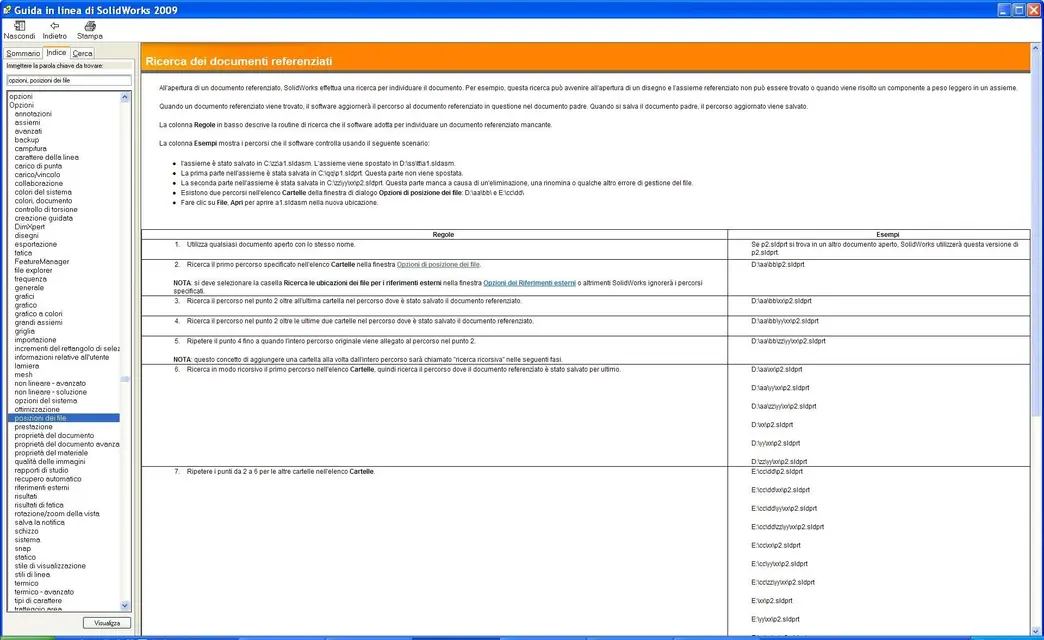
I could say a baggianata but if you synchronize the files with a program that is not inside solidworks he goes to search anyway in the last place where he saved them or with the search rules, see guide.
if not you should save the modified files with pack and go or change the name of the local folder so you force it to search the path. . .
But I would like to have a confirmation.. .
Hi.
 
In fact, the problem is that sw continues to search for files in laptop paths... while I would like you to change search positions. a brutal method is to delete the registry key and restore sw with a special .reg file, but it seems a bit excessive as a method... does not exist a x erase the "chronology" of files?? (understood as path)
 
I think just put a "_" in the folder name on the laptop so solidwork goes to look for it in the search paths, the important thing you set them up. However in the lnea guide there is a section where he explains with what reasoning sw searches for the files. Now it comes to mind that only _ could not be enough, depends on where the folder is. I do not have sw installed unfortunately, but it should be simple to find the right page in the guide, by memory it is at the beginning.. .
 
file paths in various pcs are totally different, of course, but folders-client have the same name. according to me sw stores the last opening of the axieme xxx.sldasm and continues to look for the parts always in the same folder. the core of the problem is that on the same workstation sw should alternate search paths, or something like that, but nn know just where to bang the head!:eek: You should, so to speak, "empty the cache" x delete all the paths of recent files, I think.
 
file paths in various pcs are totally different, of course, but folders-client have the same name. according to me sw stores the last opening of the axieme xxx.sldasm and continues to look for the parts always in the same folder. the core of the problem is that on the same workstation sw should alternate search paths, or something like that, but nn know just where to bang the head!:eek: You should, so to speak, "empty the cache" x delete all the paths of recent files, I think.
Hello pablo,
I would solve the problem like this.
I go to pc resources/tools and connect a network drive on my fixed pc (e.g. z:\) pointing to the cad workbook (which contains all directories of the various jobs)
at each start by clicking on z:\ I see the content directly.


on the laptop (because you are not physically attached to any network when you are from customers) you can name/create the work partition containing the above with z:\

You shouldn't have a problem.

p.s: I use the same system to clone cad stations configurations to point everyone to the same libraries/folders/. . .

dancer
 
I think just put a "_" in the folder name on the laptop so solidwork goes to look for it in the search paths, the important thing you set them up. However in the lnea guide there is a section where he explains with what reasoning sw searches for the files. Now it comes to mind that only _ could not be enough, depends on where the folder is. I do not have sw installed unfortunately, but it should be simple to find the right page in the guide, by memory it is at the beginning.. .
This is the solution we say dirty. but it works.
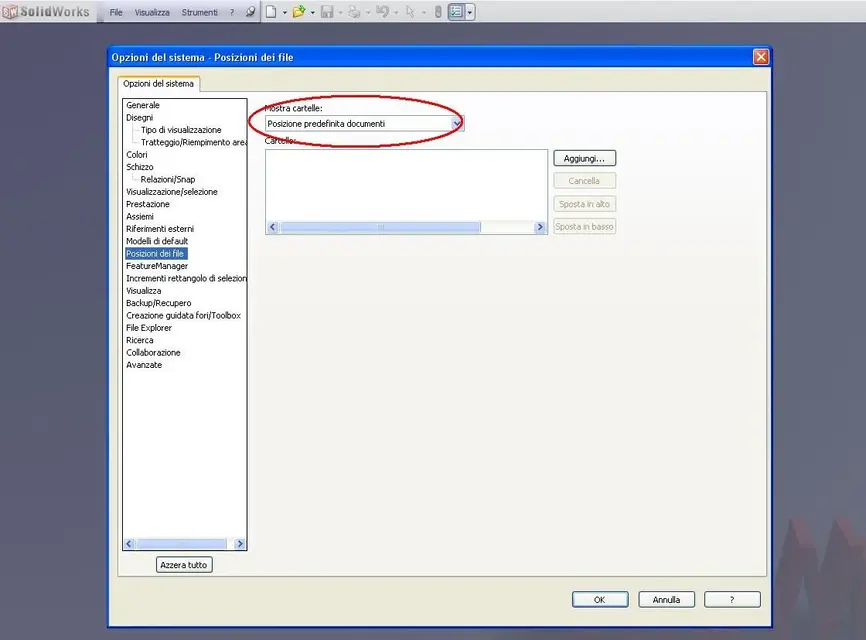
the most correct solution is to set in sw options, file locations, default document location, the location where you stored the axioms that can be networked when you work on the network or local when you work locally. in this way you guarantee the operation.

Unfortunately sw preserves a historical memory of the location where it was that file (the file with that name), the last time you opened it and this causes not a few problems.
 
Hello pablo,
I would solve the problem like this.
I go to pc resources/tools and connect a network drive on my fixed pc (e.g. z:\) pointing to the cad workbook (which contains all directories of the various jobs)
at each start by clicking on z:\ I see the content directly.


on the laptop (because you are not physically attached to any network when you are from customers) you can name/create the work partition containing the above with z:\

You shouldn't have a problem.

p.s: I use the same system to clone cad stations configurations to point everyone to the same libraries/folders/. . .

dancer
Are you telling me to get the same route on both the mobile and the fixed? if so does not work: sw va cmq to look for the files tied to the axieme according to the recent openings, and therefore, we say, rubbing of the paths. .
 
Unfortunately sw preserves a historical memory of the location where it was that file (the file with that name), the last time you opened it and this causes not a few problems.
this is exactly my problem: the memory of sw!!! I tried to delete the registry keys and it works, but it seems excessive and drastic as a solution... the day that I noticed of qs. problem I was doing a pack and go and throwing the eye on the folders of origin of the files I came wrong... .
 
this is exactly my problem: the memory of sw!!! I tried to delete the registry keys and it works, but it seems excessive and drastic as a solution... the day that I noticed of qs. problem I was doing a pack and go and throwing the eye on the folders of origin of the files I came wrong... .
I repeat.
try this way:
the most correct solution is to set in sw options, file locations, default document location, the location where you stored the axioms that can be networked when you work on the network or local when you work locally. in this way you guarantee the operation.
 
I repeat.
try this way:
the most correct solution is to set in sw options, file locations, default document location, the location where you stored the axioms that can be networked when you work on the network or local when you work locally. in this way you guarantee the operation.
But... look that that location indicates where the templates you want to use x create new parts - assemblings - drawings, not the file search path.... and then in any case should I set it up every time I go out of the office? ? ? ?
 
But... look that that location indicates where the templates you want to use x create new parts - assemblings - drawings, not the file search path.... and then in any case should I set it up every time I go out of the office? ? ? ?
:mixed: ... maybe you didn't see there's a drop-down menu.
the default selection is the one where you specify template paths, but if in the drop-down menu select the second entry, you can set the path to follow for the files to open.

as regards the question: I have to do it every time I get in the office the answer is no.
there set the network path, in this way sw will look for the files in the network path, of course if you are not connected to the network will not find the path and will go to open your local files.
I hope I've been clear.
 
Hello pablo, I had the same problemma and I work like this:
- for synctoy 2.1 use synchronization, very valid win program;
- in the laptop I created 2 bat files, which I perform alternatively if I work in the office or out, in it and contained a dos line that creates a connection to the server disk in the other, instead it creates a virtual disk connected to a folder of the laptop hard disk:
- all sw files of templates, files and more, are placed on this folder;

the two bat files contain the following commands:
- out " subst r: c:\ archive"
- office " subst r: \\server\shc "

greetings and available for any clarification
flax
 
Mah... I continue to be gnocco, but in my opinion that position indicates the or the paths where the models are to be used for the new documents, and not the or the paths where the projects to be opened... .
However as soon as I have a second I will try to do as you say, maybe it worked as you say!... I also looked at qs. Help page, I think I will study x benign, maybe it can serve! :smile:
 

Attachments

  • Percorsi.webp
    Percorsi.webp
    189.1 KB · Views: 19
Hello pablo, I had the same problemma and I work like this:
- for synctoy 2.1 use synchronization, very valid win program;
- in the laptop I created 2 bat files, which I perform alternatively if I work in the office or out, in it and contained a dos line that creates a connection to the server disk in the other, instead it creates a virtual disk connected to a folder of the laptop hard disk:
- all sw files of templates, files and more, are placed on this folder;

the two bat files contain the following commands:
- out " subst r: c:\ archive"
- office " subst r: \\server\shc "

greetings and available for any clarification
flax
hello flavio and thanks x the help.
If I understood correctly, however, you didn't exactly hit my problem. In fact, all the files and folders that can serve to sw x work correctly (toolbox, blocks, preferences, part models together tables, etc.) I have them both on the server and on the mobile, and x having them always updated synchronize as I do x the customer folders (I use actyve sync, I also find myself very well). In this way I can always update the entire database in the 2 "locations". It's about finding a way to tell the laptop where to upload the files (the problem only has him, who has to load the files a bit from local disk and a bit from server, the fixed charge always from server). your bat files solve qs problem? I'd be grateful if you could give me some trouble.
 
Mah... I continue to be gnocco, but in my opinion that position indicates the or the paths where the models are to be used for the new documents, and not the or the paths where the projects to be opened... .
However as soon as I have a second I will try to do as you say, maybe it worked as you say!... I also looked at qs. Help page, I think I will study x benign, maybe it can serve! :smile:
It's all written in there.
I follow that procedure. and I never have a problem.

the best way to solve problems with sw is to work with its tools, external "tracamacchi" are used only when the sw instruments are not enough.
 
That's right. It's all right in there.
I follow that procedure. and I never have a problem.
ok, we are:finger: I couldn't understand you as from what you told me, the 2nd item of the drop-down menu in options > file locations > default location documents was not what I needed. the screen I attached before (if you refer to that) covers the documents referred, which is a little different...:confused:
 
Mah... I continue to be gnocco, but in my opinion that position indicates the or the paths where the models are to be used for the new documents, and not the or the paths where the projects to be opened... .
However as soon as I have a second I will try to do as you say, maybe it worked as you say!... I also looked at qs. Help page, I think I will study x benign, maybe it can serve! :smile:
..do not confuse pablo; you are thinking about modelli di default.
syncmaster talks about file positions, questa:PERCORSO RICERCA FILES.webpand there you can specify the search location. even more than one, will follow the order in which they are "untaled"; the first of the list is the main, if missing that (e.g. you are with the laptop out of the network) search in the first available.

greetings
Mar
 
..do not confuse pablo; you are thinking about modelli di default.
syncmaster talks about file positions, questa:View attachment 16613and there you can specify the search location. even more than one, will follow the order in which they are "untaled"; the first of the list is the main, if missing that (e.g. you are with the laptop out of the network) search in the first available.

greetings
Mar
azz.... I've always been convinced of the other.... today if I have time I will make a verification.. But I still do not solve the problem: in my case it is not that it does not find the path, but it finds 2 available. . you say if I put the server in place and at 2nd the fixed disk of the mobile should work?? In practice outside the office does not find the server and read from the disk, in the office it finds the server and reads from there...there is no risk that it makes a "myth" as it happens to me now?? :rolleyes:
 
azz.... I've always been convinced of the other.... today if I have time I will make a verification.. But I still do not solve the problem: in my case it is not that it does not find the path, but it finds 2 available. . you say if I put the server in place and at 2nd the fixed disk of the mobile should work?? In practice outside the office does not find the server and read from the disk, in the office it finds the server and reads from there...there is no risk that it makes a "myth" as it happens to me now?? :rolleyes:
the bat files are two with a command line written inside, at the occurrence executes "you" one or the other, the shutdown of the comuter resets everything. therefore there is no possibility of error, because the disk r and only one and goes to connect with the folder indicated in the command. try and see
greetings
flax
 

Forum statistics

Threads
44,997
Messages
339,767
Members
4
Latest member
ibt

Members online

No members online now.
Back
Top