• This forum is the machine-generated translation of www.cad3d.it/forum1 - the Italian design community. Several terms are not translated correctly.

fill out the fields "input request" via vba

  • Thread starter Thread starter Adahm
  • Start date Start date

Adahm

Guest
Bye to all,

Does anyone know how to fill out the "required entry" fields of a paper mill, via vba code?

fats: alcohol:
 
Hi.
I don't have time to practice now, I'm running, but I think here: e qui:I hope I can give us an eye tomorrow.

Greeting!
 
Based on what I found in the links above, from my tests it seems to me that this modified version (I added the line with setpromptresulttext) so that fill out the text functions:
Code:
dim odrawdoc as drawingdocument
dim osheet as sheet
dim tb as inventor.textbox
dim oborder as border
dim borderdef as borderdefinition
dim otb1'otb1 references to titleblocks
dim svalue as string

odrawdoc = thisapplication.activedocument
osheet = odrawdoc.activesheet
oborder = osheet.border
borderdef = oborder.definition
otb1 = osheet.titleblock

 for each tb in odrawdoc.activesheet.titleblock.definition.sketch.textboxes
       if tb.formattedtext.startswith("<prompt readonly") then
        svalue = otb1.getresulttext(tb)
        messagebox.show("property field: " & tb.text & vbcrlf & "value: " & svalue & vbcrlf & "prompted entry: " & tb.formattedtext, "prompted entry")
       
        otb1.setpromptresulttext(tb, "test riuscito")
   
    end if
next
 
above was for ilogic, vba version
Code:
sub main()


dim odrawdoc as drawingdocument
dim osheet as sheet
dim tb as inventor.textbox
dim oborder as border
dim borderdef as borderdefinition
dim otb1 'otb1 references to titleblocks
dim svalue as string
dim stext as string

set odrawdoc = thisapplication.activedocument
set osheet = odrawdoc.activesheet
set oborder = osheet.border
set borderdef = oborder.definition
set otb1 = osheet.titleblock


 for each tb in odrawdoc.activesheet.titleblock.definition.sketch.textboxes
    stext = tb.formattedtext
       if strings.instr(stext, "<prompt <="" readonly")=""> 0 then
        svalue = otb1.getresulttext(tb)
        'messagebox.show("property field: " & tb.text & vbcrlf & "value: " & svalue & vbcrlf & "prompted entry: " & tb.formattedtext, "prompted entry")
      
        call otb1.setpromptresulttext(tb, "test riuscito")
  
    end if
next
end sub</prompt>
 
Hello, catafract! ! ! ! ! ! !
What a pleasure to read you again.
Thanks for the information, I came across, but I couldn't make it work.

what the statement means:
Code:
dim otb1 'otb1 references to titleblocks
that does not specify the type of variable?
I also can't run the assignment line:
Code:
call otb1.setpromptresulttext(tb, "test riuscito")
He says: " routine call or argument not valid."
Do I have to include some bookstores?

Finally, the two codes in ilogic and vba versions seem equal or wrong?
soon
 
then, I would say that (hiking not to say stupid):
dim otb declares a "base" object, in fact the vba editor proposes nothing when you put the ".
you can declare:
dim otb as titleblock

because the routine doesn't go I don't know, I have a very fresh intallation of the operating system and inventor 2022 so there shouldn't be any particular libraries included. Perhaps with the most explicit statement it works to you, but I don't know exactly why the difference!


Finally, the two codes in ilogic and vba versions seem equal or wrong?
soon
Yes, there are only syntax differences: that vba wants the set command for the assignment of objects, the call command and finally (it seems) the search function strings.

This, which is the above but with the explicit statement, in vba it is working me: I created a table, modified the cartiglio I hope that there is a field to input request and made the code start
Code:
sub main()


dim odrawdoc as drawingdocument
dim osheet as sheet
dim tb as inventor.textbox
dim oborder as border
dim borderdef as borderdefinition
dim otb1 as titleblock 'otb1 references to titleblocks
dim svalue as string
dim stext as string

set odrawdoc = thisapplication.activedocument
set osheet = odrawdoc.activesheet
set oborder = osheet.border
set borderdef = oborder.definition
set otb1 = osheet.titleblock


 for each tb in odrawdoc.activesheet.titleblock.definition.sketch.textboxes
    stext = tb.formattedtext
       if strings.instr(stext, "<prompt <="" readonly")=""> 0 then
        svalue = otb1.getresulttext(tb)
        'messagebox.show("property field: " & tb.text & vbcrlf & "value: " & svalue & vbcrlf & "prompted entry: " & tb.formattedtext, "prompted entry")
      
        call otb1.setpromptresulttext(tb, "test riuscito")
  
    end if
next
end sub</prompt>
Let me know how it goes
 
I also tried to make the explicit statement, but the result is the same.
I use version 21.
I see that in the line where you look for the text name, use "<prompt "<="" "foglio",="" che="" con="" ho="" io="" readonly"="" senza="" sostituito="">".
Why did you put "<" at first? Is there a reason?

in my text I had only put "sheet", but then I found this </prompt>post which discusses the presence or not of characters "<>". then I tried to put "<foglio>".
in the code though I wrote:</foglio>
Code:
if strings.instr(stext, "<prompt <="" readonly")=""> 0 then</prompt>
in fact it seems to work, because when it finds it, it executes the conditional code.
But when it comes:
Code:
call otb1.setpromptresulttext(tb, "test riuscito")
It stops.

on the net there are other examples of use of setpromptresulttext, to edit various texts and syntax always looks the same, even things a few years ago, so I don't think it is a version problem.
 
I also tried to make the explicit statement, but the result is the same.
I use version 21.
I see that in the line where you look for the text name, use "<prompt "<="" "foglio",="" che="" con="" ho="" io="" readonly"="" senza="" sostituito="">".
Why did you put "<" at first? Is there a reason?</prompt>
if you enable the messagebox line (under the correct syntax vba, other difference!)
msgbox ("property field: " & tb.text & vbcrlf & "value: " & svalue & vbcrlf & "prompted entry: " & tb.formattedtext)

see that formattedtext is different, use xml strings to define type font, size and various tags: now I have not come to the bottom but I would say that one of these tags serves to find our inputs required (prompted entry), and the initial "<" is a demilitator of xml stuff

then to nose if you look for a readonly maybe the error comes because in the readonly then you can't write. . e.g. if instead of looking "<prompt readonly" you look for "put a value" (the name of my property field) finds it and works, if I look for (and find) instead "description", which takes the data from the model and therefore is not editable, then it gives me error.
 
if enabled the row of msgbox gives me this result:
property field: foglio
value: foglio
prompted entry: foglio
as you see the value of tb.formattedtext is always "sheet" like others.
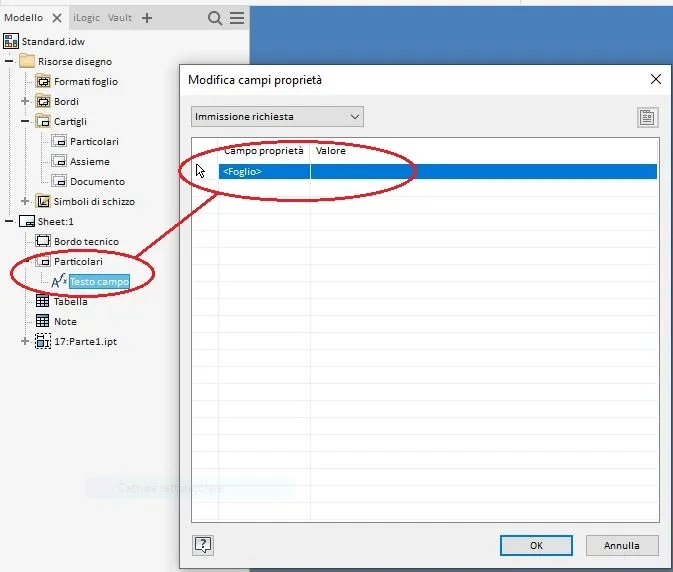
I'll attach you a couple of pictures to show you how I created the field and how I called it, maybe you know where I'm wrong.

I also found some code that did something with xlm, with a command line that needed the library "microsoft xml, v6.0" that I activated, but I still couldn't make it work.

in another circumstance I use the command:
Code:
call osheet.addtitleblock(onewtitleblockdef, , spromptstrings)
to replace the cartilage in the active sheet.
the spromprstring variable, is an array type variable, where the values to pass to the cartiglio are stored, just to fill in the fields of "input request". and there it works. therefore it means that you can do as code and that the same are not readonly.
Am I wrong?
 

Attachments

  • Immissione richiesta.webp
    Immissione richiesta.webp
    15 KB · Views: 3
  • Testo campo.webp
    Testo campo.webp
    23.3 KB · Views: 3
can you post a sheet with paper, naturally cleaned from sensitive data, to try on my machine? to see if it's a matter of code, paperwork or anything... I'd say you did the same thing I did in my test.
what comes out to me:1650612107109.webp
1650612130770.webp
1650612281558.webpwith this code (returned)
Code:
sub main()


dim odrawdoc as drawingdocument
dim osheet as sheet
dim tb as inventor.textbox
dim oborder as border
dim borderdef as borderdefinition
dim otb1 as titleblock 'otb1 references to titleblocks
dim svalue as string
dim stext as string

set odrawdoc = thisapplication.activedocument
set osheet = odrawdoc.activesheet
set oborder = osheet.border
set borderdef = oborder.definition
set otb1 = osheet.titleblock


 for each tb in odrawdoc.activesheet.titleblock.definition.sketch.textboxes
    stext = tb.formattedtext
       'if strings.instr(stext, "<prompt <="" readonly")=""> 0 then
       if strings.instr(stext, "prompt") <> 0 then
        svalue = otb1.getresulttext(tb)
        msgbox ("property field: " & tb.text & vbcrlf & "value: " & svalue & vbcrlf & "prompted entry: " & tb.formattedtext)
    
        call otb1.setpromptresulttext(tb, "test riuscito")
  
    end if
next
end sub</prompt>
 
I realized what was the problem!!!
the name of the custom input field was "sheet".
the problem is that even the label I called it "sheet", so the program scrolling the texts present in the sketch, found stopped on the label, which as you suppose is readonly and could not change the value, because it is a label.
so your code was fine in all versions, as well as those I had tried before.
Forgive me for wasting your time, but at least I solved the problem.
Thank you very much
 

Forum statistics

Threads
44,997
Messages
339,767
Members
4
Latest member
ibt

Members online

No members online now.
Back
Top