• This forum is the machine-generated translation of www.cad3d.it/forum1 - the Italian design community. Several terms are not translated correctly.

filling surface: cat vs nx

  • Thread starter Thread starter cesius79
  • Start date Start date

cesius79

Guest
Hello everyone....before everything I take the opportunity to wish (I know clearly late) good year.
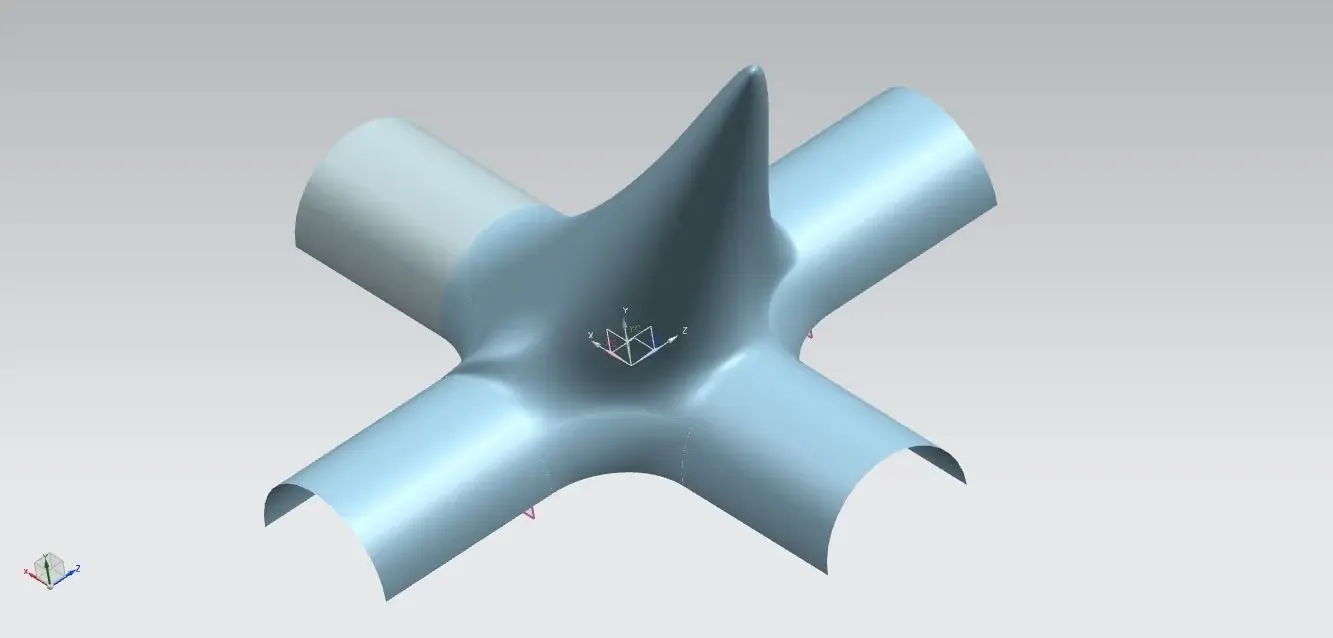
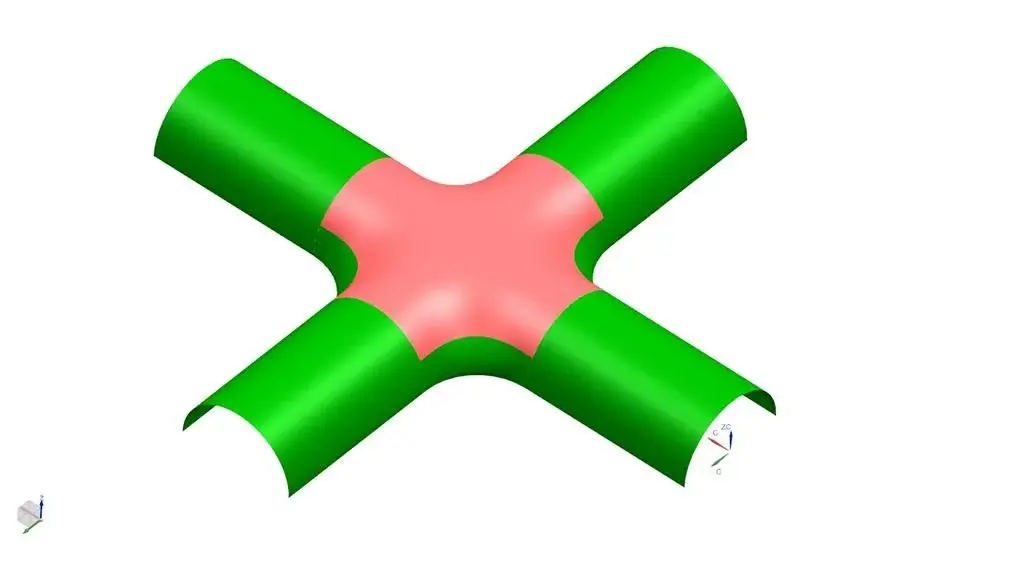
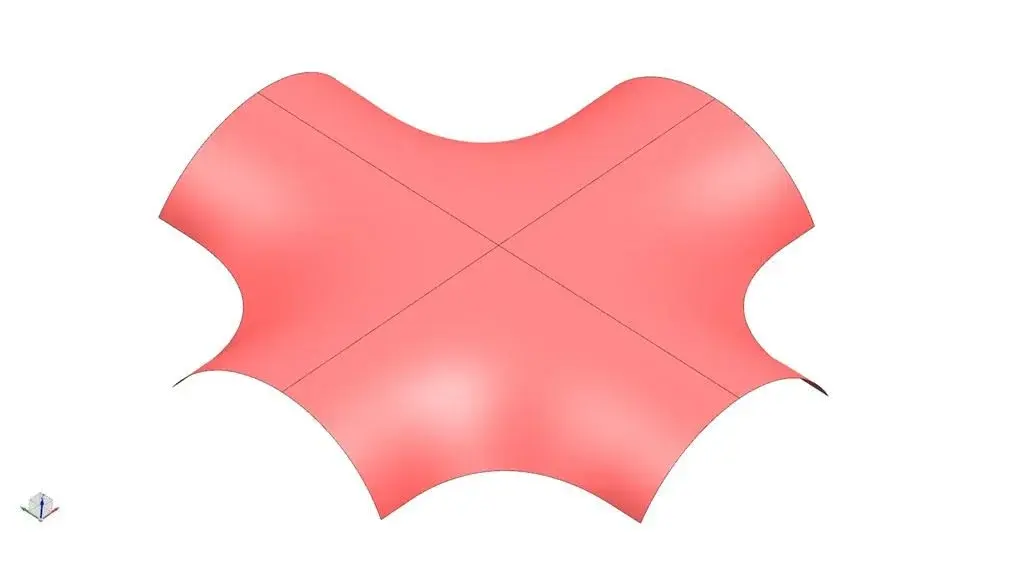
My question is this: as you can see from the attached images, I can't make a decent closing surface (so tangent to the surfaces connected to the edges) , as with catia v5, in nx 7.5... or I am the one who milieuously strikes the command "surfaces with n sides" or is not this the right command or simply nx is definitely a step backward compared to catia that in a millisecond closes the surface (seeing the yellow one)
Thank you.
 

Attachments

  • catia.webp
    catia.webp
    86.8 KB · Views: 49
  • nx.webp
    nx.webp
    16.3 KB · Views: 36
Please attach me to the surface of the caia.
to improve the flatness of the surface in the middle, you must use the setting in shape control.
 

Attachments

you can use the patch opening command below the surface menu.
works very similar to that of catia v5.:eek:
 
..or it is I who mislead the command "superficie con n lati" or it is not this the right command or simply nx is definitely a step back than caia.. .
:eek:

before you said. I'm convinced that with nx you don't just do everything, but more and I often think better. You just need to know how to use it.
 
I answer to procatug and nic65; I haven't seen your solution yet, so before shooting at raffica c....aprite nx and dedicated time to find the solution.
 
and to see it I know you'll have to wait a bit. I'm sorry but I'm currently working with mach2, so I don't have advanced/freeform2 surfaces. But I have often worked with mach3 from clients, and, despite all, I have to work with catia. What I wrote is not bullshit. Before you say that a software could be a step back than another I assume that one should know how to use it well. I don't understand why you're asking for a solution since you've already posted a more than valid one, but I'm going to repeat that as soon as I have a chance I'll devote some time to proposing an alternative.
 
to have a correct, perfectly correct gait, you have to use the n-side surfaces command, but to make a quarter of "toppa".

with a single surface, the upper part does not come (to me is not:biggrin:) linear.
 

Attachments

  • 1.webp
    1.webp
    15.9 KB · Views: 16
  • 2.webp
    2.webp
    4.7 KB · Views: 13
  • 3.webp
    3.webp
    7.3 KB · Views: 11
  • 4.webp
    4.webp
    12.5 KB · Views: 11
and to see it I know you'll have to wait a bit. I'm sorry but I'm currently working with mach2, so I don't have advanced/freeform2 surfaces. But I have often worked with mach3 from clients, and, despite all, I have to work with catia. What I wrote is not bullshit. Before you say that a software could be a step back than another I assume that one should know how to use it well. I don't understand why you're asking for a solution since you've already posted a more than valid one, but I'm going to repeat that as soon as I have a chance I'll devote some time to proposing an alternative.
tell others you need to know the software and you don't know that the 'n-sided surface' command is in the basic license as well as the 'patch openings', which don't give a satisfactory result.
What I've done is not satisfactory, and I couldn't send him to produce.
 
to have a correct, perfectly correct gait, you have to use the n-side surfaces command, but to make a quarter of "toppa".

with a single surface, the upper part does not come (to me is not:biggrin:) linear.
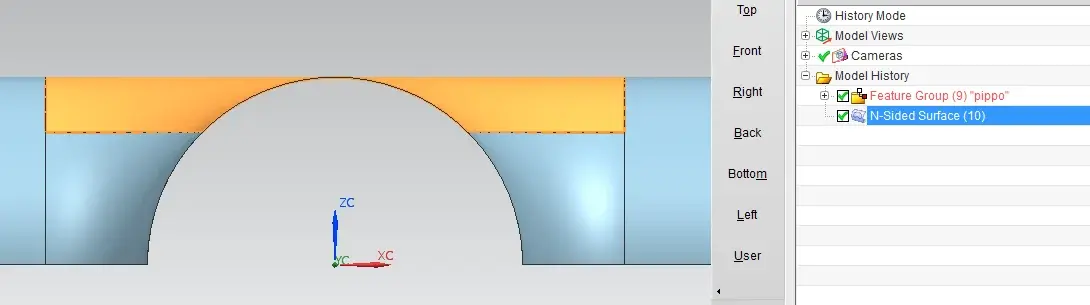
the command to use is the n-side surfaces not as a quarter, but adding two curves that bind the mesh.
 

Attachments

  • pippo.webp
    pippo.webp
    14.5 KB · Views: 19
tell others you need to know the software and you don't know that the 'n-sided surface' command is in the basic license as well as the 'patch openings', which don't give a satisfactory result.
What I've done is not satisfactory, and I couldn't send him to produce.
I never wrote that I knew nx well enough to say that catia is a step back. And then who says you wanted to use those commands?
Anyway, at great request....:biggrin:
 

Attachments

hi guys already talked about something like this here as joining in a single command plus surfaces and we saw that catia and nx had the same command ... other cad did not show up except solid works that does not have a similar command, I was curious to see creo.. and solid edge...:finger:
http://www.cad3d.it/forum1/showthread.php?t=35444cmq places you videos of how to make joint in 4 different commands

solution 1 the best through junction surface without use of auxiliary driving curves

solution 2 classic base filling using joint surfaces as done by example cesius79

advanced catia automatic filling solution as 2 solution but manage step limits and patch wanting

advanced catia analytical filling solution can manage and move the surface with directional constraints or as 3 solution with step limits and patches

Hi.


Attachments

I never wrote that I knew nx well enough to say that catia is a step back. And then who says you wanted to use those commands?
Anyway, at great request....:biggrin:
Good job.
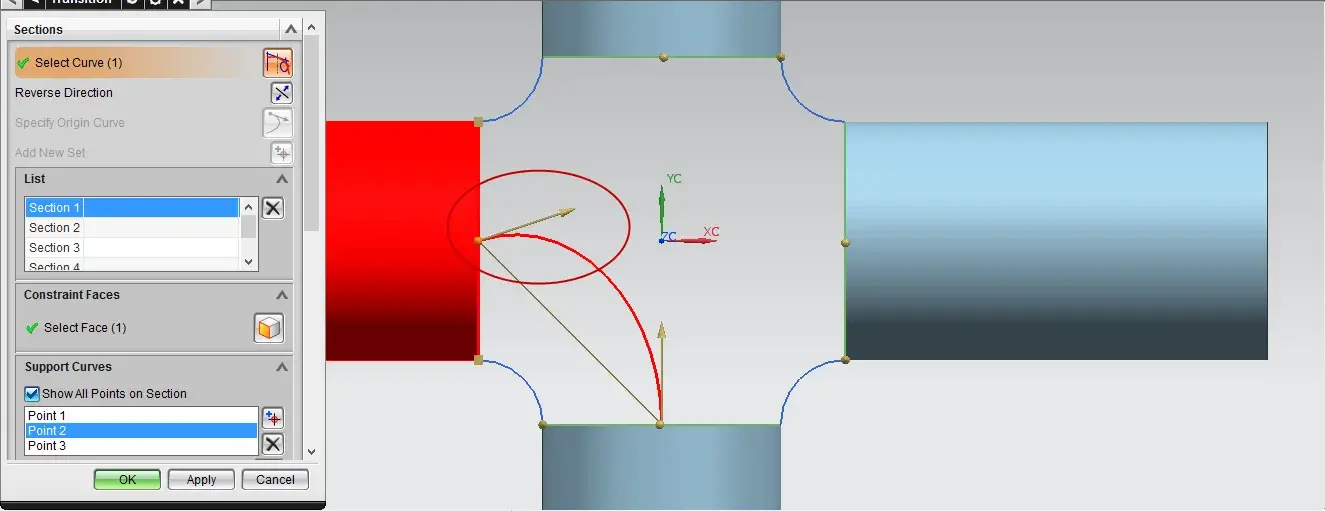
the first command I tried for the resolution of the question was precisely 'transition', but the extra curves were not normal and so I abandoned.
In your case, I find the normal curves.
I use 8.
Can you say something about that?
 

Attachments

  • transition.webp
    transition.webp
    27.5 KB · Views: 16
Because you're curious, you're satisfied.

the first file is a n-sided surface driven by 2 control curves.
the second file is a n-sided surface without control curves.
 

Attachments

Because you're curious, you're satisfied.

the first file is a n-sided surface driven by 2 control curves.
the second file is a n-sided surface without control curves.
hello max thanks for your intervention :smile:

so the command you used is the same for both I have different commands. . .

Maybe you put videos of how you did it?...

in the other discussion I open was talking about closing open surfaces all in one shot without additional guides I attach links
http://www.cad3d.it/forum1/showthread.php?p=302246#post302246
 
hello max thanks for your intervention :smile:

so the command you used is the same for both I have different commands. . .

Maybe you put videos of how you did it?...

here and in the other discussion I open was talking about closing it all in one shot without additional guides I attach you links
http://www.cad3d.it/forum1/showthread.php?p=302246#post302246
the command is always the same, "superficie n lati".
in the second case the command and select the 8 limit curves.
In the first case I tracked two straight curves at the top that guide the surface.
There should be a third road that should work without tracing the curves but intervening on the tangency constraints ... I look at you and I let you know.
 
hi guys already talked about this here something like joining in a single command plus surfaces and we saw that catia and nx had the same command ... other cads did not show up except solid works...:finger:
http://www.cad3d.it/forum1/showthread.php?t=35444cation

rs4
the solidworks command exists and uses the dassault acis kernel.
needs edges and therefore does not close in a single stroke.
I attach image.
I no longer participate in these competitions, because in the end it does not come to head, it continues to say that the cad that is used is the best on any functionality, even in front of obvious demonstrations, you see move hole on other plane, etc...
 

Attachments

  • sw.webp
    sw.webp
    35.5 KB · Views: 14
the solidworks command exists and uses the dassault acis kernel.
needs edges and therefore does not close in a single stroke.
I attach image.
I no longer participate in these competitions, because in the end it does not come to head, it continues to say that the cad that is used is the best on any functionality, even in front of obvious demonstrations, you see move hole on other plane, etc...
hello solid

We just have fun... At least as far as I'm concerned... and then remember we are all friends and you will always find who helps you or who helps in this forum

the comado of which I speak and the video from me posted in .zip file called:Catia vs nx filling surface 1_rs4 solution that without joints of guides or surfaces between them, I do not understand from your image if you have used or not of additional links supports

Hi.


Attachments

  • prima.webp
    prima.webp
    52 KB · Views: 6
  • dopo.webp
    dopo.webp
    54.5 KB · Views: 8
Good job.
the first command I tried for the resolution of the question was precisely 'transition', but the extra curves were not normal and so I abandoned.
In your case, I find the normal curves.
I use 8.
Can you say something about that?
Thank you.

I used 6. Looking at your image at the moment I thought it was dependent on how the 4 basic surfaces are created. But yesterday I tried to do it both from surfaces extruded by arches and from surfaces extracted from solids and the result was itself.
contrary to your image, however, it did not highlight the direction of the tangent with the carrier. Have you tried to select it? Could give you a chance to impose the bribe you want. For example, the "specify origin curve" command that you see well in your image, yesterday I couldn't activate it.
 

Forum statistics

Threads
44,997
Messages
339,767
Members
4
Latest member
ibt

Members online

No members online now.
ciao
Back
Top