• This forum is the machine-generated translation of www.cad3d.it/forum1 - the Italian design community. Several terms are not translated correctly.

fine filettaura

  • Thread starter Thread starter MaxBigno80
  • Start date Start date

MaxBigno80

Guest
Hello, everyone.
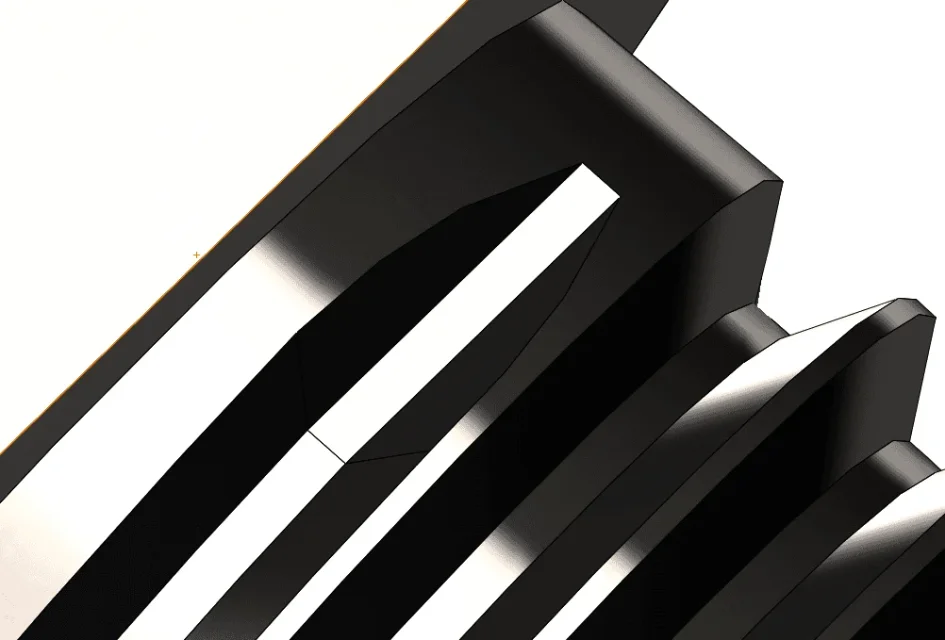
using the thread function, it creates the threaded part and up here no problem. but the final of the same ends flat.
in reality threads tend to "go out" how can it be done?

I have seen that many suggest extrusion to cut.

thanks in advance1553870757671.webp1553871095758.webp

 
because I knew you would respond in this way;) btw in recent times I am also doing a pile of threads especially gas npt, not on the lathe, but precisely with swx on plastic details that have to finish in mold :) cmq when you have the mechanical notions, the cad speech and how to do it pass second place, no?! !
 
thanks polymar, and thanks massivonweize,
I will apply polymar's suggestion as the video posted honestly does not give for nothing the realistic effect of the tool output during threading on lathe (in my case mobile fan).

thanks for the help

max max
 
the video posted honestly does not give for nothing the realistic effect of the tool output during threading on lathe
there is also another link that however with 2014 I can not check
 
because I knew you'd respond this way
I always willingly accept advice or advice on the answers I will give... Perhaps sometimes I will avoid giving a useless opinion
 
yesterday I was at the fair in parma and I asked lumi at the stand of the solidworks on this thing and the answer left me base...." we do not know" I will have caught the wrong technician:oops:(
 
the most correct method is to have the cylindrical propeller for the thread with sweep and a second successive conical propeller with increasing diameter, just as it does at the lathe, so the sweep dies to zero gradually.
 
the most correct method is to have the cylindrical propeller for the thread with sweep and a second successive conical propeller with increasing diameter, just as it does at the lathe, so the sweep dies to zero gradually.
Are you absolutely right, in inventor there the variable helical function, to do what you suggested you also exist in solidworks or do I have to do two separate sketches?
 
@mammals : However, from my point of view, no advice is useless, the forum should also be understood as a sharing of ideas and advice.
 
yesterday I was at the fair in parma and I asked lumi at the stand of the solidworks on this thing and the answer left me base...." we do not know" I will have caught the wrong technician:oops:(
Considering the costs and sales of cad/cam products with everything that follows at the license level (=$$$), it is logical that companies send in trade fairs in the hope of detaching some extra sales contract. The time has come when you could have contact with real technicians with solid skills.

worth noting that what you asked, it is part of one of those small but great details that distinguish a fake technician from a
 
Are you absolutely right, in inventor there the variable helical function, to do what you suggested you also exist in solidworks or do I have to do two separate sketches?
you don't have to do two sketches, but two spiral/elica wireframes, and for a pure operational convenience run two features doesn't take you away so much longer, indeed you will have a better control of the entire thread. If you want to turn 1 ms, do the ctrlc+ctrlv of the sweep and then change the angle;)
 
Are you absolutely right, in inventor there the variable helical function, to do what you suggested you also exist in solidworks or do I have to do two separate sketches?
the variable propeller there is but you have to look how it works correctly with the solidworks guide. I believe however that you will have to do thread with two sketches (sagoma + sweep/elica path) and then do the second function with the copied template on the new plane and the sweep/elica path.
 

Forum statistics

Threads
44,997
Messages
339,767
Members
4
Latest member
ibt

Members online

No members online now.
Back
Top