
• This forum is the machine-generated translation of www.cad3d.it/forum1 - the Italian design community. Several terms are not translated correctly.

finestre su superficecilindrica

  • Thread starter Thread starter Filo
  • Start date Start date

Filo

Guest
I hope the theme has not already been discussed, with the search I found nothing.

I have to make windows on a cylindrical surface like an enclosed image.
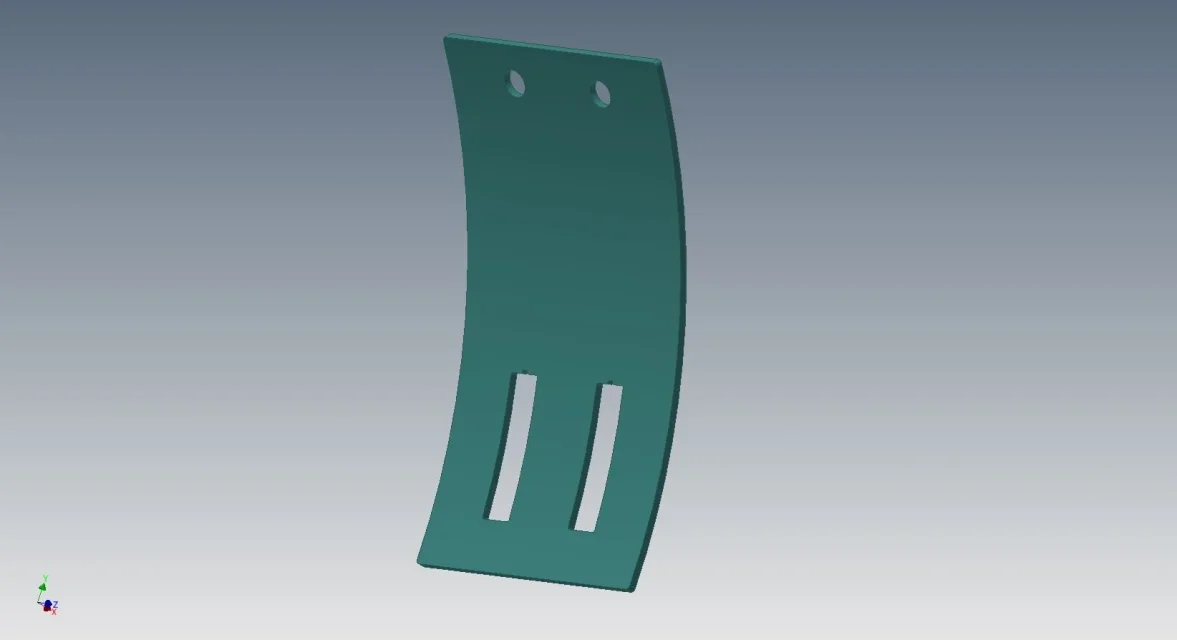
img.webpwindows are made before the piece is folded.

how to correctly create the 3d model and flat model?

I hope I've been clear

Thank you.

thread
 
2 roads:
do the piece in sheet metal environment, then:
- command "explain"
- scrapping and cutting of windows
- command "fill"
- Flat model

other road, always in sheet metal environment:
go to "model 3d"
-profile development
-creation of windows with 3d sketch and split command
- thickening to "thickness"
-return in "lamiera" environment
- Flat model.

Surely faster the first...
 
the second road too complicated, instead the first I would say great! the command explains just I missed, many times I projected the flat model with some strange lap, instead it explains it simplifies things.

Thank you very much

Hi.
 
2 roads:
do the piece in sheet metal environment, then:
- command "explain"
- scrapping and cutting of windows
- command "fill"
- Flat model
I take this thread back because I would like clarification if possible.

how do I realize in sheet metal environment the piece of the first image (without holes/opens), then can I explain it?

Thank you.
 
I take this thread back because I would like clarification if possible.

how do I realize in sheet metal environment the piece of the first image (without holes/opens), then can I explain it?

Thank you.
here is easier:
simply draw a sketch with your profile, then use the command "flangia contour".
as it is a piece of shit, remember to set the factor k=0.5
p.s.
the command explains asks you to choose a fixed reference face, if you do not have it, that is your piece is made with the only curved part, you can take the face of the thickness as reference.
 
simply draw a sketch with your profile, then use the command "flangia contour".
Okay, I think I get it. only the sketch of the profile already curved, without creating the "face" but directly the "flangia contour".
as it is a piece of shit, remember to set the factor k=0.5
changes a lot if I leave the default value?
I just know the sheet metal environment, and I ignore almost everything (I'm reading the old threads).

Thank you.
 
Okay, I think I get it. only the sketch of the profile already curved, without creating the "face" but directly the "flangia contour".


changes a lot if I leave the default value?
I just know the sheet metal environment, and I ignore almost everything (I'm reading the old threads).

Thank you.
depends on how much you set the k value.
I feel good with 0.273 for bending on thicknesses up to 10 mm.
in this case the difference in length of development with a factor k of 0.5, is about 0.7 mm per 360° angle per mm thick.
It's not a big deal with small thicknesses, though....
Still changing it is not difficult:
in sheet metal environment, on the toolbar, open the dialog box: "Default sheet values" , then click on the pencil icon next to the line "explaining rule" and from here change the value of factor k. apply and close.
 

Forum statistics

Threads
44,997
Messages
339,767
Members
4
Latest member
ibt

Members online

No members online now.
Back
Top