
• This forum is the machine-generated translation of www.cad3d.it/forum1 - the Italian design community. Several terms are not translated correctly.

fori in assemblaggi

  • Thread starter Thread starter vaina
  • Start date Start date

vaina

Guest
hello to all, I apologize in advance for the stupidity of my question - I am at the first experience with catia.
I have a problem with tools assembly features: in the specific case, I cannot create a hole through some parts that make up the product. In particular, I can't select any surface of the solids that make up the assembly, but only the edges. What is my mistake? thanks for the attention.
 
be sure to work in assembly design environment = blue color of product name in logical tree
 
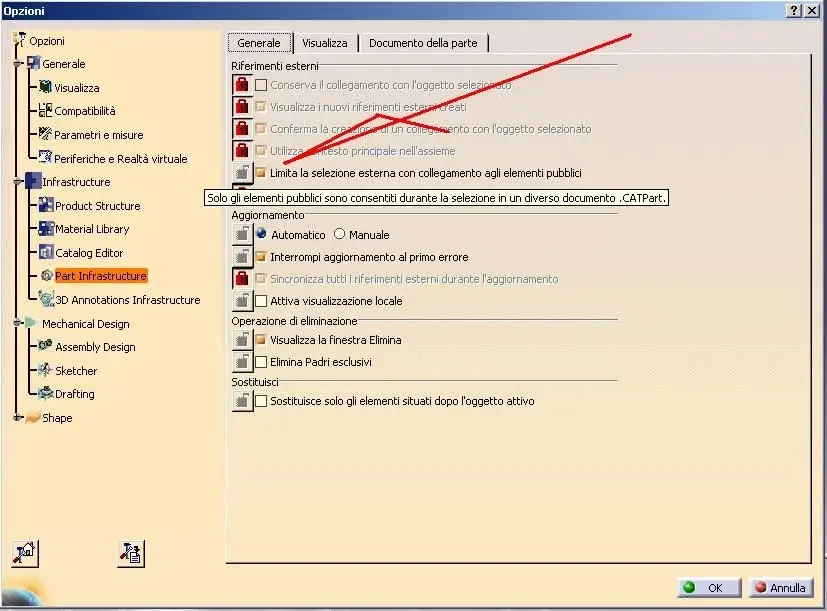
you probably have the limitation of selection only for public items.
Usually this option is activated by the administrator user.

you have two solutions, or post the reference face from which the hole starts or remove the option in tools/options/infrastuctures/part infrastuctures in the "general" table remove the check indicated in the image.

if instead you have to opt for the first remember that the publication you have to carry out within the part.

Hi.
 

Attachments

  • part.webp
    part.webp
    57.5 KB · Views: 24
the correct answer for my case is that of ferrezio, in the meantime I had been answered on the forum eng-tips and this morning I could solve the problem by removing the check mark from the publication restriction option (options/part infrastructure/general). I had no knowledge of the term publication There's no trace in the manuals I'm studying. I'm still missing its meaning, I'm satisfied with solving the problem. I would like to understand why.
Thank you for your help.
 
but why do you have the "limit only to public elemnti" option active? so it's like giving you the wedge on your feet. all that is not published will not be selectable.

to save your work you should have already beautiful basic models packed with publications or disable the option.

:-)
 
I didn't set the options. Dassault systèmes consultants have configured a standard work environment on the office server, which in this case provides restriction to public items. In fact if I launch catia with the generic configuration present at the local, the check mark is not present.
I know how to avoid it.
 
the option limits to the published and fundamental when you work in a large set and use the skeleton.

so who did the configuration takes into account this, not knowing the job he you have to face and difficult to recommend

I avoid removing the option, but it's just my opinion.

Hi.
 
excuse me if I take advantage of the discussion but change speech for my need
is it possible to make a hole in a product that is not propagated in the part?
For example, I build a product "a" but a customer wants the version "b" with an extra hole/work.
practically the product "a" would go into another product ("b") but the hole should not be propagated either to the product "a" or to the parts within the product "a". here we use for external and internal work accounts. Thank you.
 

Forum statistics

Threads
44,997
Messages
339,767
Members
4
Latest member
ibt

Members online

No members online now.
Back
Top