Dario1982
Guest
Good morning to all, I write to ask you for help with a problem on the scales of the drawings that is making me waste a lot of time. does not exist a command to change the scale 1:1 of the design? so that 1 card unit is = 1 design unit? for example if I have this situation from the beginning:
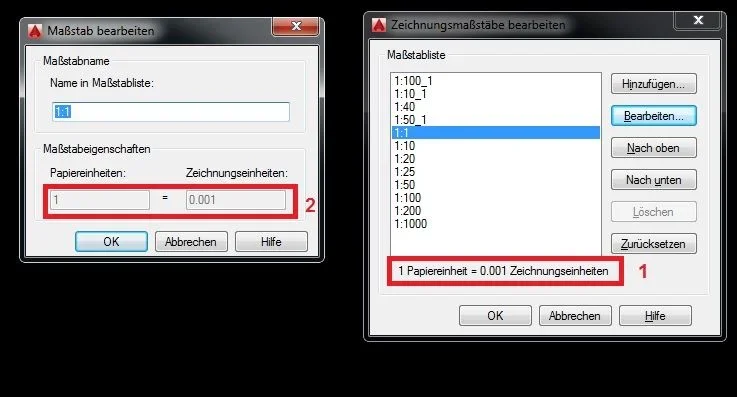 (although it is in German since I work in austria, but you understand) there is a way to make sure that the scale 1:1 can be set correctly instead of 1 card unit = 0.001 design unit? here is "gray" and therefore you cannot change. . in the old versions there was a command, "state bar" that allowed access to a menu with various options including the general scale of the design, which could be changed, but now I can't find it anymore.
Thank you very much and good day!
(although it is in German since I work in austria, but you understand) there is a way to make sure that the scale 1:1 can be set correctly instead of 1 card unit = 0.001 design unit? here is "gray" and therefore you cannot change. . in the old versions there was a command, "state bar" that allowed access to a menu with various options including the general scale of the design, which could be changed, but now I can't find it anymore.Thank you very much and good day!