
• This forum is the machine-generated translation of www.cad3d.it/forum1 - the Italian design community. Several terms are not translated correctly.

generate frames by sketch or solid?

  • Thread starter Thread starter GianniM
  • Start date Start date

GianniM

Guest
Imagine drawing a frame (motor of frames) on which to apply profiles.
we hypothesize that our frames are not flat, but have three dimesions for the construction of even complex forms.

at some point is it better to do everything through 2d frames and 3d frames? I have seen that the 3d frame is steeped in updating if I change the working questions and comunuqe a little brigorous to build.

or is it so much worth using usual and exploiting the strands of solids to grind the frame? At the most, they can also do sketches on the faces I can use as geraters.

Thank you.
 
Imagine drawing a frame (motor of frames) on which to apply profiles.
we hypothesize that our frames are not flat, but have three dimesions for the construction of even complex forms.

at some point is it better to do everything through 2d frames and 3d frames? I have seen that the 3d frame is steeped in updating if I change the working questions and comunuqe a little brigorous to build.

or is it so much worth using usual and exploiting the strands of solids to grind the frame? At the most, they can also do sketches on the faces I can use as geraters.

Thank you.
I guess with frames 2d/3d you mean sketches 2d/3d....
I 3d sketches have never been able to use them, usually if the frame is more complicated than a frame I make a solid and use the edges of the solid or sketches on the faces to generate the tubulars, as you also indicate...
 
to create 3d sketches without "stripping", I suggest you simply make lines along the coordinates that interest you.
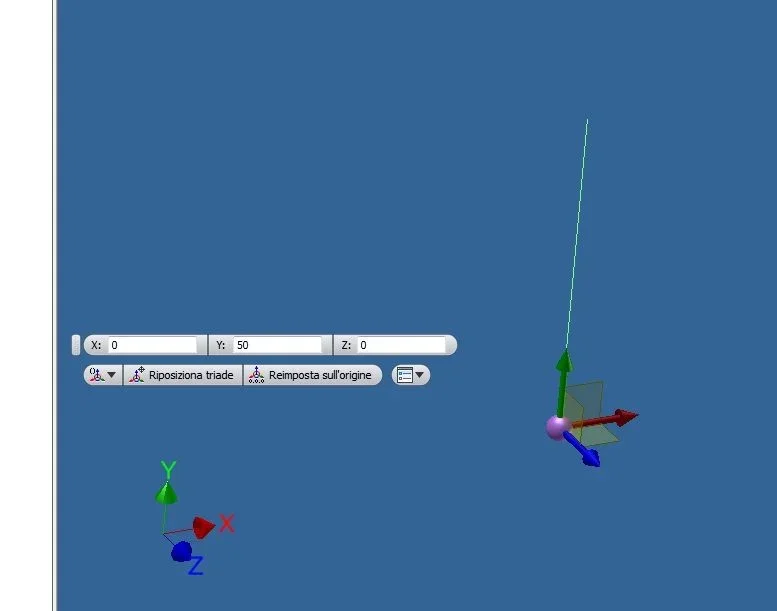
at least one sketch in 2d make it so have the first point or starting reference for 3d sketch, then pass to 3d sketch, enable "precise input"
3D.webplocated in the "drawing" bar. In this way you can build value lines you want along the 3 axes of origin. Once you have made the various lines, you can simply quote them and then change them at will.
If you see the second image, you will see that I am creating a 50mm line along the y axis, then you should just quote it to fix its size.
2.webpuntil the relic 2011 or 2012 the precise input bar was always visible then..... They hid it.
 
your indications have made me take a few steps forward in creating 3d sketch, but now you create another problem: I can't share as decent as I create. I explain: I created a 2d sketch with the projections of axes and origin and then in a 3d sketch, after including the geometries of axes, I designed a line from point 0.0.0 to point +500, +200, +150. the only odds I can put at this point are a corner and the length of the segment, but I can't quote the final point of the segment from the origin as I wish to change the sketch later. I hope I've explained... Did I miss something in the construction or a valley made the sketch no longer touch? ?
Bye!
 
your indications have made me take a few steps forward in creating 3d sketch, but now you create another problem: I can't share as decent as I create. I explain: I created a 2d sketch with the projections of axes and origin and then in a 3d sketch, after including the geometries of axes, I designed a line from point 0.0.0 to point +500, +200, +150. the only odds I can put at this point are a corner and the length of the segment, but I can't quote the final point of the segment from the origin as I wish to change the sketch later. I hope I've explained... Did I miss something in the construction or a valley made the sketch no longer touch? ?

Bye!
the procedure that I have indicated is exclusively to create lines along one of the 3 axes, if you want to make a line with different coordinates for the 3 axes the only way to keep under control the position is to make work plans regarding the origin, to create a point to intersection between the plans and create the 3d sketch.
 
the procedure that I have indicated is exclusively to create lines along one of the 3 axes, if you want to make a line with different coordinates for the 3 axes the only way to keep under control the position is to make work plans regarding the origin, to create a point to intersection between the plans and create the 3d sketch.
great advice, I never thought about it... thank you so much!
 
I don't understand why getting lost with 3d sketches when 98% of the time a set of 2d sketches are more than enough. . Perhaps you have to make some extra plans, but it is much easier to manage and change. . .
 
When I do a 3d sketch, then I find limits. the model struggles or does not change when I move the quotas.
I use this system: I do a 2d sketch, then a second sketch on a floor at the desired distance, finally with 3d sketch I join the points of the first and second floor.

But I feel better to use solids, even if when I insert tubulars on the skewers and tubes remain inside the solids I do not see well what happens. I should use transparency for the solid generator, but sometimes I use an old pc and transparencies do not act for shortcomings of the video card. how do you solve this problem?

Thank you.
 
I don't understand why getting lost with 3d sketches when 98% of the time a set of 2d sketches are more than enough. . Perhaps you have to make some extra plans, but it is much easier to manage and change. . .
I give you 100% reason, but for a couple of weeks my workshop colleague teases me because I can't shape well of the tubular pieces for his bike with a little special folds:redface:. . .

Now... revenge!
 
I don't understand why getting lost with 3d sketches when 98% of the time a set of 2d sketches are more than enough. . Perhaps you have to make some extra plans, but it is much easier to manage and change. . .
explain how you make a set of a 2d sketch....
 
When I do a 3d sketch, then I find limits. the model struggles or does not change when I move the quotas.
I use this system: I do a 2d sketch, then a second sketch on a floor at the desired distance, finally with 3d sketch I join the points of the first and second floor.

But I feel better to use solids, even if when I insert tubulars on the skewers and tubes remain inside the solids I do not see well what happens. I should use transparency for the solid generator, but sometimes I use an old pc and transparencies do not act for shortcomings of the video card. how do you solve this problem?

Thank you.
If you need to create reference points for the 3d sketch, create them inside the 3d sketch itself, or when you are still changing the sketch. had happened to make plans or points out of the sketch, i.e. once the sketch itself ended, and going to change the plan quotas these did not update.
 
I don't understand why getting lost with 3d sketches when 98% of the time a set of 2d sketches are more than enough. . Perhaps you have to make some extra plans, but it is much easier to manage and change. . .
I quote in full, unless it is a frame with profiles that follow a curved and wrapped trajectory (which is very unlikely that I do not even know if it is always feasible with fg), with 2d sketches solve all situations.
never used a 3d sketch..
 

Forum statistics

Threads
44,997
Messages
339,767
Members
4
Latest member
ibt

Members online

No members online now.
Back
Top