
• This forum is the machine-generated translation of www.cad3d.it/forum1 - the Italian design community. Several terms are not translated correctly.

gestione file step

  • Thread starter Thread starter Antodima77
  • Start date Start date

Antodima77

Guest
Good morning to all I would like to understand how to manage some situations with the step files.
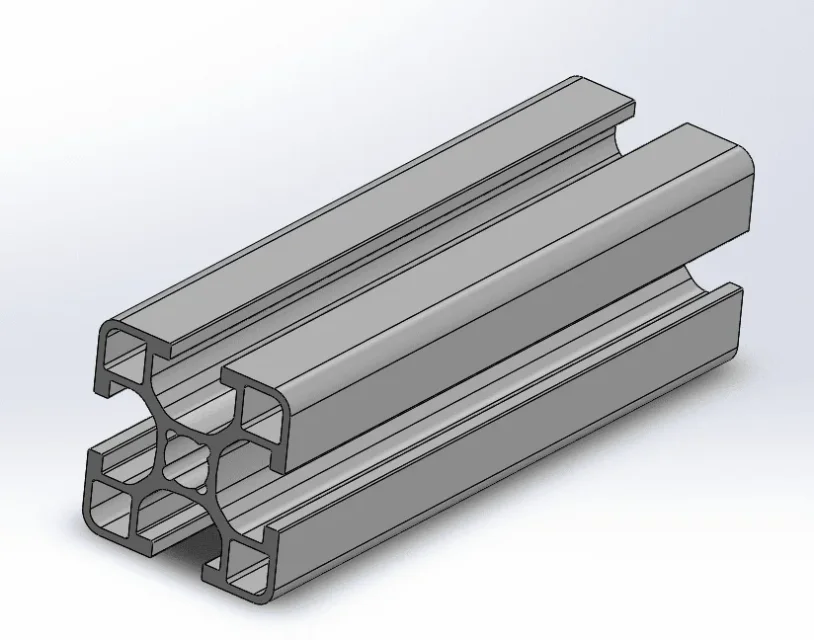
I downloaded a step file profile, I would like this to be a project library file to be changed only in length (I thought I would manage the various lengths that will occur in the various projects with configurations ). I therefore wanted (as I currently do with inventor) to extrapolate the profile section in 2d and then extrude it to my liking, but I did not find the way to do so.
Could you give me help?
thanks in advance
antonio
 

Attachments

  • Cattura.webp
    Cattura.webp
    47.8 KB · Views: 8
Thank you.
I wanted to ask you, but the files that are of project library (i.e. those, that if I have correctly understood, I can insert in the axioms of different projects, in inventor as of library, in the project remain unmodified, while in sw I see that despite bookstores are editable in every work, it works so sw or I error something?
I hope I was clear in expressing the question
 
You don't understand anything. refer the question and use a decent punctuation
 
1- project library files in solidwork are those that use to be inserted in the various projects (correct configuration? )
2-the library files in inventor once you insert in a project you can't change in sw I can do it, am I wrong something or sw works like that? Is there a way to make library files unchangeable within the work session a project?
3- In inventor I create a new project every time I work on a new job in sw this management is not there, right?
I hope in this way that I have been clearer
 
for library files do you mean toolbox parts?
to edit a file you want to do, it does not change alone for whims.
to make a new project do a new file obviously
 
Meanwhile, excuse me if I do parallels with inventor
-for project library files I mean for example the aluminum profile you explained to me how to get the sketch from the step, I rearrange the image.
in inventor this file once insert in the axieme as a library file is editable only in height the profile section no.
in sw instead I can change besides the height also the section of the profile doing sketch change They are two different philosophies.
- for the new project I will do as you say, inventor manages the project in a different way.

Thank you.
 

Attachments

  • Cattura.webp
    Cattura.webp
    47.8 KB · Views: 3
but you have to change the sketch voluntarily before choosing the part, then choosing sketch modification and finally changing the sketch.... you have to put a lot of yours! in addition to the fact that to change a sketch of convert entities you have to commit a lot

I don't know how it handles the inventor project and as you don't explain well fosa you want to get I can say, based on information, that to make a new project you have to make a new file
 
but you have to change the sketch voluntarily before choosing the part, then choosing sketch modification and finally changing the sketch.... you have to put a lot of yours! in addition to the fact that to change a sketch of convert entities you have to commit a lot

I don't know how it handles the inventor project and as you don't explain well fosa you want to get I can say, based on information, that to make a new project you have to make a new file
but you have to change the sketch voluntarily before choosing the part, then choosing sketch modification and finally changing the sketch.... you have to put a lot of yours! in addition to the fact that to change a sketch of convert entities you have to commit a lot

I don't know how it handles the inventor project and as you don't explain well fosa you want to get I can say, based on information, that to make a new project you have to make a new file
I don't explain what I want to do because I'm just trying to figure out everything here, I haven't done anything yet, usually before I try to understand.

Now I'll explain to you that in the specific case of the profile as you say one has to commit a lot to change.
but more generally if you have a spacer with round section with diameter 20
while in the project on which you are working in your drawings one from 22, that maybe you have to change after it has been three weeks since the beginning of the project .
If you're not careful, it can happen that you change that library (I see that maybe you don't have to commit so much to change it by bringing it from 20 to 25).
inventor if you try to change that library prevents you.
That's all.
according to my sw opinion in so many things is more performing than inventor in this no if things are like I understood
 
do the tutorials if the program and then stop making comparisons or doing things in the same way as another program.
use terms of inventor that in solid or do not mean anything or indicate anything else.
you don't know how to use the program and you make problems that don't exist because you use wrong references (inventor)
 
which part is not clear?
what do you decide to do tutorials or you have to stop using inventor terms?
 
inventor terms such as project library maybe, are a concept explained in the tutorials you talk about.
The question seems different.
The fact that I have an answer you can have is that it gives you the right to say what to say to another user . read well the questions and I repeat if you have difficulty answering you are not necessarily required to do it otherwise every discussion becomes a way to polemize . I make comparisons to try to make you understand my question.even if not profitable, I thank you for the time you have dedicated me
good work colleague, and good day
 
Then let's do some charezza:
When you talk about the project library you are not getting stuck in particular because in the project library (see image) there are several folders that can be created and customised and can contain any file type.
for example you see: various notes (folder created by me and containing annotations, blocks and other for drawings); features (default folder that contains library functions) and toolbox that is a business library managed by a solidworks database)
If you create a folder and insert your part that you want to manage with configurations (which I'll be back on later) you can't expect you to know how to handle it. if then in your axiemi insert the part this behaves like any part of any folder and that is you can change and its changes are reflected in the assemblies in which it was inserted.
if you do a library function (which is very feasible) this, once inserted in the part to create the extruded, loses the connection with the library file and modifying these does not change the extruded. just insert one of the existing ones, such as keways that are the locations for the flash drives and see that changing the original does not change that in the part.
if you use a toolbox part this, unless you save it by name, will be read only and can not be changed except through the configuration panel or entering the part, which is read only, and then saving it by name.

I think I've been clear.

returning to configurations if you use this method you will find a configuration for each length you will find so if you use that profile often after a few months you may find yourself with a file with hundreds of configurations and a file that weighs tens of mega and that will slow the assemblies. Moreover if you need to do an additional workmanship (hole, cut to frame it with another profile and more) or create a new part or do the work together that are always a little annoying especially if it is a complex axis.
Instead you can think of creating a welding profile that you will use to exploit the potential of structural members.

in last two questions:
What is the tutorial about the project library?
What does July 10 mean?
 

Attachments

  • Immagine.webp
    Immagine.webp
    20.4 KB · Views: 9
Thank you for the answer.
Generally speaking, I'm not trying to force the sw mode, but simply to adapt. (I would like to understand the dynamics, using the tutorials don't always give me the answers I'm looking for)
the online guide that you linked me in time is not always clear on Come so well.I will absolutely follow your advice on profiles.
You made me understand how to handle the library, thank you.
I'm dealing with automation, building machines that use different business details.
I attach my bookcase, the one made so far, that it lacks the modification on the management of the profiles you suggested.
today I have seen the use of intelligent components, for the type of design that I am doing I find absolutely a beautiful command.
 

Attachments

  • libreria.webp
    libreria.webp
    15.5 KB · Views: 11
commercial files, which do not undergo modifications because they already order ready (motors, bearings, pinions, etc.) and which typically come from neutral files and therefore without modifyable functions you can manage them so.
files that may undergo changes (profiles, straps) because they do not order as finished piece, but as size or semi-finished they must be managed in a different way.

discourse aside are the components that make handling (martinees, cylinders...) that even if they are sorted as finished piece require a specific management for each job because they simulate a movement.
in this case you can use a set with the configurations of the various positions by binding the mobile part (see in the forum flexible assemblies) or a monolithic part with configurations where geometry changes with some functions to create various positions. these files must also be managed individually for each job to avoid creating dozens of configurations that at the long time create confusion or unintentionally modify other projects

the files that will be used on multiple projects I recommend you to make them read-only so that they are not accidentally modified. if a change is made there must be the express desire to do so by removing the read-only check; also in this case remains trace of the rescue date and could be traced back to the author of the modification
 
commercial files, which do not undergo modifications because they already order ready (motors, bearings, pinions, etc.) and which typically come from neutral files and therefore without modifyable functions you can manage them so.
files that may undergo changes (profiles, straps) because they do not order as finished piece, but as size or semi-finished they must be managed in a different way.

discourse aside are the components that make handling (martinees, cylinders...) that even if they are sorted as finished piece require a specific management for each job because they simulate a movement.
in this case you can use a set with the configurations of the various positions by binding the mobile part (see in the forum flexible assemblies) or a monolithic part with configurations where geometry changes with some functions to create various positions. these files must also be managed individually for each job to avoid creating dozens of configurations that at the long time create confusion or unintentionally modify other projects

the files that will be used on multiple projects I recommend you to make them read-only so that they are not accidentally modified. if a change is made there must be the express desire to do so by removing the read-only check; also in this case remains trace of the rescue date and could be traced back to the author of the modification
Thank you very much. I try to look for what you told me about the various topics, thank you I put to work.
 

Forum statistics

Threads
44,997
Messages
339,767
Members
4
Latest member
ibt

Members online

No members online now.
Back
Top