• This forum is the machine-generated translation of www.cad3d.it/forum1 - the Italian design community. Several terms are not translated correctly.

get volume from a .igs file

  • Thread starter Thread starter Andrew85
  • Start date Start date

Andrew85

Guest
I press that I am not a designer but working in a small company often I have to open and provide information on the maths.
some customers send me files to .igs
The basic information I need is the volume of the piece under review.
catia v5 sees it as only surface. How can I do to get the volume? Just convert it to .stp? How do you do that? thanks for the help
 
This is a great question, andrew, and it affects the deafening silence of the missing answers.

the problem of iges files is that they are composed of disconnected surfaces, like a parallelepiped formed by playing cards: seemingly united, but in fact unhook one another.

Also admitted to find a way to "binding" them between them (in jargon "stitching"), I don't seem to be in network iges-to-solid converters.

If I received a .igs like yours, I would try to connect the walls to a single surface called "waterproof", then with the convtosolid command I would solidify the inside.

this in theory, having never tested this procedure for real.

Let us know how it ended, thank you!

:
 
This type of discusion has already been treated before.... as far as I am concerned, I can say that there is the machining module in which the command is to determine the volume of an object (also composed of surfaces)
 
This type of discusion has already been treated before.... as far as I am concerned, I can say that there is the machining module in which the command is to determine the volume of an object (also composed of surfaces)
I confirm.
no need to transform surfaces into solid to know the volume
 
I couldn't do it in catia v5. Do you kindly explain me step by step how to do it? would be very important to us
 
This type of discusion has already been treated before.... as far as I am concerned, I can say that there is the machining module in which the command is to determine the volume of an object (also composed of surfaces)
Sorry if I ask your help again, but throughout the forum I did not find directions how to determine volume in working environment, you could give me some more in-depth indication.

Thank you.
 
Sorry if I ask your help again, but throughout the forum I did not find directions how to determine volume in working environment, you could give me some more in-depth indication.

Thank you.
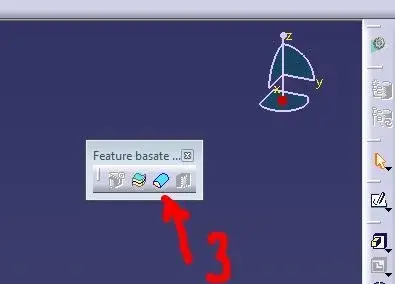
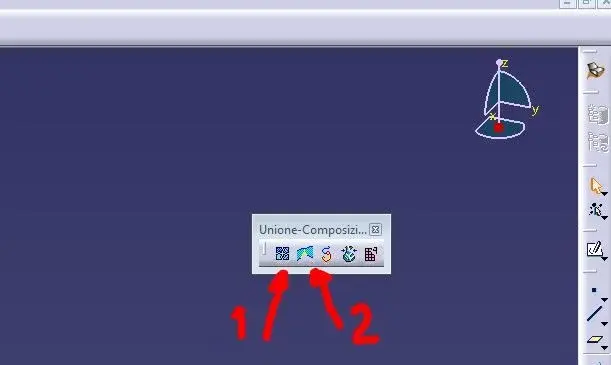
There are 3 steps to join in a single surface.
I have attached 2 images with highlighted icons to use.
in the image "a" there are 2 icons
icon #1 is the first step you need to do, select all surfaces and then join them with this command (join)
the icon n°2 (compons). this command should eliminate all micro apertutures not visible.

in the image "b"
the icon n°3 solidifies the surface created with the first 2 steps

ps.
that I know, in machining there is a command... but only to obtain the max volume (a simple cube) from which to obtain the piece to be milled
 

Attachments

  • a.webp
    a.webp
    9.1 KB · Views: 22
  • b.webp
    b.webp
    6.7 KB · Views: 15
There are 3 steps to join in a single surface.
I have attached 2 images with highlighted icons to use.
in the image "a" there are 2 icons
icon #1 is the first step you need to do, select all surfaces and then join them with this command (join)
the icon n°2 (compons). this command should eliminate all micro apertutures not visible.

in the image "b"
the icon n°3 solidifies the surface created with the first 2 steps

ps.
that I know, in machining there is a command... but only to obtain the max volume (a simple cube) from which to obtain the piece to be milled
I also know this method to work on the surfaces, but the particular design is very complex and after several hours of work I make the "join" the "compons" to eliminate the openings but I can not solidify it because it gives me error and tells me that there are still openings... for this reason I wanted to know if there is a second method as indicated in a previous post (there is a special command in machining).

Thank you very much for your help
 

Forum statistics

Threads
44,997
Messages
339,767
Members
4
Latest member
ibt

Members online

No members online now.
Back
Top