• This forum is the machine-generated translation of www.cad3d.it/forum1 - the Italian design community. Several terms are not translated correctly.

ghost lines autocad

  • Thread starter Thread starter syfer
  • Start date Start date

syfer

Guest
Hello, everyone. I have a problem I can't fix.

the design generated with autocad 2002 shows everything, without problems.
see img1 attached.

when I go to the press, some lines disappear from the preview. :eek:
I can't understand why.
see img2.

Thank you all.
 

Attachments

  • img1.webp
    img1.webp
    45.3 KB · Views: 11
  • img2.webp
    img2.webp
    24.3 KB · Views: 8
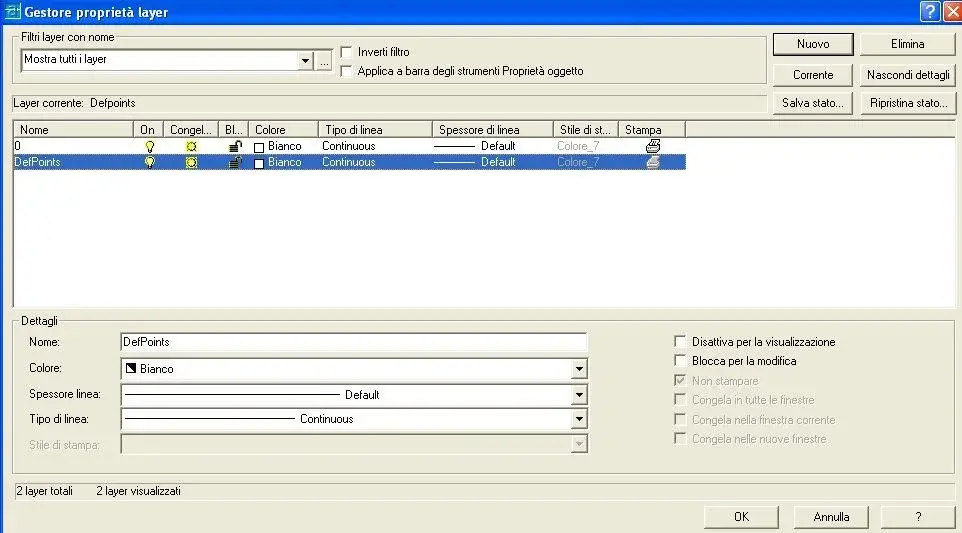
check in the list of layers that there are no layers with the barbed printer icon and check that there are no objects in the defpoints layer.
 
Maybe it would be better if this post was moved to the autocad area, which here has something to do with merenda.
 
Apologize for introductory. :smile:
next time I'll be more careful.

Thank you very much for your help.

Greetings ale.
 
I checked and in fact on layer defpoints, the printer icon is present, it is not barbed but shows up in light gray shade.
allego img.
What do you recommend me to do?
 

Attachments

  • layer DEFPOINTS.webp
    layer DEFPOINTS.webp
    37.9 KB · Views: 11

Forum statistics

Threads
44,997
Messages
339,767
Members
4
Latest member
ibt

Members online

No members online now.
Back
Top