• This forum is the machine-generated translation of www.cad3d.it/forum1 - the Italian design community. Several terms are not translated correctly.

gorgeous

  • Thread starter Thread starter PAC86
  • Start date Start date

PAC86

Guest
Bye to all,
My name is gorea, I'm praying that I've already been looking for a bit on the forum but I haven't found a discussion about it.

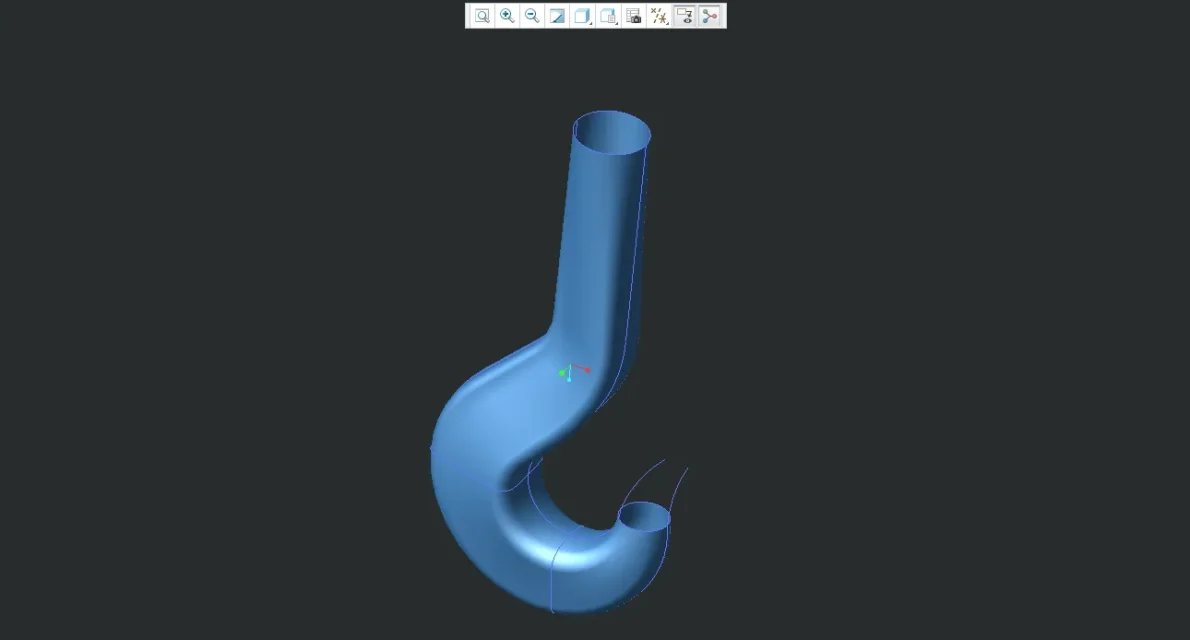
My problem is the following, I would like to reproduce the attached hook,
I created the various sections and references only that I can reproduce the design only with the "blend limit" function, thus obtaining only the outer surface of the hook.
I actually want to create a solid.
Can you tell me if there is a more correct way to proceed?

Thank you in advance.
 

Attachments

  • 46-Gancio-A6-UNI-4392.gif
    46-Gancio-A6-UNI-4392.gif
    90.8 KB · Views: 40
  • Gancio1.webp
    Gancio1.webp
    10 KB · Views: 33
  • Gancio2.webp
    Gancio2.webp
    10.9 KB · Views: 21
Cattura.webpI'll give you an example. work in the field.
If you want help post the file.
you lack the knowledge of the controls to combine the surfaces and solidify them.
 

Attachments

Bye to all,
My name is gorea, I'm praying that I've already been looking for a bit on the forum but I haven't found a discussion about it.

My problem is the following, I would like to reproduce the attached hook,
I created the various sections and references only that I can reproduce the design only with the "blend limit" function, thus obtaining only the outer surface of the hook.
I actually want to create a solid.
Can you tell me if there is a more correct way to proceed?

Thank you in advance.
hi gorea, I modeled the hook with the odds of your image.
Look if it can help you, unpacking the tree of the model you should be able to understand its construction.

greetings
jambo
 

Attachments

your file is great jambo.
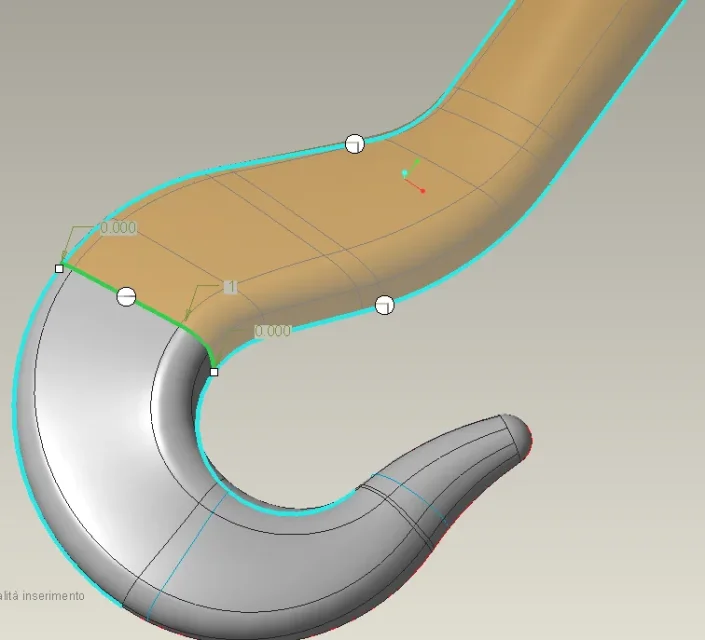
In my modest surface experience, however, I can point out that if you put boundary control points below, you reduce the number of patches you create with the surface.Cattura2.webpfor the boundary above go well the boundary conditions that you have put however sappi that it is always better to use as curves of boundary edges intent/spigoli rather than sketch (the tangency if not very often you do not get it). In this case you were orthogonal and it's okay anyway.Cattura3.webpin general cmq for a hook the sections for which to pass the boundary must be more than those used here. Obviously it was an exercise.
 

Attachments

hi mad76 I agree on everything, I saw that you already corrected the file so I didn't post another one.
regarding the sections in fact if you feel the lack of additional in the passage between the round stem and the section that
starts to crush but I did with those of the image.
compliments for the excellent knowledge of surfaces.

greetings
jambo
 
hi jambo1970 and hi crazy76, sorry if I didn't answer right away.
I currently have knowledge mainly of solid modeling, I hope to improve quickly.
Thank you very much for your advice, I will try to put them into practice and I will update you on the result:
 
hi guys I followed your advice but I can't generate boundary blend.
select the first 4 chains in the first direction, but I can't select the 2 chains in the second direction as when I go to select it considers me the perimeter as the only chain.
I put in the annex what I managed to do:wink:
 

Attachments

hi guys I followed your advice but I can't generate boundary blend.
select the first 4 chains in the first direction, but I can't select the 2 chains in the second direction as when I go to select it considers me the perimeter as the only chain.
I put in the annex what I managed to do:wink:
hi andrea, to select the curves in the second direction, make the selection
interactive mouse curves.
fast clicking with the right mouse button on the entire sketch,approximately
on the first curve to be used, the curve becomes blue, left button becomes red, shift stop
+ button left mouse and top all the segments you need to compose the curve.
the segment that progresses you can delete it by clicking the dx button on the white square
at the end of the curve, by selecting from the "Round to" menu and selecting a reference
for the rifilo.
references are usually curved,planes,points etc.

greetings
jambo.
 
hi jambo1970 and thank you very much for the help.
I think I managed to finish I am blessed hook even if your looks better (and not only for rendering :biggrin: )
If you want to take a look.
Thanks againView attachment 45136
hi gorea, I pray that, being completely self-taught, first with proe then with creo I understand the difficulty
in working with the surfaces.
If you do not take courses, understand the potential of the "blend limit" is not simple, therefore in the first model I do not have
deliberately inserted control points or particular tangency conditions between the surfaces.
I think that this has already been a good result in solidifying the model (which is not so obvious) , but I invite you to
to analyze the tangency constraints of the two blends (white bolllins found at each end of the surface n.d.r)
Specifically you can attribute the condition of perpendicularity between the two lower ends of the surface and the plane through
which you will mirror half the hook.
You can also create the tangency condition between the semi-spherical surface and the first blend and then between the first and second blend.
test, checkpoints will serve you later, also remember that a 4-sided blend is the most "robust" even if you can create it at 3 or 2 sides.

greetings
jambo
 
the boundary blend control points are missing on the lower part of the hook, but above all the tangency conditions for boundary curves. for the rest is fine. Anyway, I think it's a school exercise. Good evening!
 

Forum statistics

Threads
44,997
Messages
339,767
Members
4
Latest member
ibt

Members online

No members online now.
Back
Top