
• This forum is the machine-generated translation of www.cad3d.it/forum1 - the Italian design community. Several terms are not translated correctly.

help with command

  • Thread starter Thread starter MatteoSurf
  • Start date Start date

MatteoSurf

Guest
Good morning to all, I am new to the community, or better written for a long time but never asked for help.. .
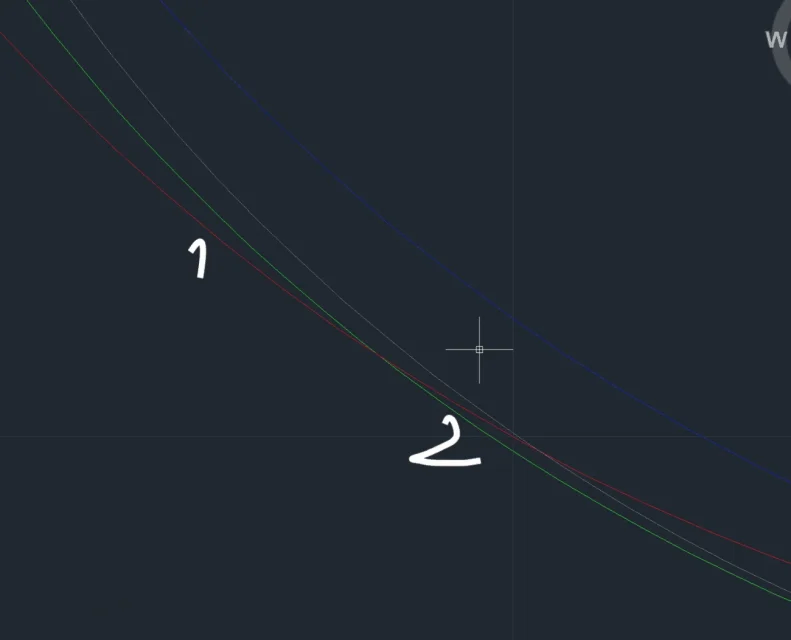
However I am here to ask you a hand on a autocad mechanical command, I can't in any way reconnect these 2 circles, or better I managed once and now no more, but or need to replicate the command.
I attach a screen to see which the 2 you look for.... in short the red circle indicated with 1 I must connect it with circle 2 of green color.

the command is banal I know but I can't in any way it always gives me error and says not valid or find second point.
thanks for the help in advance
greetingsSchermata 2018-10-20 alle 12.58.27.webp
 
Some more information wouldn't hurt. Maybe by attaching the file.
size fitting radius in the meantime.
mechanical controls; if you specify it I think it is precisely mechanical and not the classic radius also present in normal autocad.
Did you try to make a very trivial circle at 2 tangences and a ray?
 
Hello, thank you very much for the answer, I tried but I can't possibly mistake something.
I attach the connection file to do, to view it I made 2 red lines to indicate where I would like to make the connection, for the circles involved, are those of the figure sent in the first post....
I wait for your help... Thank you.
 

Attachments

If the other circles are not interested in the problem they must be removed because they only make confusion.
missing the connection radius.
Have you tried to create a tangent circle at the two entities with a known radius?

the design should be checked and cleaned because there are overlapping entities (red arc on red circle tantpo to say) that can create and problem in entity selections.
other thing to do is to use a color other than those on which you work in order to highlight if the radius is made; otherwise you risk that the created entity overcomes an existing one and if of the same color you do not notice giving the impression that the command has failed
 
Last edited:
If the other circles are not interested in the problem they must be removed because they only make confusion.
missing the connection radius.
Have you tried to create a tangent circle at the two entities with a known radius?

the design should be checked and cleaned because there are overlapping entities (red arc on red circle tantpo to say) that can create and problem in entity selections.
other thing to do is to use a color other than those on which you work in order to highlight if the radius is made; otherwise you risk that the created entity overcomes an existing one and if of the same color you do not notice giving the impression that the command has failed
solved! !
clean the design and remove the circles not interested in the fitting and arrange the colors, then command executed perfectly.

Thank you very much for the advice.
See you soon.
 

Forum statistics

Threads
44,997
Messages
339,767
Members
4
Latest member
ibt

Members online

No members online now.
ciao
Back
Top