
• This forum is the machine-generated translation of www.cad3d.it/forum1 - the Italian design community. Several terms are not translated correctly.

hide a part in one view

  • Thread starter Thread starter ndonio
  • Start date Start date

ndonio

Guest
hello to all
I would need to know if there is a possibility to hide an object/part in a single view (in the draw).
example: I have a wardrobe with three doors that close as many rooms.
in one view I would like to hide only one door to view the inside.
in other views must remain visible.
Do you know any procedure?
Greetings to everyone.
 
Should these configuration stay forever or is it just temporary?
if the second case is valid, I recommend to copy the set with links ( thus creating a different but connected set) and use it as a combination for the view, I delete the front
so doing you have both the "dad" and the "son attached to it.
This is the first thing that comes to mind; if someone else in the forum has another idea.... .
In pro-and I know that simplified and honest representations are used, I don't know if he has them.
 
happy excuse but the solution is the use of scenes. configure what you want and go that it's a beauty
 
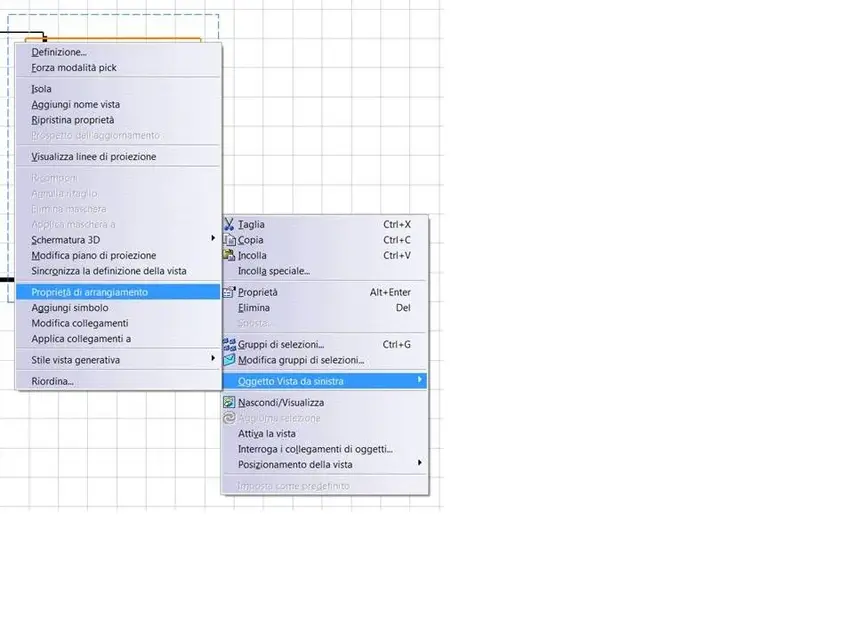
another solution, is the command "property of arrangement".
is located inside the pup-up menu that opens by selecting the view frame with the buttondx.

Hi.
 

Attachments

  • proprietà di arrangiamento.webp
    proprietà di arrangiamento.webp
    32 KB · Views: 31
Yes, but you have the inconvenience that if behind that composer there is another who leans both to destr and to the left, they hide as you say you are with a hole in the center!!! !
 
Meanwhile thank you for your first advice but:
1)For what is said by ferrity you have the hole in the center as rightly responds falonev, instead you should hide the whole part so as to find out what is inside.
2)As proposed by falonev with the scenes I will try to deepen as soon as possible and see if it is valid.
greetings to all
 
Excuse me, but I have to go back to my steps and confirm that he was right.
the solution is located in the arrangement properties.
in the variables available to get the result I wanted, you have to slow the option (for the particular to hide) 'used in the projection'.
so I deserve ferrity for the solution.
Thank you for your disposition.
greetings
 

Forum statistics

Threads
44,997
Messages
339,767
Members
4
Latest member
ibt

Members online

No members online now.
Back
Top