
• This forum is the machine-generated translation of www.cad3d.it/forum1 - the Italian design community. Several terms are not translated correctly.

hide work parts without suspension

  • Thread starter Thread starter giorossi
  • Start date Start date

giorossi

Guest
hi to everyone, I am with this "problem":
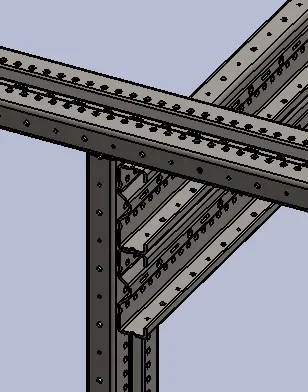
I have to create a set containing dozens of beams that have very thick holes (pass 25mm).
in the general representation, having just tens of beams, I am having to manage thousands and thousands of holes that weigh the file and also graphic representation.
I can not suspend the holes functions as they are part of couplings in the axieme but I would like to create a display state in which they are not visible.
any suggestions on how to proceed?

Thank you.
gio
 
any suggestions on how to proceed?
starting to give feedback to open discussions and there are many more.. .
 
that I know, but I reserve to check*, a display status manages the graphics (color, display and display mode) of the component and its possible bodies, but not functions.
so you can graphically hide a body, but not just a part of the body.
said this to solve the problem there may be several ways:
- maintain only 2 holes to perform coupling and physically cover others (with an extrusion or delete face or suspended a function.. methods are various)
- do a sketch with points to use for mating and suspend holes
- to create a second beam without holes above the other and with display states to hide one or the other but it is necessary to check the times of reconstruction and if it effectively smoothes the assembling
-...

*if you can do it only by hiding the function; expand display panel and see if you can manage the single function.
 
as I suspect it is not possible to hide the functions therefore you must find a solution, suitable for the context, to eliminate the holes
 
thanks massive for the directions.
Following what you suggested I am trying to follow the road of the second overlapping beam without holes and verify the impact on my hardware. Moreover I would like to try, only for a graphic issue, to draw a sketch with holes in 2d in the full beam, only to see in the table that is a perforated beam
 
a smooth beam without holes will be always leaner than the same beam with holes. how the holes are made then depends how leaner it is.
a sketch with all holes will be heavy and the performance impact will be high.
verifications are done mainly with performance assessment.
to give correct insights you need to know what you want to get. from a summary idea I would say you could make beams with two configurations: a realistic table setting and a lightened with only two assemblies.
 
we talk about beams with pitch holes mm.25 and step mm.50 on the different coasts.
through the two configurations is the best way. configuration with the holes necessary for positioning and for carrying out the coupling details with squadrons, bolts, etc. while with the "lix" configuration I can make a light board as a general layout
 

Attachments

  • Immagine 2021-09-01 092553.webp
    Immagine 2021-09-01 092553.webp
    21.7 KB · Views: 13

Forum statistics

Threads
44,997
Messages
339,767
Members
4
Latest member
ibt

Members online

No members online now.
Back
Top