• This forum is the machine-generated translation of www.cad3d.it/forum1 - the Italian design community. Several terms are not translated correctly.

hook and surfaces... what patience...

  • Thread starter Thread starter antog89
  • Start date Start date

antog89

Guest
Good morning.
I am facing the surfaces on visi (the sample I have "resolved" perfectly, so how the various controls work it, is how to apply them in certain situations that still escapes me. . )

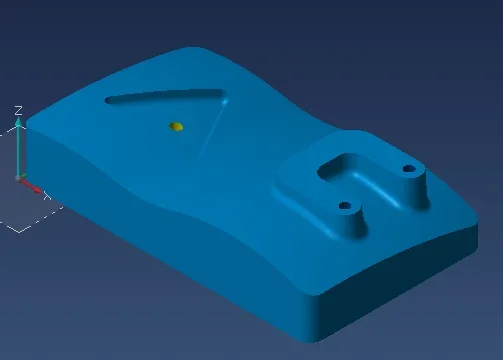
to do so I have a table to make, a 2d of a hook with 4 sections + 1 of the body of the hook.

I on visi drew the 2d of the hook, drew the 4 sections and put them in place. My goal would be to make a sweep for sections along the hook profile.
problems:
the profile is closed. I tried to make it an open one but says that the segments (since it is a piece of fusion I had to realize rays and adapt them a little by putting them in tangency) are not united and to review the tolerance. I tried to put a higher tolerance and nothing, I tried to do "unisci/connetti curve" and tells me that the curves are already connected, I tried to project it on the plane and nothing. In short, to make this profile open there is no direction. my goal was to create 2 open profiles (of the 2 sides of the hook) so as to use them as tracks and use sections as generators. But I can't. .

a screen..Cattura.webpI put the superifices on the sections to facilitate the understanding of the screen.
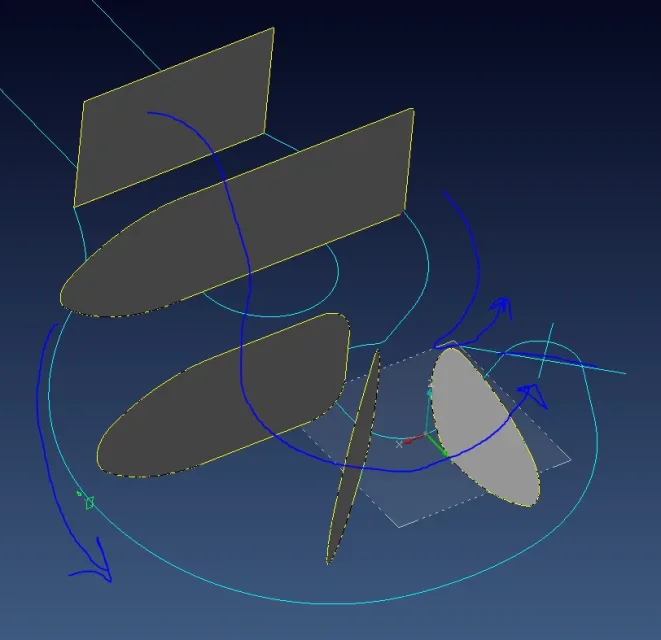
another thing I tried (with little results...) is to put only half section (for the long) so as to extrude a simpler surface and then mirror everything. but nothing.. (actually from the screen I moved the profiles on the axis to the middle point, and then I deleted the negative half)

Any suggestions?
I came to the conclusion that I'm doing the job backwards and bad... a bit like driving a car from the trunk and not finding pedals.. .

p.s.
Let me lose the hole on the hook that I would have done so later. It's the least.
 
update:
Nothing yet.
I managed to combine the 2d curve of the hook, with the command "concatena" and I created the 2 open profiles...but I can't develop it with any type of surface...and say that I also paid attention to creating the profiles all in the same way so as not to have self-intersecting surfaces but still nothing. .

none of you have ever made a hook.. ?
 
update:
Nothing yet.
I managed to combine the 2d curve of the hook, with the command "concatena" and I created the 2 open profiles...but I can't develop it with any type of surface...and say that I also paid attention to creating the profiles all in the same way so as not to have self-intersecting surfaces but still nothing. .

none of you have ever made a hook.. ?
hi, I do not have vsi underhand, but it seems to me that there are several options to manage the swept sections (of the parrallele/Orthagonal type ). Maybe what you need is there. Unfortunately I have no experience of hooks, but so, to the eye, I would say that perhaps the arrangement of the sections does not help you. Can't you prepare them for the driving curve? I think it would be more logical, even from the point of view of the structural dimensioning of the object, but this is obviously another speech.
another approach could be to keep the "spigolose" sections and apply the edge fittings only after, at the end. not for the other sw, but with visi it is better to keep the fittings for last. and evaluate well in what order to apply them, in the case of complex objects, because the result changes.
and I would say that the tip of the hook will require a dedicated modeling, not connectable to the swept.
Good job.
 
Here I am. So I was explained what was the problem but (despite being done before my eyes) at home then on my project it does not work.... another mistake. (but a manual done, really, good of visi exists? you can't miss the senatum for every menata when you might just have to reverse the selection order!! bho... compared to rhino or autocad on visi there is really nothing.... )
... eeh.. therefore.
the curve of the profile of the hook, albeit in tangenza and united with the curved chain, must however be repaired. made this proceed with the surface for sections in 2 directions. the first takes all the various sections and the other the 2 curves of the hook. I saw him do it in front of my eyes and it came very well (except for that inner narrow curve of the hook.. there you probably have to create a new section).
I'll try... doing the same identical steps and this is the result.
external curves are not suitable for a two-way section surfaceI'm not saying...
I also did everything, creating only half section. I put the screen. (I was seen just like that)gancio2.webpHowever I also tried to do it to live edges and then reconnect later but I can only make uniform fittings, is there a way to connect with variable radiation? Yes, for the tip of the hook I thought to create a little sphere, so much that is a perfect arc (in the sense is the arc of a circumference, the trimming after. If you were "extended curve" would reform the circumference.). because it is all in tangency, if (as it should do) pulls out this blessed surface, then with the union I should have the tip in tangency. In theory.

If you should be aware of paperwork and not, tutorials, and what else let me know. I only have the pdfs of the real...and explain very little.

Thank you for everything. it is hard to find support on these software. . .

p.s.
For the record.
do you know the file inside the "sample/cad" folder that shows you all possible surfaces? I solved it in two seconds. this to say that the "how to use" the yes.. is the "why not work" that I don't understand.. .
 
Hello antog89, I'm sorry but I don't have much familiarity with sup. so elaborate, so you know why they don't work, I can't. even if the suspect that the flat curves, in addition to being repaired, must be without edges (or not rational or otherwise, that is all in the same menu) at this point I come.
But I'm almost sure you don't have to get to the tip, but stop even 1/10 before, because there the sup. changes logic to assimilate to a sphere and end at a point instead of in a section. but you should have seen the demonstration. . .

for variable fittings, the command is after "harvests" and "musts", but I would say that there is nothing to do with what you need, since the exercise takes place on different principles.

If you want to circumvent the obstacle, you could do the hook to pieces, not in the sense of hammering the pc :biggrin:, but to break the 2 flat curves in the sections defined by the position of the sections, use the command "sup from 2 generative directors/2", get some hooks and then fitting them with tangent surfaces or real fittings. but it would be just a bypass, an extreme ratio and the result would be different as well as more laborious.

I saw a paper manual at least 10 years ago, then nothing. and don't even ask me in scanned pdf because it was referring to another interface.

by curiosity: what version are you using?
 
also eliminate rounding vertices could help. But it is strange that it was not necessary in the demonstration.
 
I am using visi 19 (yes that it went out 20, but at the course I use the 17... you will understand that casino every time export and import the steps...).
Yes, I had tried to tear it apart but it does not keep the tangency between the various "pieces". and as if not enough with the teacher (which then teacher is not, but a professional who lent himself for the course) worked and to me not.
In fact it might even give itself that the 19 is more rognose but it seems strange to me usually is the opposite (for this I am on 19).

Rounding tops: ok I need a flash pill on this:d. what are the vertices so, the meaning of redundancy also but... in practice what would they be? more vertices that describe the same point? how to remove them?

I don't think he did anything else. The only thing she did was:
draw the 2d
repair the curves (without touching anything with default settings)
make the surfaces for sections in 2 directions. (here pressed ctrl during selection. with or without me nothing changes).

with regard to the tip not the touch, I start right from the intersection point between the curve of the hook and the axis from the arc of the tip. I'm trying to keep a peline back.

Monday, I'll have a chance to ask him better, but it'll be the last lesson. Too bad we couldn't see the cam profiles, indeed all the cam... I will need to find material alone, but I first plan a new software given the scarcity of information about it. .

p.s.
It has nothing to do with it, but I put a model of exercise right there that I did in a few minutes. and take advantage of the 1-director 2-generators.Cattura1.webpI've done a lot of them, I've had a lot of fun doing the 3ds max animation. to say that modeling is usually not a problem. these situations are the problem.

p.s.2
In the meantime, I'm going to go back for the umpteenth time on the hook and the sections. I make 4 copies, and I try every time on the "intact" curves instead of patting too much on the same.
 
Hi.
1: the version was just out of curiosity, not for anything. However it is not said that the newest version is better, some defects are hard to die.

2: If you have to pass from a recent version of visi to an older one, you don't necessarily have to pass by step, but if you export/save in parasolid (which is at the base of visi) there is a flag:" export for reimport in visi", so the file remains in a native format and it is less likely to corrupt (then in v17 you have to use the import from parasolid...). while if you pass from the old to the new you will already see that the file is loaded natively.

3: that you had already tried to break the hook is a good sign, if nothing else. that the professional is a "poco communicative" teacher does not surprise me (teaching is difficult, teaching is a gift)

4: what are the rounding vertices not even me, but in the window that opens when you want to repair a curve you find some "mathematic" curve data and different editing options, if selecting "elimina verte rind." tells you that it takes away sure that it does not.

5: of the ctrl I hope you have explained that it serves only multiple selection (with > active, without > sel. single element, both from keyboard and icon); is a command that you can fix on/off by default in global system parameters. depends on how you work.

6: If you want to post the original file, that we "paciocco" as well, if I advance time....

7: I better understand the cam, at the time I took an evening course at the aclis. He served little by little, but it wasn't useless.

8: by prof., if he is a professional in the sense that I think, let him leave a business card, that he never...

greetings, reborn
 
1: eh, we just have to hope in the 20...

2: great great, I will definitely!

3: thanks :), in fact study also autocad with a teacher and the difference is substantial.

4: OK I will try :d!

5:uhm no just used it instinctively and I promptly threw the eye (but he wasn't explaining directly to me... When I see that they spy on someone, I immediately interfere, so I stand there and listen :)

6: look I do better, now it's late but tomorrow I'll calmly scan your table, so you do two laughs too with the various fittings (if you ask yourself "but where is the center of this ray?" the answer is, there is, I fixed with the command "curve fitting" set the same radius of the table. at the end is the same thing)

7: eh a cam course I have to find it because there are a lot of ads as camera operator...

8: we say he works for a very big Italian company :). In fact I could also try to ask him to take me as an intern (in a while I have to do 400 hours), but I have to assess how much I can grow... or it takes a little.
 
hi, assuming I'm better off with the cam than with the cad, I was wondering if you tried to build your model with the auto constrained surfaces.
in the workf\exemple\cad\surface exemples.wkf folder at box 4 there is the example that seems to me to look a lot like what you have to get.
If he doesn't get anything, I'm sorry.
 
I'm sorry, I've completely absorbed my commitments and I've completely forgotten! !
I am sorry, I am sorry.

in the end anyway I tried with other hooks and came to me, most likely that hook was drawn to cabbage for the book (one of the superiors) and away, because all the others came with the methods you proposed and not..
and also on autocad with the supcoon.
 
Hi, I'm simone.
I don't know if I can help you but the curves don't have to be chained completely otherwise the command doesn't work.
then according to what versions you use there is a better and more intuitive and powerful command.
cmq if you send it to me I try to help you.

Bye.
 

Forum statistics

Threads
44,997
Messages
339,767
Members
4
Latest member
ibt

Members online

No members online now.
Back
Top