• This forum is the machine-generated translation of www.cad3d.it/forum1 - the Italian design community. Several terms are not translated correctly.

how to bind objects to the floor

  • Thread starter Thread starter fabio_lone
  • Start date Start date

fabio_lone

Guest
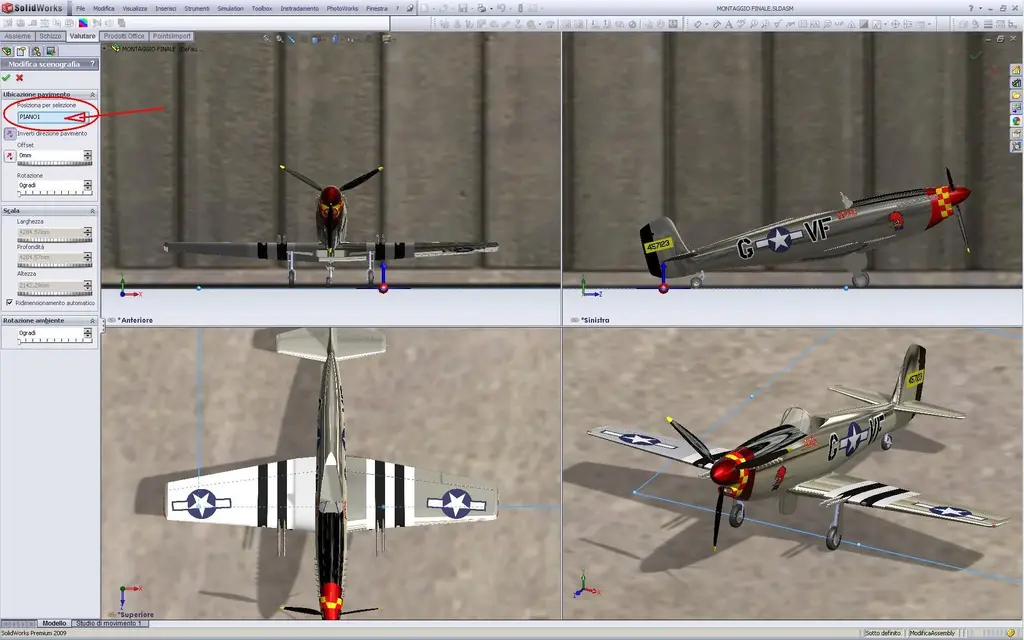
Hello, everyone, my name is fabio. I am a metal mechanic from the province of vicenza and I am doing a basic course of solidworks 2009. I tried in vain the topic but aimè I can not find it. As you can see in the image the rear carriage of the plane does not rest on the ground and I cannot understand how to make it. in the rendering comes so, in the program even makes me the shadow as it was rested on the tail despite the drawing plans are accurate. It's not the first time I happen and I want to figure out how to handle these situations.
I thank you very much and I hope that you have not asked a question already proposed a hundred times.
hello to all:smile:
 
Did you do the plane model? I think it's a spitfire. beautiful textures and also some plumbers ... the propeller then is intriguing.
 
I didn't answer... You have two possibilities. If you're making a unique part rendering on a preset scenario, you need to use the move/copy command and then turn and tilt by turning for degrees until the rear wheel rests on the virtual floor. otherwise you must create a set by binding with tangent couplings the wheels on the upper floor of the axieme.
 
thanks to the poly answer. Yes the model I did, it is not a spitfire had to be a p-51 d but I did it a little by heart, taken from the sew to use the lofts, concerning the photos in fact seems a spitfire with the wings of a p-51, I had already made all the decals and did not go back to it, without counting that the American ones are more "coreographic" than the English ones. .
said this, the design is a set so I tried to put the tangent rear wheel on the upper floor but without any result, without counting that the upper floor is located more or less in axis with the center of the plane carlinga.. So I don't know how much that makes sense. .
I said this thank you but so I did not succeed and the first part of the explanation on the move/copy is not so clear to me.
at this point I am thinking of remake the assembling beginning to insert from the wheels, so that then can move all the body of the plane making pin on the front cart. In this case I started from the plane's body and so the program doesn't let me move it. . I just hoped I didn't have to do it again.. Maybe I wait a bit if we find a solution. . .
 
I know where the problem is... .

the first detail you enter together by default is fixed. you have to make it soft: Right-click and from the menu choose mobile.

At that point you can move all the asses as and wherever you want.

if you are unable to rotate the plane as suggested by poly, try to create a tangent plane to the front wheels and then add the tangency bond to the rear wheel.
 
I'm sorry, but I'm the one who's stupid. ok I unlocked the fixed piece, now it moves everything, I fixed a front wheel and the plane rotates around the same pemettendomi to tilt as I wanted... Now however, if I hold myself quite parallel the shadow remains exact, as I approach the rear cart to the ground moves the shadow with the result that does not rest any wheel and the plane is there suspended.. for the tangency speech to a plan... Maybe! She doesn't let me do tangency coupling between any wheel and a plan, at least I can't...
 
I'm sorry, but I'm the one who's stupid. ok I unlocked the fixed piece, now it moves everything, I fixed a front wheel and the plane rotates around the same pemettendomi to tilt as I wanted... Now however, if I hold myself quite parallel the shadow remains exact, as I approach the rear cart to the ground moves the shadow with the result that does not rest any wheel and the plane is there suspended.. for the tangency speech to a plan... Maybe! She doesn't let me do tangency coupling between any wheel and a plan, at least I can't...
if the wheels are obtained by extrusion of a circle or by revolution you must create by force of the selectable faces that allow to set tangent coupling with the plane. the shadow is not right because the model is not at the right height. it is not correct to set fixed a front cart wheel. the correct procedure is to bind the three wheels to the floor. this can be obtained in various ways by exploiting also the reference plans.
to improve rendering can be useful to create a part for track and ground, so you can set the material and so shadows are projected more realistically.

If you don't want to sell that model, you could post it, someone willing to fix it.
 
ok I managed I made mobile the wheel and bound the three wheels on a plane with tangent coupling. He didn't make me do it because I had other combinations of plans that came into conflict. I am pleased to have managed to understand the problem but the final result does not change...
poly the speech of creating a base could also go well but if I apply a scenario of those using the photworks would make me an airplane that projects a shadow on a track that in turn projects a shadow on the floor... I should really create the whole landscape.. put a sky as a background and with a prospective artifice create a credible frame.. And then I'd like it to be the program that does what I'm asking, and I'm not the one who pleads with the program. I want my model shadowing on the square with the yellow bricks of the photoworks! :bekle:

I thank you for your precious advice!
As soon as I understand how to place the model.. .
 
As soon as I understand how to place the model.. .
file menu from the axieme> pack&go>salva in the zip file
then in a new post in the additional options pane attach the file with attached management.

when you place the attachment mentions the version of swx you are using.
 
here is the complete model.. be clementi in judging.. I'm not an engineer. . I only do a solidworks basic course:redface:

ok you see a little you can do.. .

the program version is premium solidworks 2009 sp.0
 

Attachments

at lunch break I managed to throw an eye to the axieme. I didn't get into the construction of the various parts, but I think you have a decent modeling experience. to return to the problem, it seems to me that the tangency constraints of the wheels must be reversed, in fact the wheels go under the plan. Therefore the shadows are wrong. you must select the tangent coupling and reverse the verse with the two darts up or down in the property manager.
 
Thanks for taking a look, honestly the tangency constraints seem correct to me, if you look at the image of a couple of answers ago you clearly see that the plan goes where it has to pass... I tried however to change and in fact it aligns on the top instead of on the lower, putting in a position that is not good.. and the usual shadow is wrong... I'm going to the course today, and I'll see to the professor. Thanks again:finger:
 
Thanks for taking a look, honestly the tangency constraints seem correct to me, if you look at the image of a couple of answers ago you clearly see that the plan goes where it has to pass... I tried however to change and in fact it aligns on the top instead of on the lower, putting in a position that is not good.. and the usual shadow is wrong... I'm going to the course today, and I'll see to the professor. Thanks again
I have seen (and then "correct" :biggrin:, but few changes are enough and everything is put in place) the files of the aircraft; Good job modeling to be early. the aesthetic result is nothing wrong, remember that you are using a drawing software "greatly mechanical" and more so you can not expect.
Anyway,
first of all if you check a scenography (the garage compartment) and want it to look real you have to place the "floor" on the same floor where the wheels stand:P51.webp... from the tree feature manager expand lights, cameras and sceneries, right clik on stage and choose Scene editing and in the first field at the top check the floor, that floor 1 where you rested the wheels.

then you have to pay attention to how sketches/models; did you not notice that the plane is slightly tilted on the left? The front wheels aren't on a horizontal plane, and in fact you couldn't give the tangence to both, did you?
this because you made the tread "biconic" (the sketches of pneumatic revolution are made a little at home with mixed lines and splines, broken and not in tangency. and the tread is formed by two non-hill lines.. I supported them with a single horizontal. and the sketches are better if you define them all completely). when you gave the tangency to the plane you selected the sloping face of the bicono and this led you to tilt the plane on one side preventing you from tangling the other front wheel.
the tail cart instead turned slightly on one side (not parallel to the axis of the plane, as if it was making a curve) just to allow the tangency (because the tread of this is flat) since the plane was "out horizon" and at the point also slightly boarded.
correct these small things went all right; I removed your tangences on the wheels, I put the plane longitudinal plane coincident with the right plane of system as well as the plane of the parallel tailwheel. then I "beamed" by sketching the treads of the front wheels. Now I was able to assign the tangence with the floor to all three wheels and the result is what was expected, without errors.

greetings
Marco:smile:
 
Thank you very much rotten! I had actually noticed that the plane 'thinks', but as everyone learns something new you have the seal of trying and in fact the modeling of the wheels left a little to want. . . I had done them without the flat part initially, I had added it later to facilitate me in creating tangency doing more damage than anything else apparently... do well wring me on the sketches defined if I were more careful I would avoid so many cases.
excellent straight to bind to the stage a plan, fundamental I would say. :finger:

But... .
I know I break the so-called but it became a matter of principle... the shadow in the model is always wrong!! :eek: In fact, if you want to make the rendering with the photoview 360, I should dismantle with the height from the ground to get the right shadow! (I say a moment: you charge the decals the photoview? )

it doesn't matter at the end... if you need rendering the way of repair there is for all the rest the shadow really counts little...

very much thanks to all:smile:
 

Forum statistics

Threads
44,997
Messages
339,767
Members
4
Latest member
ibt

Members online

No members online now.
Back
Top