• This forum is the machine-generated translation of www.cad3d.it/forum1 - the Italian design community. Several terms are not translated correctly.

how to close an open object on toptron?

  • Thread starter Thread starter ReDACRO
  • Start date Start date

ReDACRO

Guest
Slave has just been using toptron, and today working on a project I find myself in serious difficulty, trying to explain to me at best:
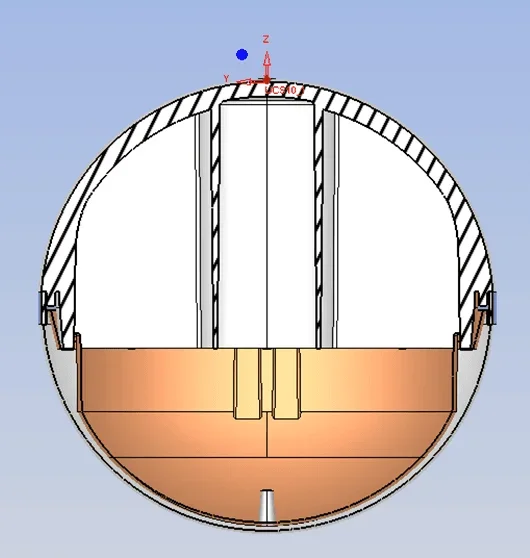
We are talking about a ball consisting of two semispheres, the design is complete, but the upper halfsphere appears to me as a closed solid, so in the control of the measurement I can calculate also the weight, and the lower one not. I tried with various commands, faces union, and solid merge but nothing.. .
I attach images to make the matter clearer, and 3d stp format.
help me pls:cry::cry:Immagine3.webpImmagine2.webp
 

Attachments

  • Immagine1.webp
    Immagine1.webp
    20.4 KB · Views: 2
  • Immagine2.webp
    Immagine2.webp
    5.9 KB · Views: 2
if faces union does not generate a solid closed, probably the faces that selections do not describe a closed volume. Did you import surfaces from another system? If yes, there are probably problems of excessive gap between the edges. try to increase tolerance in faces union.
 
hi, with the open edges function, toptron highlights you in blue all the edges that are not closed. once you have found the open edge, let us pass an extrusion-remove, so as to create a removal of material that interests the whole open edge. at this point you should have a hole, but in a closed solid, so you can use extended removes to restore the solid part you previously removed with extruding removes.
I hope to have been clear, since it is a procedure that I always use with imported maths from other cads that are open.
 
hi, with the open edges function, toptron highlights you in blue all the edges that are not closed. once you have found the open edge, let us pass an extrusion-remove, so as to create a removal of material that interests the whole open edge. at this point you should have a hole, but in a closed solid, so you can use extended removes to restore the solid part you previously removed with extruding removes.
I hope to have been clear, since it is a procedure that I always use with imported maths from other cads that are open.
bellissimo workaround! da provare.
 
Hello, what version do you use?

to see where the object is opened, in addition to the open edge function, you can use the object integrity analysis function, which performs a complete diagnostic of the object.

to close the open edge, you can use the open face>chiudi gap function, which allows you to close one or more open gaps, with a single feature.
 

Forum statistics

Threads
44,997
Messages
339,767
Members
4
Latest member
ibt

Members online

No members online now.
Back
Top