• This forum is the machine-generated translation of www.cad3d.it/forum1 - the Italian design community. Several terms are not translated correctly.

how to create surface references

  • Thread starter Thread starter bagarospo81
  • Start date Start date

bagarospo81

Guest
Good morning, I've been squeezing a lot lately with my doubts and my demands and every time I have to create a different discussion not to go or.... have patience.
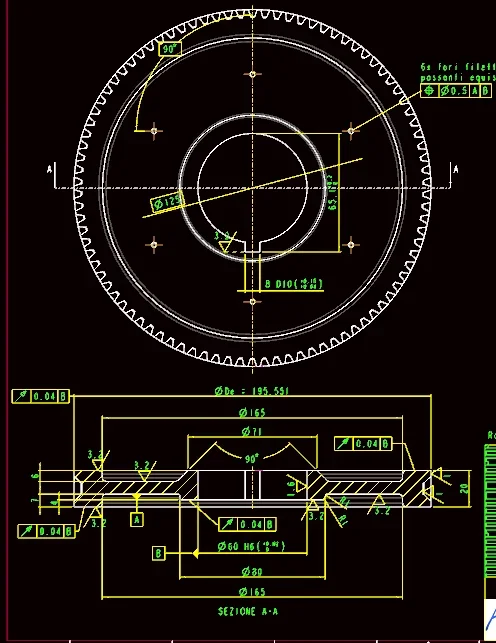
cmq the question is simple: I can't designate a surface as a reference (obtained from an extrusion feature) to impose a geometric tolerance of perpendicularity of an axis compared to this surface.
I met a lot of difficulty on the table with creo and the various tutorials I was following did not take away all the doubts.
Thank you.
 
Before inserting geometric tolerance, by means of the appropriate button in the annota section--> annotations, you must create the reference.
to generate the reference you can, always from the annota-> annotation panel, press on model reference. Then a panel will open on which you can define the name of the reference and associate it with the geometry.

only at this point you can press on geometric tolerance, always from the annota-> annotation panel, and insert the tolerance you want.
 
Before inserting geometric tolerance, by means of the appropriate button in the annota section--> annotations, you must create the reference.
to generate the reference you can, always from the annota-> annotation panel, press on model reference. Then a panel will open on which you can define the name of the reference and associate it with the geometry.

only at this point you can press on geometric tolerance, always from the annota-> annotation panel, and insert the tolerance you want.
Okay, thank you anyway.
I managed to get into the logic of this cad and so I got there alone. Of course it is that sometimes I don't convince myself of the way I create the table. for extremely strict charity but I also think it is expensive in terms of time. seems almost sometimes to have to literally submit their drawing choices to the judgement of the cad more than to the various colleagues/engineers/clients etc.
 
Okay, thank you anyway.
I managed to get into the logic of this cad and so I got there alone. Of course it is that sometimes I don't convince myself of the way I create the table. for extremely strict charity but I also think it is expensive in terms of time. seems almost sometimes to have to literally submit their drawing choices to the judgement of the cad more than to the various colleagues/engineers/clients etc.
bhe from
see the thing in positive... sometimes colleagues never have time.. .
 
Okay... I'll fuck you!
I'm sorry to use this tone but I'm more and more exasperated by creo... I can't do it anymore!
When I think I understand something, there's a piece in it and I don't understand anything.
I continue to evere problems with the refections.. I don't understand why sometimes I'm there and I can call them back and sometimes I don't.
I'm putting pictures so we're clear.
I had made the table of this wheel (let's sit if it is correct conceptually or not....it's a work of others and I don't care) and I exported it to pdf.1.webpfrom the view in the plant it is seen that I was able to insert a reference for the circumference on which the threaded holes lie...and I had done it simply by right-clicking on the view and then "show model annotations". The references appear alone, including this circumference.
I finished listing, I saved several times and then I exported to pdf.... until here everything is good.
shortly after I went to reopen the design, without having made 3d modifice (if not the color it seems to me of the piece but nothing significant) and I find this2.webpWhat the hell happened? I tried to recover the previous revisions (use creo 2.0 that still has mandatory revisions) ...but always the same problem.
If you try to do the same thing the references always remain those.
how do I (without having to draw of course) to make the circumference of the holes appear and the references of the corrective holes oriented (not at 90°...but radial-tangent)? ?
Please help me... the time I'm throwing behind this software is unimaginable! !
thank you and excuse me:(
 
It seems to me that the big problem is only on the holes. I use I create 3.0 and to be able to insert the diameter quota (ø125) both for the angle of 60° I think a sketch has been carried out on the table. usually the sketch is then associated with the view so that it remains supportive to it.

It would seem that the program lost the sketches, badly enough to give them back and insert them again.
 
It seems to me that the big problem is only on the holes. I use I create 3.0 and to be able to insert the diameter quota (ø125) both for the angle of 60° I think a sketch has been carried out on the table. usually the sketch is then associated with the view so that it remains supportive to it.

It would seem that the program lost the sketches, badly enough to give them back and insert them again.
I did the sketch of the circumference as you say but only to insert the quota from 125 mm, because the reference does not consider it as useful entity for the quotas.... but then I erased it as I always did. so remains the quota on the circular reference without overlap.
That's not the problem...because I always do it....the problem is how it generates the reference from the series of those 6 threaded holes!! sometimes it understands how to do it (i.e. circular with the centers identified by radial-tuning axes) and other times it happens this....incomprehensible....so as it is unconpressible the fact that in the drawing practically the button in order to be able to return to the previous step and correct perhaps a mistake (the arrow of undo) does not work... I have no words.
 
you will certainly have highlighted the circle and then you will have grouped it to the view but looking at the image seems that the sketch made in the table has lost the references .

I adopt the method of not doing sketches at the table but I do them in prt.
I then recalculate the profile on the table and hide with the layers the sketch in the part and in the views if it serves.
the advantage is that so it is all very + robust and you do not meet leaks of references.

inside a sketch the undo key works, as well as if you delete and then you want to recover a feature . but don't expect it to work as in office .

Hi.
 
you will certainly have highlighted the circle and then you will have grouped it to the view but looking at the image seems that the sketch made in the table has lost the references .
has happened again with a new design !!!
It seems that everything I opened yesterday has been the same fate

first:
2.webpdopo:
1.webpis no longer a question of a missed reference...it is the software that is kissed!!
 
....he held you what he had lost in the previous table......the fate is strange!!
 
....he held you what he had lost in the previous table......the fate is strange!!
exact!!! This has kept all the precise references but the quotas and tolerances have been dropped.
... I feel as much as the magda of red white and green with fury
I can't do it anymore!
 

Forum statistics

Threads
44,997
Messages
339,767
Members
4
Latest member
ibt

Members online

No members online now.
Back
Top