
• This forum is the machine-generated translation of www.cad3d.it/forum1 - the Italian design community. Several terms are not translated correctly.

how to export only the sheets of a set?

  • Thread starter Thread starter reggio
  • Start date Start date

reggio

Guest
hi, I would like to export in one blow only all the plates contained in a set and its subaxis and parts-lamiera in swx format,
ns pdm allows to do so in all formats, except in the swx format ...

according to you is possible with solidworks? How?
 
I don't know what you're saying.
pdm exports parts, assemblies, tables and simulations with everything if you use the pack and go and not from the single file what you have to tie it to what if you copy and paste from pdm to outside pdm.
What discriminating do you have to divide the rolled round sheets? I hope the code or a property.
However, it's not automatic.
there is to prepare dialog boxes, macro and try.
 
However a pdm does not export anything alone if there are no modules of the main programs.
What miraculous pdm do you have?
pdm exports to pdf if the native program is installed, idem in dwg, step etc.
 
Thanks guys, I'm trying to make it clear.
as I said, I would like to export in a blow (without using the pdm) only all the plates contained in a set and its subaxis and plate parts

I need this to be able to send to the lamierist, all the models of sheet metal that must work

when asked in pdf,dwg,dxf,iges,step, ... the pdm is able to export all the codes that within its db we have tagged as sheets,

when we are asked the sldprt format we go into trouble as the pdm (born for swx) is not able to export in swx format :frown:

That's why I was looking for a solution...

I hoped that swx would already create a "discriminator", recognizing the files together from those departing to those sheet metal and that then you could use that feature to select alllalamiere and export or save or pack_and_goare automatically and in one shot, with a command or with a macro or other
great intuition, memory .. and search engine:biggrin:
We're almost there, I'd need a

macro for export of sheet metal parts in sldprt
the macro should be launched in a file together, if it finds a part in sheet metal (which in my case, due to the pdm will be found in a folder always different from each other) then:
- asks where to create a collection folder and creates it
- recognizes it (sheet part)
- export or save the file to the folder
- continue the cycle
- at the end of the process message appears .. and opens the folder
:confused: tomorrow I will discard the macro of jenuary and perhaps I will break the marons because I will not understand a bat, ...
In the meantime, however, if you have another solution, let me know:finger:

... as long as I'm at stake, isn't that you understand about macro/vba and would you want to tutor me? :p
 
I attach the required macro,
- asks a director or if you want you can create it directly from folderbrowserdialog (new folder)
- scans the axieme and if the component is a sheet, it saves it in copy to the folder.
- End-cycle message at the end of the macro.
 

Attachments

I attach the required macro,
- asks a director or if you want you can create it directly from folderbrowserdialog (new folder)
- scans the axieme and if the component is a sheet, it saves it in copy to the folder.
- End-cycle message at the end of the macro.
:biggrin:

comments and questions

1st opening and launch with 2 open assemblies: crashed swx.
reopened swx open 1 only together, launched macro: came to good end showing message but did not export anything.
solved light weight: solved problem, or export without errors.
open 2 assemblies (the ones before) and raised macros, solving before launch: works nicely.
= it is not clear why of the 1st crash that has not been repeated, probably caused by another.
would be nice to add the "resolve" function automatically, of this recording, which "pieces" should be copied and where?
and how to replace "p1_021_01_038.sldasm" with "assieme_actually_open.sldasm"?
dim swapp as object

dim part as object
dim boolstatus as boolean
dim longstatus as long, longwarnings as long

sub main()

set swapp = _
application.sldworks

set part = swapp.activedoc
dim mymodelview as object
set mymodelview = part.activeview
mymodelview.framestate = swwindowstate_e.swwindowmaximized
boolstatus = part.extension.selectbyid2("p1_021_01_038.sldasm", "component", 0, 0, 0, false, 0, nothing, 0)
part.clearselection2 true
end sub
attention (justly) does not export mirrored sheets (actually after the mirroring are no longer sheets), it is not if solved, I usually do not use mirrors but I create dx and sx sheets (for mè now is not a real problem).
I did not understand if you consider all possible configurations:(or if you take only active configuration:) in case, how to process only active configuration?
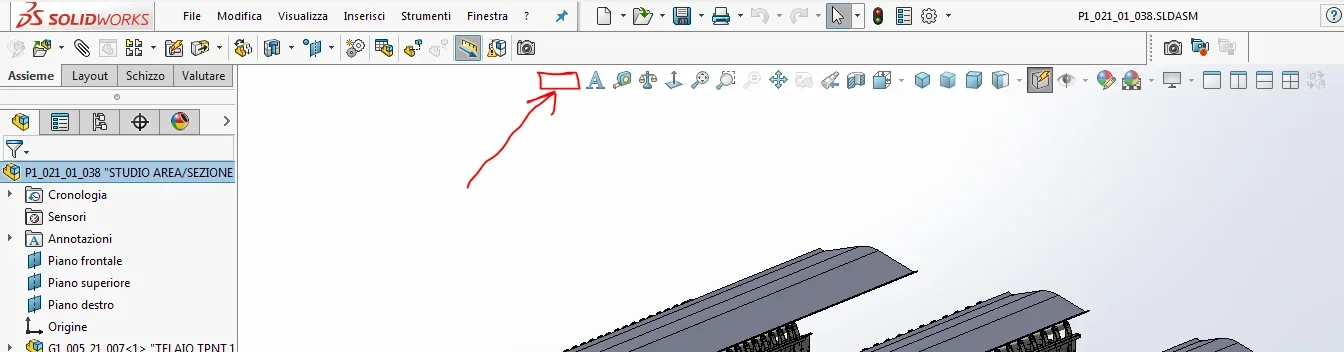
How do I create a "export sheet" button that launches the macro to keep in the foreground?bottone-esporta-lamiere.webp
 
Hello, Reggio,
often write in posts that you would like to be able to write macros and would like to find someone who can teach you.
I think any user expects that before asking for a macro review, you have tried to change it in person
asking the questions necessary to come out, with references to the manual bees.
first of all I recommend you to change the declaration of the part variable
by dim part as object
a dim part as sldworks.modeldoc2

so the vba shows you the context menu of objects related to the document

and dim swapp as object
a dim swapp as sldworks.sldworks
coming to your request to the question:
and how to replace "p1_021_01_038.sldasm" with "assieme_actually_open.sldasm"?
boolstatus = part.extension.selectbyid2(part.gettitle, "component", 0, 0, 0, false, 0, nothing, 0)
(gettitle returns the name of the document in the title of the interface
while getpathname returns the entire path of the document)
based on what you need the document title, you owe it to the correct code location, I make an example:
- if you have as in your case two open assemblies and launch the macro, once open-worked-closed the first sheet found it activates one of the documents opened according to its index.
in this case if you want you to activate "assieme_actually_open.sldasm" you have to get the title at the beginning of the macro, creating a variable string
declared for the whole module in question (if you declare it inside the main sub routine it is born and dies in routine and is not recognized within other sub routines; This is basic vba).

to the question:
would be nice to add the "resolve" function automatically, of this recording, which "pieces" should be copied and where?

take a look at the bee manual at the call
resolvealllightweight method (iassemblydoc)
this is a property together in the manual there are various examples, as well as having included it in other macros developed in the forum
with insertion after the first version, as next request.
for mirroring it would be possible to check if it is a sheet, just check if the component is a symmetric
through the call
ismirrored method (icomponent2) see manual bees,
if it is symmetric you go to see who is the right component and at that point if the right is a sheet you can export even the left.
alla domanda:
I did not understand if you consider all possible configurations:(or if you take only active configuration:) in case, how to process only active configuration?

you asked me to save copy of the file in a decided path at the beginning of the macro, what do configurations center? he saves the copy and end, regardless of whether the file has or does not have configurations.
alla domanda:How do I create a "export sheet" button that launches the macro to keep in the foreground?
drag a new macro button into the graphics window bar, do it in the prtdot and asmdot so you find it for every new document.


try to work on it and at the limit we implement it

Hi.
 

Forum statistics

Threads
44,997
Messages
339,767
Members
4
Latest member
ibt

Members online

No members online now.
Back
Top