• This forum is the machine-generated translation of www.cad3d.it/forum1 - the Italian design community. Several terms are not translated correctly.

how to give different codes for each configuration

  • Thread starter Thread starter genesis1975
  • Start date Start date

genesis1975

Guest
Bye to all,
I'm seeing more configurations for the same part, but I have a question; by file name I have the corresponding code of the part and in the drawing folder in the space related to the code then put "filename".
But for each configuration of the part I have a different code and instead in the cartiglio the file name that appears to me is always the same...how can I come in the cartiglio to the space code that corresponds to every configuration?
thanks for the help
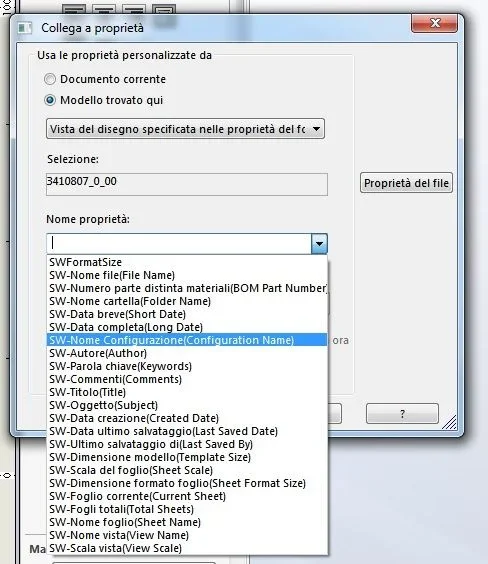
 
you must enter the writing, from the property manager select connection to the property, then set:model found here>view of design designname proprietàconfiguration
 
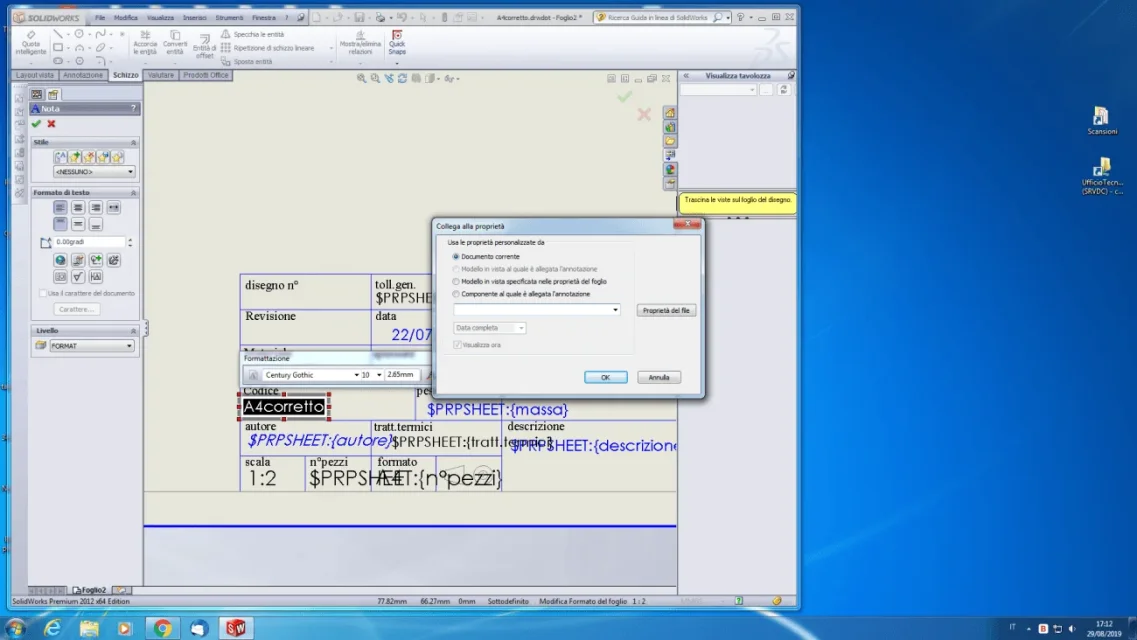
Sorry but I didn't understand... then I open the design model, then I edit sheet format, then I click twice where there is the link to the file name, then I click the button link to the property, then?
there is no model found here... there is current document, model in sight... then property name>configuration where is it?
 
then I went to the part I named the two configurations with the two codes then I selected more under configuration; then I opened the design model, edit sheet format, clicked on the file name writing, then button connects to the property, but the second item I should choose is disabled...how come on?
 
I don't have sw underhand, I'm on vacation. but if I understand correctly, it is something you have to do in 3d and not in the table. .
in the menu co figurations, you have to click on the configuration button dx, property, a submenu opens, one of the last entries from the possibility to recall in the cartiglio the name of the configuration and not of the master part..

sent by my clt-l09 using tapatalk
 
I don't have sw underhand, I'm on vacation. but if I understand correctly, it is something you have to do in 3d and not in the table. .
in the menu co figurations, you have to click on the configuration button dx, property, a submenu opens, one of the last entries from the possibility to recall in the cartiglio the name of the configuration and not of the master part..

sent by my clt-l09 using tapatalk
 
Yes, what you said is to do, but there's more to do in the cartouche properties, but just the voice I have to choose is disabled
 
I guess you didn't try one of the two voices below active?
if for what I had done it for example by selecting model specified in sheet properties, who happens to be called the image of the post #4, and if you put the configuration name you would have seen it works.
 
ok I will do it...but then for the other parts without configuration and for which the code was given by the file name as I do?
 
call configuration with file name
.
or make two different cards in which one calls the file name and the other the configuration name
 
to think about it well there would be another way to avoid having to make two carts or change each time the properties.
within the properties of the part file you create a property that will be recalled in the design instead of the file name or configuration name.

try to follow me carefully (the words in lanes are precisely those present in the program or to write):
in the property there are 3 tabs:synthesis
customized
specific configuration
the first does not affect
the second reports the properties of the general part
the third those specific configuration

if there is only one configuration default the properties of the 2nd card prevail
If there are multiple configurations, in the case of the same property in the 2nd and 3rd card, this shall prevail.

as always exists configuration default (visibile in applica a)in the 3rd tab enter a property (we call it file code) and write as an expression value $prp:"sw-file name" the file name will be recalled (this step can be saved as a template)
if there are other configurations in these (by selecting them from the curtain apply a) you will copy the property, but instead of the previous value you will write $prp:"sw-configuration name"then in the drawings you will write the property $prpsheet:"file code"

what happens in this way:
if the file part has no configurations will be recalled the file name, if instead in the design a specific configuration will be called the specific name of this,
 
Before asking the question, I looked at the property of the part, the specific configuration, I realized that it had something to do, but I couldn't know the rest... thank you very interesting, I try to do it, hopefully I come
 

Forum statistics

Threads
44,997
Messages
339,767
Members
4
Latest member
ibt

Members online

No members online now.
Back
Top