• This forum is the machine-generated translation of www.cad3d.it/forum1 - the Italian design community. Several terms are not translated correctly.

how to open read-only files

  • Thread starter Thread starter Giancesa
  • Start date Start date

Giancesa

Guest
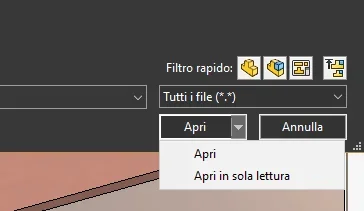
there is a command/method to open file read-only, not to risk that if you make changes you do not change the file. Thank you.

 
click on customization menu and see that it is not deflaged
 

Attachments

  • Immagine.webp
    Immagine.webp
    29.5 KB · Views: 9
I have 2020 and on the menu there is not even the voice to put the flag. Maybe it is an addition of 2021.I did with the other method by clicking on the open button. Thank you.
 
to display the voice read-only yields you have to go to system options>collaboration and activate the active voice multi-user environment
 
if you update the profile by entering software and version would help other users
 

Forum statistics

Threads
44,997
Messages
339,767
Members
4
Latest member
ibt

Members online

No members online now.
Back
Top