• This forum is the machine-generated translation of www.cad3d.it/forum1 - the Italian design community. Several terms are not translated correctly.

hyperlink pro-e excel 2007

  • Thread starter Thread starter rory_the_king
  • Start date Start date

rory_the_king

Guest
Hello, everyone.
Is there a possibility to open a pro-e file from a management table created with an excel sheet via hyperlink?
Greetings to everyone.
Lorenzo.
 
Hello, everyone.
about opening a pro-and file from an excel sheet, does anyone have news?

other question: after reading the discussionswww.cad3d.it/forum1/showthread.php?t=240www.cad3d.it/forum1/showthread.php?t=609&highlight=calcolo+massaconcerning the calculation of the mass and volume of a part... all very clear (already applied to other cases successfully).
now, someone knows the bulk mass and hardness of the following material: hard metal widia g5?
from some old table I find 13.10 g/cm^3 with hardness hra 84.5.

- Does anyone know the reference rules for hard metals (so obtained through powder metallurgy and sintering)?

- after entering a new type of material, how do you always make it appear in the material library?

thanks to all
Lorenzo
 
Good morning, everyone.
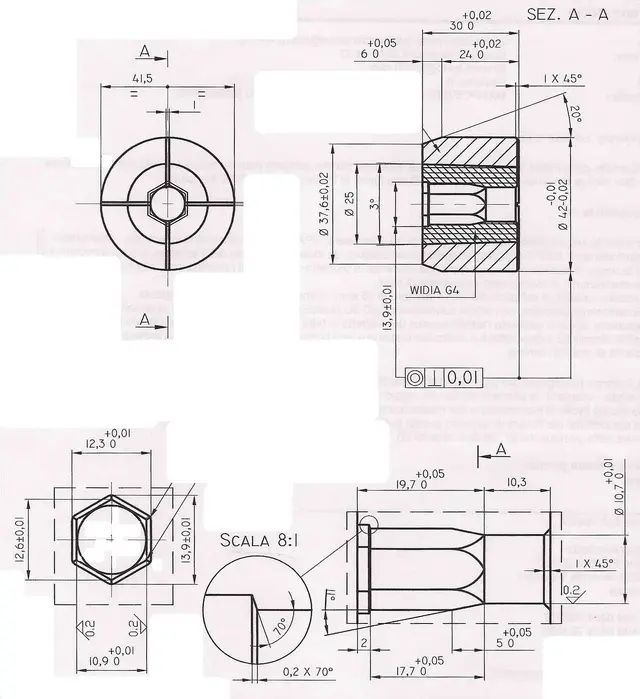
I attach a drawing on which I have several doubts:
I am making the inner part (the hazelnut in widia g4) which will then be coupled to the outer part (the container).
a cut (a conical part) between the hexagonal section and the next circular section can be seen in the sketch at the bottom right.
How do you shape everything? with a blend?
the representation of the final part of the hexagon (always in the same sketch down to right) what does it mean? There are curved lines.. .
I'm practicing what I've done so far.
greetings to all and thank you.
Lorenzo
 

Attachments

I tried to create a blend that includes:
- the first hexagon
- the second hexagon
- the edges that connect the two hexagons (see below to left).
I have a doubt:
the part that connects the two hexagons corresponds to six edges or is a simply conical part (smusso 0.2 x 70°).
Does anyone give me any kind advice?
I'm quite doubtful. . .
greetings
Lorenzo
 
hi rory, that is a very simple lathe processing.. You don't have to make any blend to combine the hexagon to the cylinder, make a beautiful revolution by removing the material and you'll see that it comes out... :-)
 
Ozzy cabbage...
I therefore deduce from what you write that it is a banal revolution yes!
and I who thought of making two blends, one after 2 mm (connect between the two hexagons) and another between the second hexagon and the cylindrical tract!
I'm so excited!
Hello and thank you
Lorenzo
 
a last curiosity. . .
but at the end of the second hexagonium... the curved lines that are to mean? ? ?
I don't remember anymore...
Does anyone know? . . .
I will have to remove the ancient texts of knowledge :)
Hello!
Loire
 
very elegant your proposed solution. . .
I'm stepping back.
At first glance it would seem perfect!
Thank you.
Lorenzo
 
Hello rory_the_king,
You will have already been able to verify that there are more ways to achieve the goal:finger:.

that I proposed is only one way; far from me to call it the best.

I saw the design you had attached and in a few minutes I created everything.

available for any clarification.

Hi.
 
I'm re-writing your entire process to accomplish the part.. .
I'll post it. . .
could be useful to understand what you did!
Hello and thank you
Lorenzo
 
here is a zipped word file with step by step description (I did not put pictures for issues related to file size itself).
if someone wants to try to remake the part related to widia_g4 and to integrate... is welcome!
Thank you.
Lorenzo
 

Attachments

Hello rory_the_king,
only to tell you that steps 1.2 and 3 are features that are part of the standard reference part that I created and that unite all the new parts I create.

i.e. the 3 reference plans, the 3 axes that intersect the pairs of the plans, the coordinate system, the point at the origin of the axes and the relation for the calculation of the weight of the particular.

the whole is the result of the lessons received during the courses :mixed: and of the needs born in the use of the program :finger:.

Hi.
 
I agree!
and it can be a great way to set a model!
Today afternoon I complete the description with pictures!
I noticed that you can attach relatively large zipped files!
Hello and thank you
Lorenzo
 
Hello, fabrizio.
how do you define the point (in your file has as point-def name) giving the x, y, z coordinates?
Hello and thank you
Lorenzo

ps:
I am inserting hand images; a good job will come out that I will obviously post!
 
attached the first part of the description of the procedure with relative images! ! ! !
I'll continue tomorrow!
greetings and thanks to all!
Lorenzo
 

Attachments

Hello, fabrizio.
how do you define the point (in your file has as point-def name) giving the x, y, z coordinates?
Hello and thank you
Lorenzo

ps:
I am inserting hand images; a good job will come out that I will obviously post!
[Bleep]
Hi, rory.
to define a point specifying the x,y and z coordinates you can use:
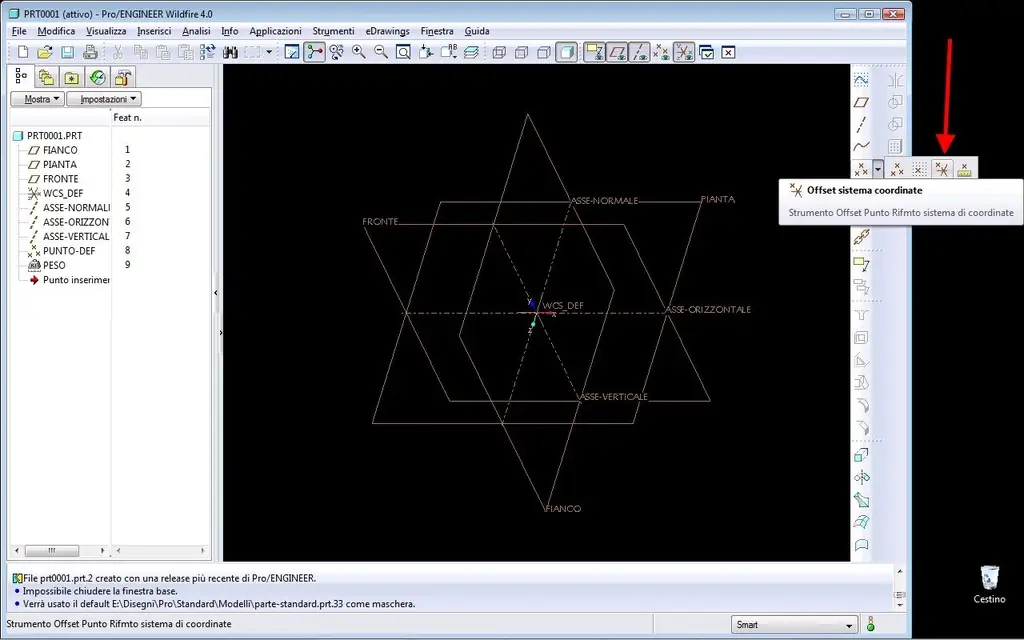
insert - reference model - point - offset system coordinates - select the reference coordinate system - insert the x,y and z values.

much faster, you can use the indicated icon (image 1) and then as above insert the values of x,y and z (image 2).
:smile:

Hi.
[Bleep]
 

Attachments

  • Immagine 1.webp
    Immagine 1.webp
    67.3 KB · Views: 6
  • Immagine 2.webp
    Immagine 2.webp
    66.5 KB · Views: 4
hi fabrizio... in step 11 you made a mistake... you created revolution 3 of surface and as reference lines you used the side of the external hexagon (correctly) and the inner circle (here according to me should have used the side of the inner hexagon!!!).

Do you agree?
Hi.
Lorenzo

ps: similar thing to insert the weight icon on the tree!How do you do it?

Hello and thank you!
 
I am not with the odds you used in revolution 3 (pass 11).

Step 12:
why extension of 1 mm?

Hello and thank you
Lorenzo
 

Forum statistics

Threads
44,997
Messages
339,767
Members
4
Latest member
ibt

Members online

No members online now.
Back
Top