• This forum is the machine-generated translation of www.cad3d.it/forum1 - the Italian design community. Several terms are not translated correctly.

i can't put a point in the middle of a ball

  • Thread starter Thread starter Giovannino60
  • Start date Start date

Giovannino60

Guest
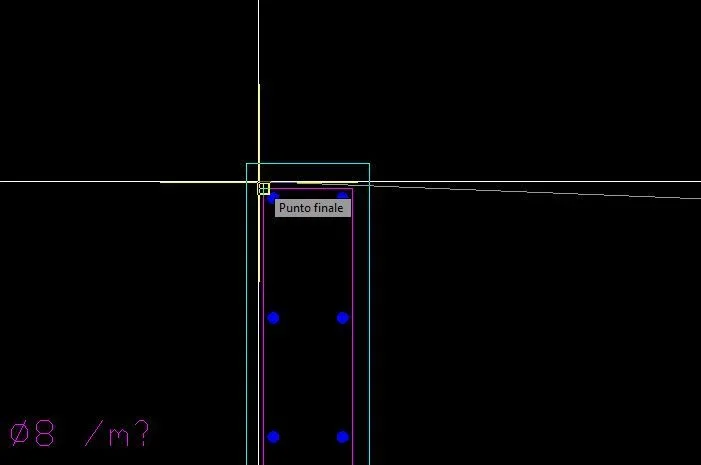
I have blocks with balls I have to insert a cross made with the point command, but it is not highlighted with the snap, on the contrary it is drawn into the nearby edge?
How can I do that?

I attach image.
 

Attachments
  • Non_riesco_a_centrare_il_punto_blocco.webp
    Non_riesco_a_centrare_il_punto_blocco.webp
    4.6 KB · Views: 2
Last edited by a moderator:
the cross is only a silky view of the point. Do you have to put the point where? What should be highlighted? the point is an entity like another and becomes hookable with the snap once drawn, not before

However you probably didn't trigger the snap point. the fact that attracted at the top is because you have the triggered snap end.
if the snap you have to use is of little use you can activate provisionally holding shift and selecting the affected one
 
the question is this:
  1. probably the ball was a point
  2. the point was exploded
  3. it has now created a ball that is a block
  4. ora ho createdto a croce with due line
  5. I wanted to insert this cross in the center of the ball (block)
  6. but you do not highlight the snap center, just influential the snap
  7. also clicking twice to change the block, even the snap does not highlight
  8. so I can not center my cross made with two lines in the precise center
 
I don't think that the ball was originally a point that was then exploded, since between the modes of representation of the point there is not at all the ball.
to understand your problem, it would take the dwg file, from the jpg file attached to you can not understand anything.
attach the dwg file so we can see what kind of entity we are talking about.
 
I attach the ball file design1.dwg
I can't attach the revised dwg file, since it doesn't load with attached management (I'm sure I'm not good enough).
Anyway, I'll explain.
if you issue your ball with block editor, you notice that it is a block that is made of another block; by exploding this block (in the block editor), you realize that what remains is a "solid" object without contour. then you can recreate a polylinear around the dash and you will get a circular polylinea, in the center of which you will go to insert your cross-shaped point, the right size to see its ends exit). do this you can, if you want, delete the boundary circle and exit the block editor (obviously saving the changes).
When you get out of the editor, you should see all the ball blocks inside your drawing complete with cross-shaped points.
I hope I've been quite clear.
Good job.
 
the question is this:
  1. probably the ball was a point
  2. the point was exploded
  3. it has now created a ball that is a block
  4. ora ho createdto a croce with due line
  5. I wanted to insert this cross in the center of the ball (block)
  6. but you do not highlight the snap center, just influential the snap
  7. also clicking twice to change the block, even the snap does not highlight
  8. so I can not center my cross made with two lines in the precise center
2 a point cannot explode
3 if you explore something this cannot turn into a block
4 if you create a cross with two lines you cannot say I have to insert a cross made with the point command. Do you realize these are two different things?
7 click two voilte to change a block (but it is an operation that depends on the double click setting on the block) does not have a fava with the snap. an entity is selectable inside and outside the block.

summarizing, in the first post in two lines you managed to explain confusedly and incorrectly your problem. how can other users help you in this way? Moreover if possible it is always better to insert the file containing the problem, maybe extracting it from the original design.
even if Giuseppe already gave you the solution it seemed right to show you this situation, found other times in your posts.

attach files via advanced mode, zipping them and uploading them to this site; linking to other sites is not the maximum
 
I can't attach the revised dwg file, since it doesn't load with attached management (I'm sure I'm not good enough).
Anyway, I'll explain.
if you issue your ball with block editor, you notice that it is a block that is made of another block; by exploding this block (in the block editor), you realize that what remains is a "solid" object without contour. then you can recreate a polylinear around the dash and you will get a circular polylinea, in the center of which you will go to insert your cross-shaped point, the right size to see its ends exit). do this you can, if you want, delete the boundary circle and exit the block editor (obviously saving the changes).
When you get out of the editor, you should see all the ball blocks inside your drawing complete with cross-shaped points.
I hope I've been quite clear.
Good job.
I tried to explode the puppy in the editor blocks but it disappeared and just did not remain the clean circle, how do I proceed?

Thank you.
 
you have a block called iron ang sc20 with scale 1 in which there is another block called iron ang sc10 with scale 2 and qunado enters this second block you find a solid detachment without twist. how did it disappear (which among other things?) is not clear since a solid detachment cannot explode (with other sampling styles instead yes)
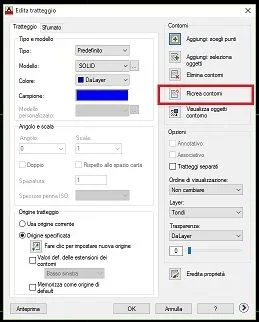
However what is telling you giuseppe is to modify the _hatchedit dash and to recreate the contour so as to have an entity that allows the snap center.
or if you have to do the work on all the blocks draw directly inside the x lines.
I have to do this job for 60 balls and the procedure seems pretty long
If you use the tools, you'll take two-three minutes... I don't think so.

punctuation:
- the blocks must be created with common sense and putting them with a logical insertion point, these is the origin inside the block.
-it is necessary to have the entities of the blocks on the layer 0 because infact it allows to change color according to the new layer on which they are placed also if there is the need to freeze a layer you do not risk seeing disappear drawing parts and then go crazy to ask why.
- Who made those blocks can't work with autocad. You don't seem very hard on me, too, I suggest you go over the program.
 
1. Which do I have to use?
2. And then I don't know how to handle it, and when I explode the circle I can't find it?
 
You didn't understand anything about what you were told.non you must change no restraintnon You have to explode anything.
you must select the dash
start the command _hatchedit read guiderecreate the contour (see image)Immagine.webpfor point 2, do you read what others write? I had clearly specified
a solid restraint cannot explode (with other sampling styles instead you)
What do you mean? that if you put an unsolid sampling when you explore it, based on the deduction scale, you are with single entities (if the scale is small) or with nothing (if the scale is large)

Your drama is not only that you can't use well autocad, it can be there because you also learn wrong and over time, but that you don't even know how to read the answers that are given to you
 

Forum statistics

Threads
44,997
Messages
339,767
Members
4
Latest member
ibt

Members online

No members online now.
Back
Top