• This forum is the machine-generated translation of www.cad3d.it/forum1 - the Italian design community. Several terms are not translated correctly.

identify a model in an unopened set

  • Thread starter Thread starter DoctorBomber90
  • Start date Start date

DoctorBomber90

Guest
Good evening, everyone.
I would like to expose my doubt on solidworks.
I used, for about a year, inventor and there was a very useful command (I don't remember the name).
the command in question asked,as input information, a certain model and allowed you to locate the assemblies where that model was present.
I'll explain.
I have the model "xyz" and,clicking on it with the appropriate command, opens a window , where it lists the assemblies in which the model "xyz" is located.
Now, my dilemma is... is there a similar command on solidworks?

thanks to anyone who can answer me.
 
but only if indexed the route, locally and with windows otherwise it serves the pdm. this was what happened at least until a few years ago.
 
Hello, everyone.
First of all, I apologize to all if I have not given a message of "feed-back" (motive work and Christmas dinners).
I tried to use the suggestion @massivonweizen , but I see a window with the location inside my laptop (personal and not).
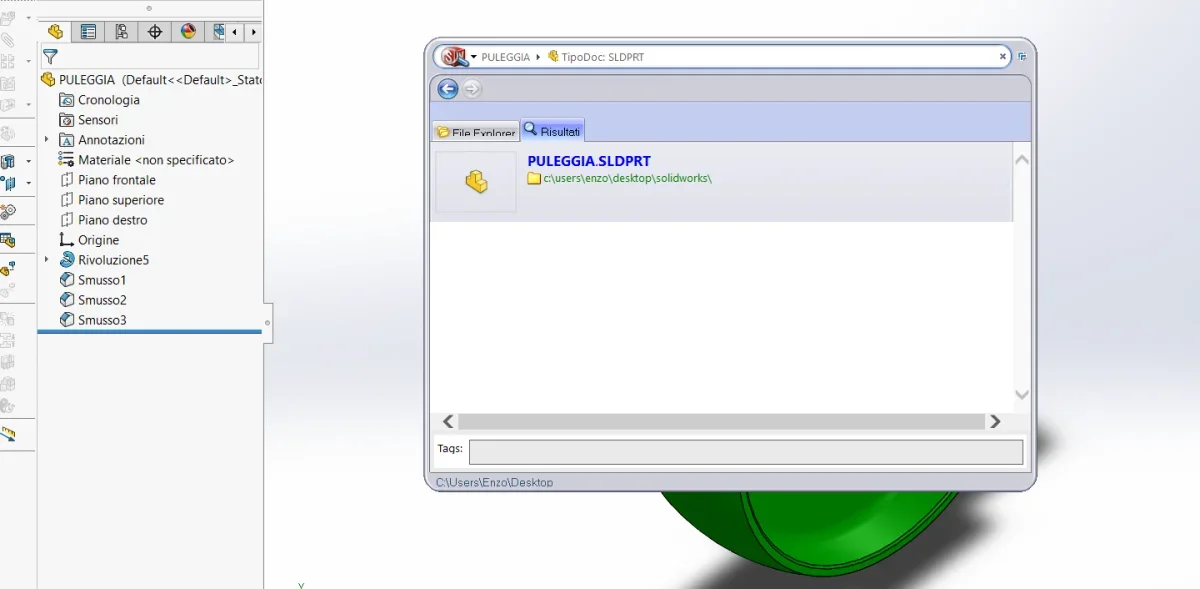
look image "consideration 1" and "2" for use of solidworks explorer.
It's not bad, but it's not what I was looking for.
therefore there is no command of solidworks similar to the "where used" command of inventor.@meccanicamg I copy the text of your post:
"but only if indexed the route, locally and with windows otherwise it serves the pdm. This was what happened at least until a few years ago."My ignorance (unfortunately) but what do you mean by " indexed"? and the pdm what is it?
Thank you.
 

Attachments

  • Considerazione 1.webp
    Considerazione 1.webp
    29.1 KB · Views: 19
  • Considerazione 2.webp
    Considerazione 2.webp
    27 KB · Views: 15
Hello, everyone.
First of all, I apologize to all if I have not given a message of "feed-back" (motive work and Christmas dinners).
I tried to use the suggestion @massivonweizen , but I see a window with the location inside my laptop (personal and not).
look image "consideration 1" and "2" for use of solidworks explorer.
It's not bad, but it's not what I was looking for.
therefore there is no command of solidworks similar to the "where used" command of inventor.@meccanicamg I copy the text of your post:
"but only if indexed the route, locally and with windows otherwise it serves the pdm. This was what happened at least until a few years ago."My ignorance (unfortunately) but what do you mean by " indexed"? and the pdm what is it?
Thank you.
windows has the possibility to manage a log of local files, in general to do the searches. This service is called indexing.

pdm is a management cad of projects where creating a database manages cad and/or extra cad in a unique way.
 
Good evening, everyone.@massivonweizen You're right.
using little solidworks explorer, I didn't know where it was "where used" and how it worked.
because, in inventor, you clicked on the model---> where used (right-click) ---> you appeared a window where it indicated you in which assemblies is that model.
I attach an image, so that, who is my identical doubt/problem, can solve it.
  1. will open a window and click on "file explorer";
  2. select the folder where your model is located;
  3. select the model in question;
a preview of the model in question will appear in the right window and :

4. the name of the document/assieme in which it is located;
5. his path.

I hope I did what you liked.
Thank you. @massivonweizen and thanks also to @meccanicamg for the explanation of pdm.
 

Attachments

  • Considerazione 4.webp
    Considerazione 4.webp
    27.2 KB · Views: 12

Forum statistics

Threads
44,997
Messages
339,767
Members
4
Latest member
ibt

Members online

No members online now.
Back
Top