
• This forum is the machine-generated translation of www.cad3d.it/forum1 - the Italian design community. Several terms are not translated correctly.

idw to dwg with programming operations

  • Thread starter Thread starter Tarkus
  • Start date Start date

Tarkus

Guest
hello to all (to all those who are not in vacation obviously)
I am using the operation programming tool to convert different idw files to dwg.
Of course, however, it turns into an inventor's dwg; when I go to open I find the drawing on paper space only and not (also) on a model of autocad.
Since in some cases I need autocad to change odds style or other things, I find myself struggling to do it from paper space.
Is there a possibility to convert directly to autocad dwg?
 
I never used "programming operations" (but I will try :wink:)... Anyway, to save an autocad dwg, you have to do a "save copy with name". .
 
I never used "programming operations" (but I will try :wink:)... Anyway, to save an autocad dwg, you have to do a "save copy with name". .
Yeah, okay.
programming operations you need when you want to do e.g. a transformation or migration of multiple files together.
In my case, I have to turn 320 files.
it becomes a problem to do it one at a time.... .
 
Is there a possibility to convert directly to autocad dwg?
I can't control now, but I think you just have to tell him that the dwg is autocad.
If you don't fix it first and someone else won't answer, I'll check this evening.

Bye.
 
Yeah, okay.
...
it becomes a problem to do it one at a time.... .
I imagined that I already knew of the "save copy by name" and that the problem was about "programming operations"... at this point I expect an answer too... I'll start using it sooner or later. . .
 
you can with export file function
Yeah, I've gotten there, too.
2 small in:
creates zipped files (even if no one asks), and files have the .idw extension in the name.
i.e. pippo.idw becomes once decoated pippo.idwg.
Anyway,better to convert one to one....

for stefanobruno:
I've been looking, but I don't know where to tell her I want autocad dwg... .
 
Last edited by a moderator:
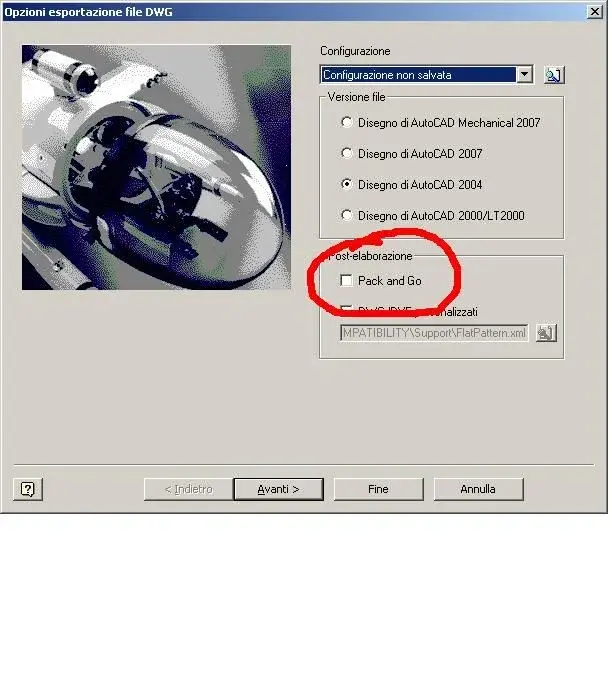
you must remove the flag in "Save copy with name->dwg autocad-> options -> pack & go", so it does not create the zip. Moreover it is at the same time that you do "export file" in programming operations that you tell him you want dwg autocad:smile:
 

Attachments

  • Immagine.webp
    Immagine.webp
    41.3 KB · Views: 26
Last edited by a moderator:
I've been looking, but I don't know where to tell her I want autocad dwg... .
I tried programming operations, both in 2009 and in 2010, and I couldn't get any results, literally.
I asked both to export and convert idw to dwg but I can't find, throughout the disk, the files that should have geneare, even with .zip extension
At this point I think I have a corrupt installation because, if this is the normal operation, I do not understand the hidden philosophy.

for maurom: what you wrote is true for the single conversion.

Bye.
 
you must remove the flag in "Save copy with name->dwg autocad-> options -> pack & go", so it does not create the zip. Moreover it is at the same time that you do "export file" in programming operations that you tell him you want dwg autocad:smile:
in the "Save Copy Name" options I have nothing flagged.
I also do not find in programming operations, where to tell him that I want a dwg of autocad.
Can you give me some more indication?
Thank you.
 
In my opinion, you are refuting your copy save options by name, and programming operations .

however result of free programs that rename the extensions in a moment
 
then I did some tests with a mix of design77 maurom drittes and stefanobruno,
and I feel like I've solved it like this:
1) in the "Save copy with name" options I chose the acad dwg rescue (in my case autocad 2004) and the nearest autocad mapping, so, always from options I saved my custom configuration.
2)close inventor and open "programming operations"
3) Export files, choose dwg extension and recall my custom configuration.
In this way, he converted me idw files, not in .zip, but in .idw.dwg.
At this point with "the-rename" I pulled off a little bit and took off the ".idw"
Now that I write, I'm converting my 320 files.....
thanks to all
 
this discussion is very interesting!
How about opening a discussion to be highlighted with the "nini-guides" coming out of interventions like this? I remember for example another discussion where a kind user (of which I do not remember the nick...:biggrin:) had explained for wire and for sign how to get a solid from multiple surfaces with a lot of pdf attached.
 

Forum statistics

Threads
44,997
Messages
339,767
Members
4
Latest member
ibt

Members online

No members online now.
Back
Top