
• This forum is the machine-generated translation of www.cad3d.it/forum1 - the Italian design community. Several terms are not translated correctly.

ilogic-saveas

  • Thread starter Thread starter MARCOC
  • Start date Start date
by noon

I wanted to ask you something from the inventor's help on the ilogic part.

syntax parameter

iproperties.value("property tab name", "property name")

You would explain to me that the difference between the two arguments of the function

Thank you very much
 
by noon

I wanted to ask you something from the inventor's help on the ilogic part.

syntax parameter

iproperties.value("property tab name", "property name")

You would explain to me that the difference between the two arguments of the function

Thank you very much
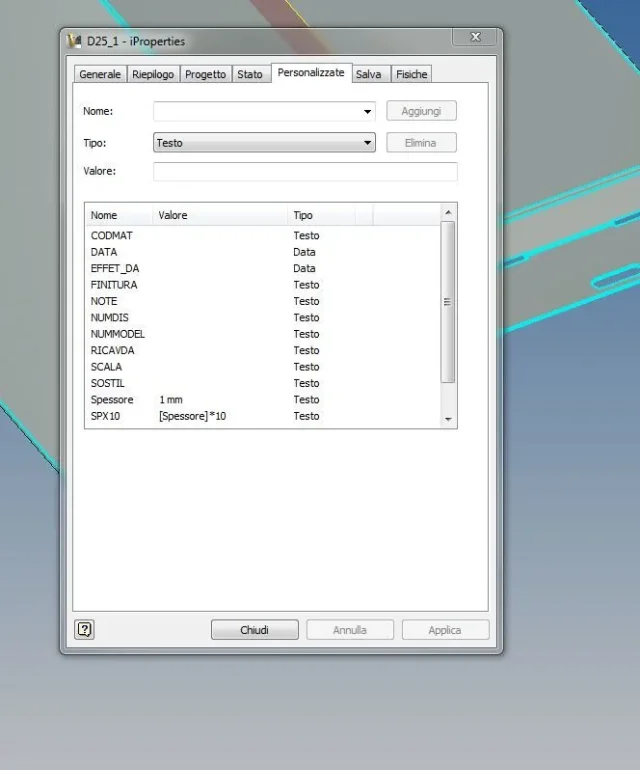
-"property tab name" are the cards (genral, summary, project, state, customized, save, physical)
- "property name" are the variables within the card.

e.g.

iproperties.value("custom", "thickness")
will give you as a result (see photo) 1 mm
 

Attachments

  • Cattura.webp
    Cattura.webp
    24.6 KB · Views: 12
thank you ...but with regard to the strings post by you... as I do to recall the table from the ipt or iam... I can not find if there is a command that calls the table connected to the model.. .
 
thank you ...but with regard to the strings post by you... as I do to recall the table from the ipt or iam... I can not find if there is a command that calls the table connected to the model.. .
Here we go.

modelname = io.path.getfilename(thisdrawing.modeldocument.fullfilename)


iproperties.value(modelname,"project", "revision number")=iproperties.value("project", "revision number")

I use it to "synchronize " the revision I have on the table . in fact takes the revision of the table and reports it in the same field in the model.

:biggrin:
 
Hi.

modelname = io.path.getfilename(thisdrawing.modeldocument.full filename)

just to understand something more by writing modelname= this becomes a variable to which you associate a command?? ?

I.path.getfilename from where I come from I don't find it in inventor's help

what exists in brackets and a composition functions, when does the point work from bonding and a programming syntax? ? ?

pulterating from the help all this is not specified

Thank you very much
 
Hi.

thisdoc.launch(thisdoc.path\parte1.idw)
that obviously does not work

p = thisdoc.path
thisdoc.launch(p\parte1.idw)
that ovviament does not work

I can only open the idw if I write the whole path

thisdoc.launch("c:\documents and settings\desktop\parte1.idw")

which is the correct syntax? ? ?
 
I've seen you're very entertaining with ilogic, so I'd need your help! ... I ask you if it is possible, that when save a file with .idw extension, make me a copy in .pdf, that in part you have already explained, but that it is saved in a position different from the original and that you carry behind the branch of the directories and original sub-directory ... is possible??! ... thank you 1000 in advance! !
 
thisdoc.launch(thisdoc.path\parte1.idw")
che ovviamente non funziona
put so can not work, given the quotes. . .
p = thisdoc.path
thisdoc.launch(p\parte1.idw")
che ovviament non funziona
you can not mix variables and texts... You have to tie them with "&". .

try this way:
Code:
thisdoc.launch(thisdoc.path [COLOR="#FF0000"]>[/COLOR]\parte1.idw")
e
Code:
p = thisdoc.path
thisdoc.launch(p [COLOR="#FF0000"]>[/COLOR]\parte1.idw")
 
Hello giga

if I want to make him fish the name from the model that obviously chama like the table

I write so

p=thisdoc.path
n=thisdoc.filename(false) 'without extension
thisdoc.launch(p & "/" & n ".idw")

and obviously it does not work1!! ! !

then asks you another thing and can let you open more .idw from a .iam set
 
Hello giga

if I want to make him fish the name from the model that obviously chama like the table

I write so

p=thisdoc.path
n=thisdoc.filename(false) 'without extension
thisdoc.launch(p & "/" & n ".idw")

and obviously it does not work1!! ! !

then asks you another thing and can let you open more .idw from a .iam set


.....prova così
thisdoc.launch(p & "\" & n ".idw")
 
p=thisdoc.path
n=thisdoc.filename(false) 'without extension
thisdoc.launch(p & "/" & n ".idw")
you left a & on the street.. .
Code:
p=thisdoc.path
n=thisdoc.filename(false) 'without extension
thisdoc.launch(p & "/" & n [COLOR="#FF0000"][B]>[/B][/COLOR] ".idw")
 
you left a & on the street.. .
Code:
p=thisdoc.path
n=thisdoc.filename(false) 'without extension
thisdoc.launch(p & "/" & n [COLOR="#FF0000"][B]>[/B][/COLOR] ".idw")

.........

thisdoc.launch(p & ">' > ".idw")[/CODE][/QUOTE]I would say that this is perfect:-)
 
Okay.

uandi in my model .ipt or .iam

I write

p=thisdoc.path
n=thisdoc.filename(false) 'without extension
thisdoc.launch(p & "/" & n & ".idw")

I apply an event trigger "after document opening

Opens the idw

and I write them the rule

name = thisdoc.filename(false) & ".pdf"
where = "c:\1200"
newfilenameandextension = where & name

thisdoc.document.saveas(newfilenameandextension , true)

and reapply an event trigger "after document opening

Now there's no chance to do this without opening the idw?? ?

Thank you very much
 
Hello everyone
I have seen you are very active and capable
I'm trying to follow your advice but I can't make them work.
example I have a table set (.idw) that I would like to save in pdf in another directory I tried with
thisdoc.document.saveas(newfilenameandextension , true)
newfilenameandextension ="c:\users\luca. \documents\dis to be sent\exported automatically\" & thisdoc.filename(false)& thisdoc.changeextension(".pdf)

But obviously it's wrong and it doesn't work. You know where I'm wrong?

Thank you
 
ciao
ho risolto cosi

thisdoc.document.saveas(thisdoc.changeextension(".pdf"), true)
strfolder = "c:\users\luca\documents\dis da spedire\esportati in automatico\" & thisdoc.filename(false) 'without extension
thisdoc.document.saveas(strfolder & (".pdf") , true)

e funziona:biggrin:
 
Good morning, I'm an inventor.
I have a lot of trouble with pack&go. working in folders where there are hundreds of files (models and tables) often and willingly the procedure to recover idw fails and in case of sending to customers, I am obliged to manually select and copy .idw files to send. I tried the strings in qiesto post, but with version 2024 I couldn't use them. My question is this: starting from a file together, where can I find the ilogic rule strings to make a copy of the .idw files of all the axieme components and save it in a default folder? they sent me the strings to realize pdf and dwg or step starting always from a set... but I couldn't change or create a new rule to simply copy idw.
Thank you.
 

Forum statistics

Threads
44,997
Messages
339,767
Members
4
Latest member
ibt

Members online

No members online now.
Back
Top