• This forum is the machine-generated translation of www.cad3d.it/forum1 - the Italian design community. Several terms are not translated correctly.

import a jpeg in rhino

  • Thread starter Thread starter spilladabalia
  • Start date Start date

spilladabalia

Guest
Hello, everyone.
I would like to know if it is possible to import a rhino raster object to 'ricalcarne' some curves to extrude.
Thank you so much!
 
I don't have rhino on the pc of the house....but tomorrow morning I check in the office..however the path should be view->background bitmap-> I also heard of a rhino plug-in (but I never cared about) to convert raster files into vectors within rhino itself, should be called rave (I think).

I'll give you certainties tomorrow morning....
 
Hello, everyone.
I would like to know if it is possible to import a rhino raster object to 'ricalcarne' some curves to extrude.
Thank you so much!
the command that allows maximum flexibility in uploading bitmap images (jpg png etc.) is _pictureframe

the command provides for the creation of a flat surface to which the image is applied.
at that point the surface can be manipulated ..( scaled, rotated, deformed..etc.) and the image adapts accordingly.

being a superfice, you can use commands to track curves on surface...etc.
maximum flexibility.... only limit. Imagination:)
 
There's no difference with what I do... view > background bitmap > place true?? ? ?
There's a lot of difference: Try and you'll see this command gives you a lot more chance.
For example, in architecture, you could use it to create some figurines of people to insert in renderings.
upload the image of a guy, after drawing the profile of the person's silhouette... fill the surface and get the figurine.

see image attached to understand the concept
 

Attachments

  • sagome.webp
    sagome.webp
    31.4 KB · Views: 134
There's a lot of difference: Try and you'll see this command gives you a lot more chance.
For example, in architecture, you could use it to create some figurines of people to insert in renderings.
upload the image of a guy, after drawing the profile of the person's silhouette... fill the surface and get the figurine.

see image attached to understand the concept
Thank you so much...... there is always so much to learn from you!
I'll try!
 
I would like to ask if it is possible not only to import the image but to take it to a point as if it was made with rhinoceros! Is it possible? :smile:
 
mariuuussssss!!!! !
command....strepitoooooso!!!! ! !
:biggrin:
Now I have no idea what I'm going to do with it....but it sounds fun! :finger:
Thank you very much.
Hi.
 
I tried: Beautiful
But I found it by typing the name; I can't find it between icons and drop-down menus: is it?
 
hi I have the same problem importing an image I have to carry along the axes to draw level curves to create a surface in 3d environment
I have got 4.0
I tried to do as you say mariuss but created a scalable transportable surface does not leave the image where I am wrong
 
Hi.
by rereading my question perhaps it is not clear my problem/question
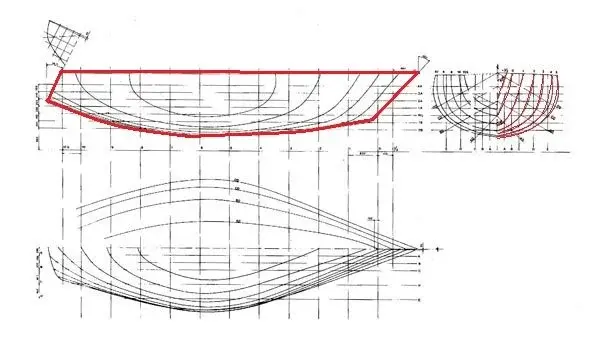
I have a design in 2d naval with level curves on all three axes file is a jpg or tif image file
I would like to recalculate the spline given by the image
and do not identify the coordinates of the points and insert them in rhino that would require a lot of work
I tried to import the image as a background bitmap but I have the problem that the image has no dimensional properties in the other planes and I can't understand how to give proportion to the bitmap
to give a size and import it proportionate in other views or change it later or delete it
 
It's not clear yet.
the image you have is in assonometry/prospect or are orthogonal projections?
In the first case, I don't know if it's possible to do something.
in the second, instead knowing at least one real measure of the level curves it is possible to scale the image and recalculate it with good approximation. as in the example that I attach: in the front view you see the background image on which the view has been recalculated. but here it is straight lines. with curves I see it harder.
However, to import the image, view/bitmap background/neck.
when you have placed the image in the corresponding view, you can change it (and then scale it) always from: view/bitmap background/neck. .
I hope I help you.
 

Attachments

  • Teatro del Mondo Rhino.webp
    Teatro del Mondo Rhino.webp
    144.7 KB · Views: 33
hello young thank you for having responded I was beginning to be afraid
the design is not prospectic but it is twisted imagine a hull of a ship taken from 3 orthogonal views.
represents this surface as level curves.
by means of similar plans of the territories
I now have such curves according to the 3 views, I would have to recalculate in all three floors, and in the prospective I should have my half hull represented by a curved grid on which I will have to build my superfice passing through these curves of level
 
I think I understand, but it's not easy to answer. If you post the image you might try to help.
In summary: the images of the level line groups should be placed in the corresponding views (zx in the front view; zy in the side; xy in the upper) and recalcate; after that you will have to move them to the correct 3d positions (as far as you will find them on a single floor).
I do not think that this operation allows you to have a good surface because the inevitable imperfections of the line recalc must be correct with the tools for the curves...... It is not a simple thing like this, but it can be a useful exercise to understand rhino.
 
hello young youth this is an example


in practice I must insert at least the profile you see on the top left in one of the rhino plans
and then I have to give the sections in an orthogonal plane to the one above taking references on the main profile

the problem arises when I have to enter 3 background bitmaps in the 3 equal floors to have the proportional curves in all 3 floors

If I might be able to recalculate everything in a plan and then to rub the curves in the plains associated with them I could solve the matter by proportioning the background bitmaps
 

Attachments

  • piano_10.webp
    piano_10.webp
    24.7 KB · Views: 29
Last edited by a moderator:
this is an example the first is the basic right profile you see the sections that I should recalcate and move on the references that I should do on the profile
then after I should create a passing surface for sections with limits the profile to the left
 

Attachments

  • piano_11.webp
    piano_11.webp
    26.8 KB · Views: 20
Last edited by a moderator:
When I had needed to perform similar jobs, I was very useful a guide found on another forum, which do not mention the name.. but if you are looking for "modelling of the virtuelle hull" you can find it. .
I found very useful the command "“curve from 2 views”. .
 
There's a lot of difference: Try and you'll see this command gives you a lot more chance.
For example, in architecture, you could use it to create some figurines of people to insert in renderings.
upload the image of a guy, after drawing the profile of the person's silhouette... fill the surface and get the figurine.

see image attached to understand the concept
Hello. I entered the pictureframe command.. but the image nn is loaded.. I can only track the rectangle of the area.. Thank you.
 
hi, I also have the same problem of displaying a neutral rectangle using the "_pictureframe" command; the beauty is that it worked first, then point in white does not work anymore. I tried to change the settings of materials related to surfaces or view options (wirefame, shaded, etc):confused:
I had already posted this question, but I still haven't solved it.
 

Forum statistics

Threads
44,997
Messages
339,767
Members
4
Latest member
ibt

Members online

No members online now.
Back
Top