• This forum is the machine-generated translation of www.cad3d.it/forum1 - the Italian design community. Several terms are not translated correctly.

import a jpeg in rhino

  • Thread starter Thread starter spilladabalia
  • Start date Start date
very interesting command. with import bitmap though, there is a very important key for me that is true. with pictureframe can I get the same result?

 
Well with pictureframe practically create a flat surface on which the texture of the image you want to import applies, so you can use all commands related to surfaces, size, scale, import more than one image on the workflow, etc. on rhino 4 I still have the problem that displays the textureless surface, on rhino5 works.
 
pictureframe is irreplaceable.
I haven't used more bitmaps for years now.
to respond to those who said they no longer see the image problems can be varied.
For example, you are on a switched level, if you are in the wrong view or you have a surface that covers you the bitmap, or the link does not work anymore because you have moved or copied the file to another directory or folder.
I do not remember if the direction of the surface affects the display of the bitmap.
 
I wanted to know if I can insert a jpg file spread along a three-dimensional object??? so it looks like a texure...
Thank you.
 
responding to the flight, you could use the jpg as a texture of a material, apply the material to the object and select the view "render". wanting to explode the solid, put on an independent layer the faces on which you want to apply the jpg and check the material.
or, if you want to smear the jpg on a flat face of your solid, explore it and replace the face with a superifice created with pictureframe; The bearer is that he's flat, then you can trim it as you want.
 
Actually, when you enter a .jpg with pictureframe (or "image picture frame") you see it in all display modes (rhino5).
if you apply the image as material, you only see it with the view render
 
accurately how does the image apply as material?
My object is curved is the image I would need spread over the entire curved surface ... :/
 
accurately how does the image apply as material?
My object is curved is the image I would need spread over the entire curved surface ... :/
...
I am trying to insert a fabric material to a sofa
... but it divides it in its own way according to the surfaces created for the modeling... and I can't put the fabric in scale compared to that of the sofa... :eek:
 
then create a layer to apply a texture.
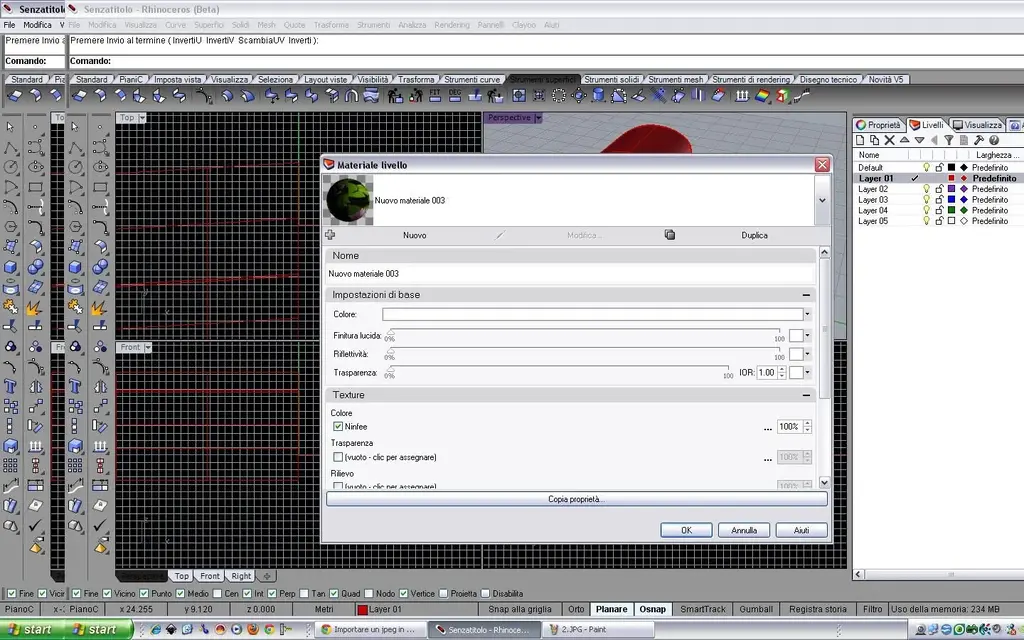
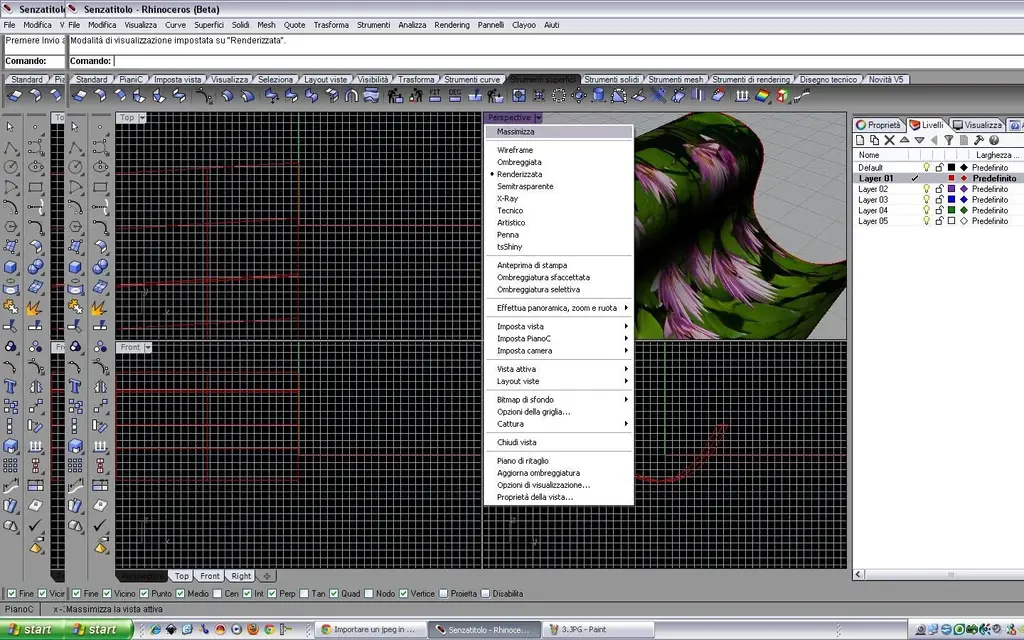
go to property levels (photo1) and click on the round column of the material. opens a window where there are the characteristics of the material (photo2); cllicchi on the texture subwindow (photo3) and choose your texture. close everything and, of course, after giving your soledo the layer, impose the view render and see that it has spread the texture on your surface (photo4).
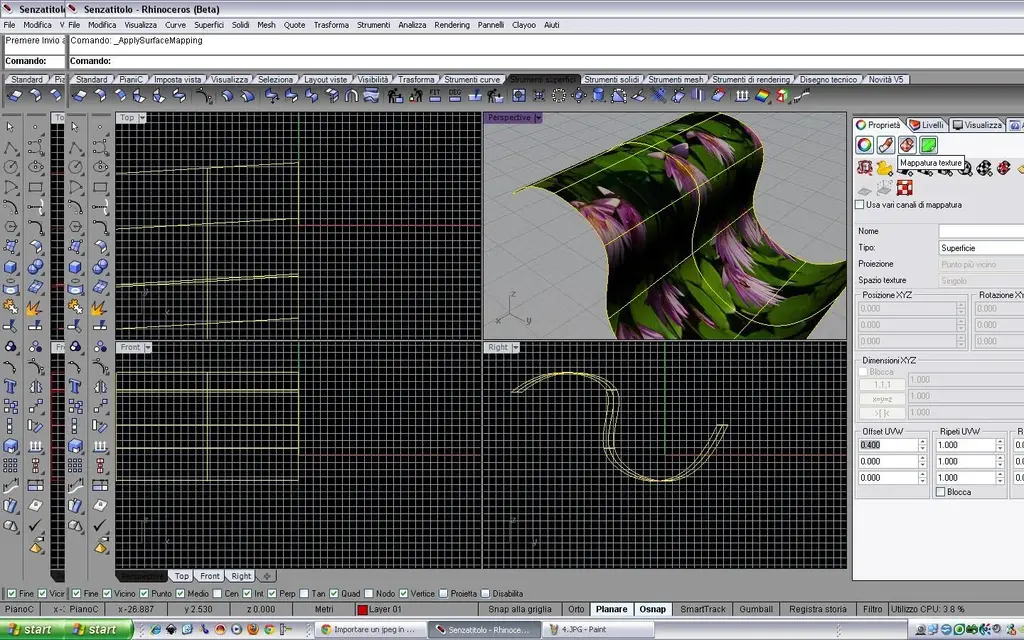
If you want to change the scale and texture location on the surface then select the surface, click on texture mapping properties and open a window with the parameters to change. I know that rhino 5 has developed many more options regarding uv, but beyond I don't know. Hi.
 

Attachments

  • 1.webp
    1.webp
    237.7 KB · Views: 8
  • 2.webp
    2.webp
    186 KB · Views: 7
  • 3.webp
    3.webp
    186.2 KB · Views: 7
  • 4.webp
    4.webp
    245.8 KB · Views: 6
  • 5.webp
    5.webp
    269.5 KB · Views: 9
I inherit the texure as I wanted and got the surrender I wanted. but the file in another pc is read though without the presence of texure... why?? ? ?
 
What way do I save? ?
How come you don't find the path of the file ... I have to save it in a particular way? ... the texur is read only in my pc i.e. where I inserted the mapping ... in other pcs read the object but not the texur :eek:
 
import the jpg into a new folder on the new pc, open your file with rhino, return to the material settings and call back the jpg, which you had put in the new folder; boh proves so
 
Do you think it's the only way??? Okay.
but if I save my object with texure in 3ds max how does the texure not appear?
 
or put the texture in the same folder as the rhino file. but depends on the versions.. .
 

Forum statistics

Threads
44,997
Messages
339,767
Members
4
Latest member
ibt

Members online

No members online now.
Back
Top