
• This forum is the machine-generated translation of www.cad3d.it/forum1 - the Italian design community. Several terms are not translated correctly.

import assembly pro

  • Thread starter Thread starter albertos
  • Start date Start date

albertos

Guest
Hello, everyone.
I have to import pro and solidworks assemblies, automatic management attempts to recognize the features creates the individual parts asks me to save the files, but last after creating the components the window appears with "empty assemblies" I have to check out some configuration in particular?
Thank you.

tree
 
Hello, everyone.
I have to import pro and solidworks assemblies, automatic management attempts to recognize the features creates the individual parts asks me to save the files, but last after creating the components the window appears with "empty assemblies" I have to check out some configuration in particular?
Thank you.
I also have the same problem and I don't understand what to do.... I tried all the possible combinations but the problem remains!

Does the parts open them well enough?
 
what type of assembly are you trying to import (file format) ?
in theory solidworks (in the file type window of the tab open file) lists as files that you can also open the native parts and assemblies of pro engineer.
when I try to open a set, a window appears where you ask if you want to try to recognize the work, the solid bodies, etc.
one makes his choices and then starts with loading but eventually opens a file together with blank solidworks!

already that I am going also a little off topic.... I sent the files that I could not open in iges and step format but also with these I had problems (other than, solidworks tells me that they are truncated). I asked for parasolid, but what you use proe tells me you don't save him that format.
Is it me that I found someone who can't use the program or the proe solidworks pass is so complicated?
 
you found someone who can't use pro/e, if you want to put a step of pro/e and see if it works.

But let's do this, here's the step.
 

Attachments

you found someone who can't use pro/e, if you want to put a step of pro/e and see if it works.
I imagined... Thank you, but I told him to try to send it back.
But can you tell me what to set up in pro/e before moving so I communicate it to the type? Consider that this is a car change so there will be very complicated castings. . .
 
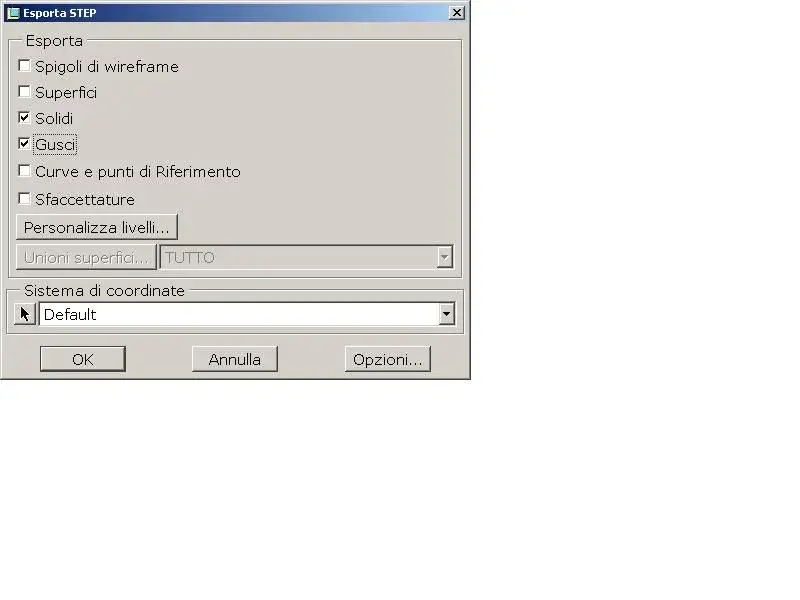
when you export from pro/e you have to decide how you want to export (solids, shells or surfaces) as attached image.
If the guy is sure to have everything in solid mode, he pounces on solids and by the ok.
If instead the work is done to caxxo, put the check on surfaces and then you will have to solidify all the imported components ... hoping that there are no big problems.
 

Attachments

  • Immagine.webp
    Immagine.webp
    16.1 KB · Views: 9
importing from proe in 99.99 of the cases I happened to have to opt on the option imports geometry directly, for the simple reason that the risk of unrecognized features is too high and risk to take whistles for whistles, that is a model that is not what should be.

I usually always open models and especially axiemi with this option (as if it were in practice a step) and reserve the option analyzes totally only for the individual parts I should edit and edit using the features.

to date I have always done much before using solidified models without converted features, which have always been wrong or incomplete.

You always make a conversion by importing solids, it can save you many headaches... Then, if you really need it, I'll do it again using the template features analysis.
 
importing from proe in 99.99 of the cases I happened to have to opt on the option imports geometry directly, for the simple reason that the risk of unrecognized features is too high and risk to take whistles for whistles, that is a model that is not what should be.

I usually always open models and especially axiemi with this option (as if it were in practice a step) and reserve the option analyzes totally only for the individual parts I should edit and edit using the features.

to date I have always done much before using solidified models without converted features, which have always been wrong or incomplete.

You always make a conversion by importing solids, it can save you many headaches... Then, if you really need it, I'll do it again using the template features analysis.
I share, much better before importing everything and then go eventually to recognize the components that interest you to change.
obliging the program to perform this operation during importing means, most of the time, to throw the system into the ball.
 
importing from proe in 99.99 of the cases I happened to have to opt on the option imports geometry directly, for the simple reason that the risk of unrecognized features is too high and risk to take whistles for whistles, that is a model that is not what should be.

I usually always open models and especially axiemi with this option (as if it were in practice a step) and reserve the option analyzes totally only for the individual parts I should edit and edit using the features.

to date I have always done much before using solidified models without converted features, which have always been wrong or incomplete.

You always make a conversion by importing solids, it can save you many headaches... Then, if you really need it, I'll do it again using the template features analysis.
Okay... I'll try to do this!

the problem however is not the imported geometry that contains errors, as sometimes happens also with iges and step, but the fact that the axieme is empty: no solid or surface appears!
 
There is something wrong with export settings from pro/e.
If, for example, the axieme is modeled in surfaces and then exported as solids, the result is an empty set.
If you want to get pro/e's assembly and pass it, I can take a look at it and let you know how it is.
in case it was very heavy, made an account on www.adrive.com, it is free and you have 50 gigabytes of space.
 

Forum statistics

Threads
44,997
Messages
339,767
Members
4
Latest member
ibt

Members online

No members online now.
Back
Top