
• This forum is the machine-generated translation of www.cad3d.it/forum1 - the Italian design community. Several terms are not translated correctly.

import measures from excel

  • Thread starter Thread starter ezioceres
  • Start date Start date

ezioceres

Guest
Good morning, everyone, I'll put our problem.
we have to interface catia v5 with a excel spreadsheet to fish the size from the sheet and update in real time the cad.
the problem is that until now we have managed to do so only if we have the parameters to import on the first two rows of the spreadsheet, with the names on the first and the values on the second.
we do not know how to tell catia to take the value in any cell we choose within the sheet. is it possible or is it necessary to use only the first two lines? It seems very limiting. .
in case, it is possible to do all this with a macro, in the sense to create the link prameter-cell with a macro to be launched in the casket?
Thank you.
 
Hi.

you have to use the project tables or project table,
they are very powerful,

If you want to send me the catpart
and the excel sheet you want to associate with
progettista@katamail.comsend me a .txt with directions on how you want the catpart to work

I try to associate you with everything

Hi.

Sbilf
 
Good morning, everyone, I'll put our problem.
we have to interface catia v5 with a excel spreadsheet to fish the size from the sheet and update in real time the cad.
the problem is that until now we have managed to do so only if we have the parameters to import on the first two rows of the spreadsheet, with the names on the first and the values on the second.
we do not know how to tell catia to take the value in any cell we choose within the sheet. is it possible or is it necessary to use only the first two lines? It seems very limiting. .
in case, it is possible to do all this with a macro, in the sense to create the link prameter-cell with a macro to be launched in the casket?
Thank you.
on tools\options\infrastructure\part infrastructure table "view" you have to activate the item "parameters" and "relations".
At this point on the feature tree you will find the related entries activated.

If your family table is richer through the table entry that you find within relationships you can choose the combination of data.

Hi.
 
I'm sorry, but what tree of the feature do you say? the one in the options or the part?
If you send an image I'd be very grateful.
 
The feature tree is the tree on the left of the working area, where the geometric features of the model are recorded.

Hi.
 
I exhume the interesting discussion, for me.
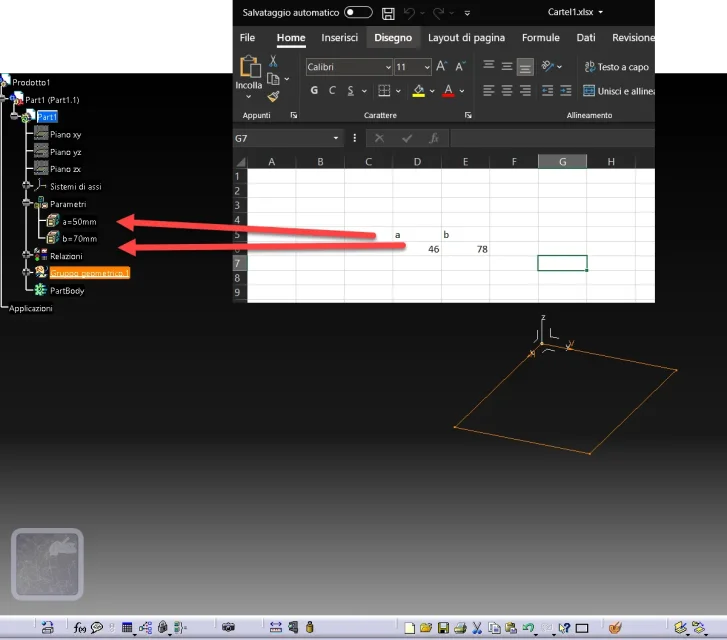
I know how to create a table excel from catia, if then I have a series of combinations, choosing the line denouncing the set of variables in catia and so far ok.
but now I am in the condition of having to fish parameters from excel sheets that are in specific position. below an example to make the idea. Can someone tell me how to do it?
1648630994321.png
 

Forum statistics

Threads
44,997
Messages
339,767
Members
4
Latest member
ibt

Members online

No members online now.
Back
Top