• This forum is the machine-generated translation of www.cad3d.it/forum1 - the Italian design community. Several terms are not translated correctly.

import new points

  • Thread starter Thread starter Gio_S
  • Start date Start date

Gio_S

Guest
hello to all, it is not a way of saying but actually I would like to inform me, because today as I use intellicad that does not manage me truecolor. and I do not know what to suggest.
In short, I was told that the famous cloud of points, importing it in autocad, loses the color attribute because (and here steadfast) the dxf does not support the color of points. This is not true, but my knowledge stops at the old reduced palette, I also amount photos, but my personal tool chooses the old color of autocad palette with the logic of the most similar, and to me it is enough, for what I have to do.
However, I wonder, actually for a friend, how and from what formats can you import clouds of truecolor color points in autocad? of the rest, truecolor today is managed.
Thank you, I hope I could explain. I practice the 3d normally for sla printing, but for now of import of clouds of points I never occupied.
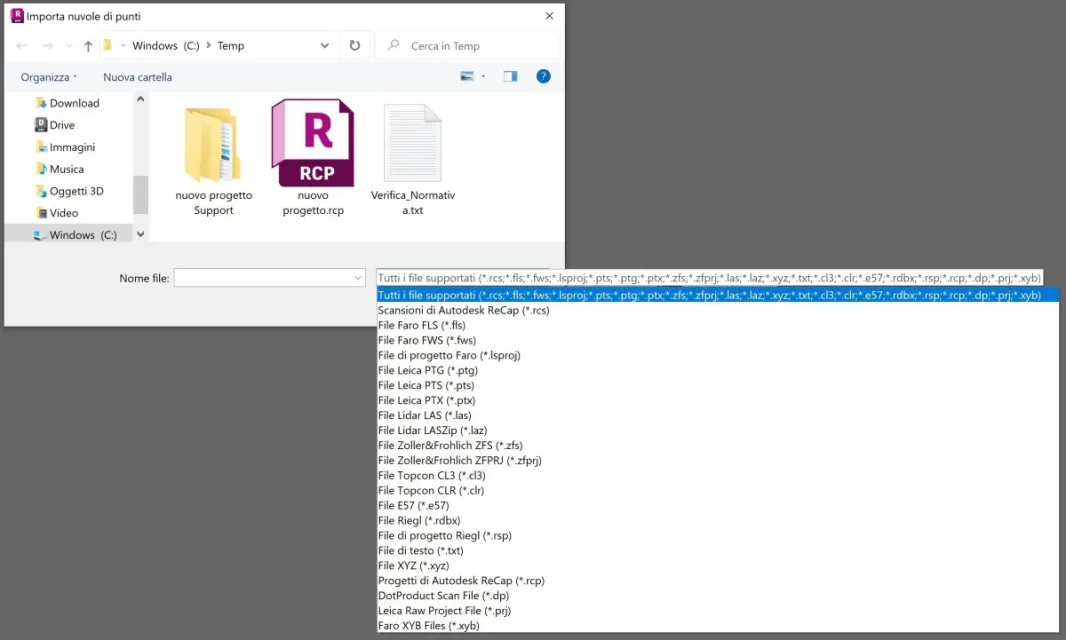
 
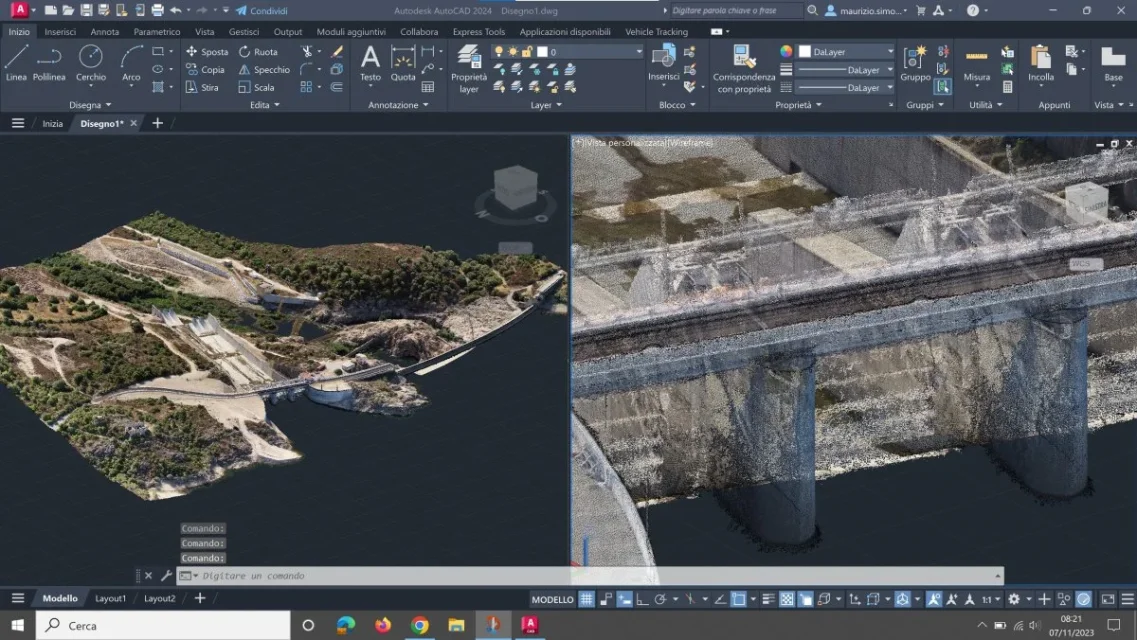
autocad in recent versions flood clouds of points in recap format (.rcp and .rcs)
recap of his, instead, accepts a great variety of formats:
Immagine 2023-11-07 081858.webp
Immagine 2023-11-07 082128.webp
 
thanks to the clarification, therefore autocad, without this recap extension, of which I also read around, the clouds do not manage them, but also with recap are not imported as editable entities, but "linked". so much less removable in dxf. it is seen that the dxf "without colors" (used even in a tutorial!) of which to the explain that I did before, was generated by some programs of import clouds in dxf, but that loses the color attribute of the points. from here, the guy had developed his own personal idea that the autocad point does not support the color.... Thank you.
 
simply making a cloud of dxf points is a caga, said out of the teeth. heavy and difficult to manage. by now the dxf format is anachronistic
 
the cloud of points if used for topographic or similar reliefs is definitely heavy, depends on what has been scanned and the type of work. I don't pay attention to the autocad philosophy of needing more and more extensions to faithfulize the user on entire lines of products, because I already support other sw for the return of scanned solids, but still my was a curiosity.
However, I do not understand that the file typically interchanges like the dxf is being replaced because anachronistic, anachronism is probably illude that today for companies it is worth having a flexible sw on the competitors and consider it a goal. I'm afraid that the point is this, just look at the flourishing of the formats that accompany the evolution of three-dimensional scanning...
 
everything has its own life cycle, even file formats. dxf is a text file containing a series of codes and was born, as you rightly say, as an interchange format, so nothing to do with the clouds of points, laser scans and singer company. obstinate to use a file format created for other purposes I consider it silly; flexibility is also in finding a better solution than usual, if it makes us gain time and money.
 
dxf is also binary, it is not necessarily a text file.
so that it can not be used just as an interchange between laser and dwg reliefs, I keep not explaining it to me. I have not yet imported scans that have not already been adjusted to mesh, but the day that I have to do so is that I would be cheap enough to have recap.
 
mah, I haven't been arguing but I think the full version of recap has never been free... after the trial period
 
Yes, the pro version is only available, but after 30 days of trial you can choose whether to pay the pro version or continue to use the standard version(free).

as written on the autodesk website and as the dealer confirmed, the free version is the pro version with limitations.
 
I installed the 2016 version that was free.
I think it's not free anymore.
Does someone still have recap2016 installer file?
5 seconds google search"with autodesk recap software you are able to create accurate 3d models with reality capture using laser scanning. this software, which lets you convert reality into a 3d model or 2d drawing, actually comes in two flavors: Recap and recap pro. this blog post is here to explain the differences between the two.

to access recap, you can start a free 30-day trial. once those 30 days are up, you will have the option to subscribe to recap pro or continue using the free features of recap"
 

Forum statistics

Threads
44,997
Messages
339,767
Members
4
Latest member
ibt

Members online

No members online now.
Back
Top