• This forum is the machine-generated translation of www.cad3d.it/forum1 - the Italian design community. Several terms are not translated correctly.

import parameters from excel

  • Thread starter Thread starter peppo82
  • Start date Start date

peppo82

Guest
Hello everyone,
It is recently that I use creo2.0, I just finished a training course of 24, in which unfortunately you can not say everything, and a curiosity that I couldn't take away is precisely, if there is the possibility in creo 2.0, to import a file of part or together a excel sheet and use the parameters to drive quotas or feature famines. I used solidworks in this way and found myself very well, and also catia v5 although a little more limited than solidworks, allows one to import tables and use the values in any way you want, but with creo I do not know the logic behind it to do something like this... Can someone please help me? Thank you!

Giuseppe.
 
creo does not use in this context the link to proprietary files, which I know. tables must be inside the file.
 
creo does not use in this context the link to proprietary files, which I know. tables must be inside the file.
However, speaking with my teacher, he told me that once for a job in which catia v5 was used for the body parts, and I create for that engine, he used a file excel shared by the two programs to manage the coordinates of the components of the drivetrain section, and those belonging to the body shop, and have at the same time available and editable axioms on both platforms. I suppose we can do this at this point, but it can also be that what the prof. did is possible, and vice versa it is not possible what I intend to do? I think it's the same logical thing.
 
if there is the possibility in creo 2.0, to import a part file or together an excel sheet and use its parameters to drive quotas or feature deficiencies. I used solidworks in this way and found myself very well, and also catia v5 although a little more limited than solidworks, allows one to import tables and use the values in any way you want, but with creo I do not know exactly the logic behind to do something like that. . .
something you can do, try to take a look at the command analysis. from what I have seen you can guide some strategic parameters for the design by excel or mathcad.
 
thank you, but there is really to study, and you go especially blind not being there a good guide online, I am full of good intentions but until now I find parametric create really complicated! ! !
 
if the parameters already exist in the part or together you can use pro/program and do so:
in excel reorganize the parameters so that each line is organized as below:
"column 1" "column 2" "column 3"
Nameparameter1 =parameter value1
nameparameter2 = parameter2
..... etc.

save excel file in .txt format

the part/axieme must have the parameters in the input part of pro/program
regenerate the part/assieme by choosing the input values from files. to the request of the creo enter the name of the text file of parameters created by excel.

It seems difficult but if you read pro/program help you should succeed.

I used this system to simultaneously enter hundreds of parameters.


aminati

p.s. something you should be able to do even with the assemblies of "layout" but you need an additional license. . .
 
for pro-programs and excel analysis should serve the advanced assembly ... if not mistaken and however you must export in txt:-)
 
I don't have aax and excel analysis can do it. for pro-program instead I think it is necessary, because if I go to file-preparation-profile model the key change of pro-program is blocked
 
you need the aax license only to use pro/program with the assemblies, for the parts you do not need.

aminati
 
hi peppo82,
It's been two months, but I hope you're still interested.
what you're asking can be done, even if in a slightly slender way. . .

First of all you have to create and save an excel table in which all the parameters that you care about import into creo (in reality if you want to keep them separate you can also create multiple tables and import them separately).

then: analysis --> excel analysis --> load (and choose excel file) --> output cells (and select the cells where there are values that interest you) --> compute --> add feature

After these operations you should find an analysis saved in the model tree.

at this point you have to assign values to parameters. if you have not already created them, you create them in the classic way:

tools --> relations-- add new parameter

in the "relations" field associate the quota that interests you to the created parameter (for example: d0=diameter)

at this point it is only missing to define the value of the parameter.

always in relation write the name of the parameter followed by the equal (e.g. diameter =)

then:

insert --> from list --> look in --> feature

select directly from the template tree the analysis you saved before. At this point you should see all the parameters you had imported from the excel table.
select what you want and press insert.

the result should be of the type:

d1=diameter
diameter=xl_1_2:fid_analysis1

updates and quotas are automatically updated.

If you want to change the parameters you can do it directly from the excel table. once you change the data in the table, to update the cad you have to right-click on the saved analysis, edit definition and immediately ok. then regenerate and the odds you have changed automatically regenerate.

I know it's Moroccan, but it's much longer to say than to do!! !
I hope that's what you were looking for.. .
Let me know how it went! !

hello and good work!! !
 
Good morning to all,

I refer to this subject, since it is existing, because I use the analysis function by excel assiduously.

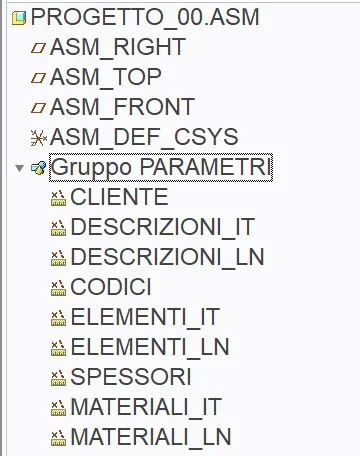
However, having created a project.asm configurator that covers vaults, when I run the copy the analysis file remains the original one and not the copied one. this implies that for each group of parameters that is regulated by excel I have to do change of definition and then change the origin of the file, in the dedicated button change file.what I wonder is: having a group of measurements/analysis, which regulate the parameters of the axieme, all referring to a single file (I did more than an analysis because more than a certain number does not allow it), you can go to change the path manually, without having to pass all the times from change definition?I hope I've been clear.
 

Attachments

  • Schermata 2023-02-10 alle 11.29.56.webp
    Schermata 2023-02-10 alle 11.29.56.webp
    24.5 KB · Views: 3

Forum statistics

Threads
44,997
Messages
339,767
Members
4
Latest member
ibt

Members online

No members online now.
Back
Top