
You are using an out of date browser. It may not display this or other websites correctly.
You should upgrade or use an alternative browser.
You should upgrade or use an alternative browser.

xxfast
Guest
I do not use this function very much.
Does it seem to me that there is no driving curve?
Does it seem to me that there is no driving curve?
panormus
Guest
a guide curve is not indispensable... But I don't understand where I'm wrong.
with catia I select 1st curve and 1st surface of tg and then 2nd curve and 2nd sup of tg, but therefore it does not go..
with catia I select 1st curve and 1st surface of tg and then 2nd curve and 2nd sup of tg, but therefore it does not go..
PiegatoreSolidworks
Guest
you must select section 1 and section 2.a guide curve is not indispensable... But I don't understand where I'm wrong.
with catia I select 1st curve and 1st surface of tg and then 2nd curve and 2nd sup of tg, but therefore it does not go..
later if you want the driving curve.
panormus
Guest
and what would be sections 1 and 2?you must select section 1 and section 2.
later if you want the driving curve.
volaff
Guest
Sections 1 and 2 are the initial and final sections you want to join with loft protusion
panormus
Guest
or the extreme edges of the two surfaces to be connected? it does not go, neither with the edges, neither with the faces, nor with the edges and faces.. .Sections 1 and 2 are the initial and final sections you want to join with loft protusion
volaff
Guest
if you notice when clicking on the two profiles to join, a "blue" ball appears on each section,
Sometimes it can happen that you are the punts (pallini) you take are not "allined" the loft operation is not realized.
try to move the location of such "balls" and see if you can achieve the operation.
Of course, then, you can add some guide curves to which the profile keeps connected during lofting.
Sometimes it can happen that you are the punts (pallini) you take are not "allined" the loft operation is not realized.
try to move the location of such "balls" and see if you can achieve the operation.
Of course, then, you can add some guide curves to which the profile keeps connected during lofting.
marcof
Guest
you are using the solid loft, for which you have to select a closed area.Hey, guys.
Can you tell me what I'm wrong?
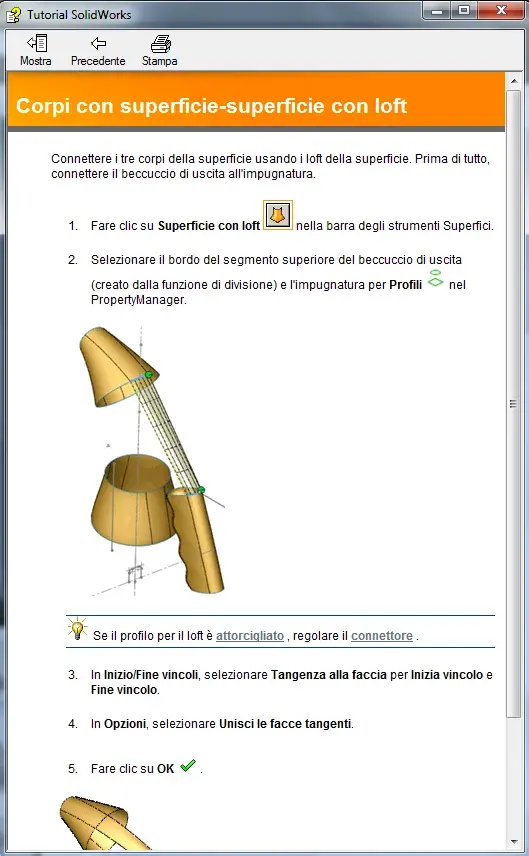
I can't make the surface from loft (see attachment) despite the preview seems to show the correct path.
you have selected two profiles so you have to use the surface loft, which you find in the surface controls.
marcof
Guest
while using forgotten solidworks of caia, and vice versa. you will have many less porblems avoiding using the commands of one like the other.with catia I select 1st curve and 1st surface of tg and then 2nd curve and 2nd sup of tg, but therefore it does not go..
panormus
Guest
this is indicated by the tutorial. where do I find the loft command for surfaces?you are using the solid loft, for which you have to select a closed area.
you have selected two profiles so you have to use the surface loft, which you find in the surface controls.
Attachments
marcof
Guest
this is indicated by the tutorial. where do I find the loft command for surfaces?
 Are you kidding?
What did you write in point 1 in the tutorial that you posted the screen? read the tutorials (and the relic help to the commands indicated) or just look at the figures?
but come on, since you were joking: I'm not pushing any further.. .
panormus
Guest
I asked you the next question because I solved (the surface card was not there for this reason I confused the loft for solid with the one for surfaces, sympathetics :tongue
What did you write in point 1 in the tutorial that you posted the screen? read the tutorials (and the relic help to the commands indicated) or just look at the figures?
but come on, since you were joking: I'm not pushing any further.. .

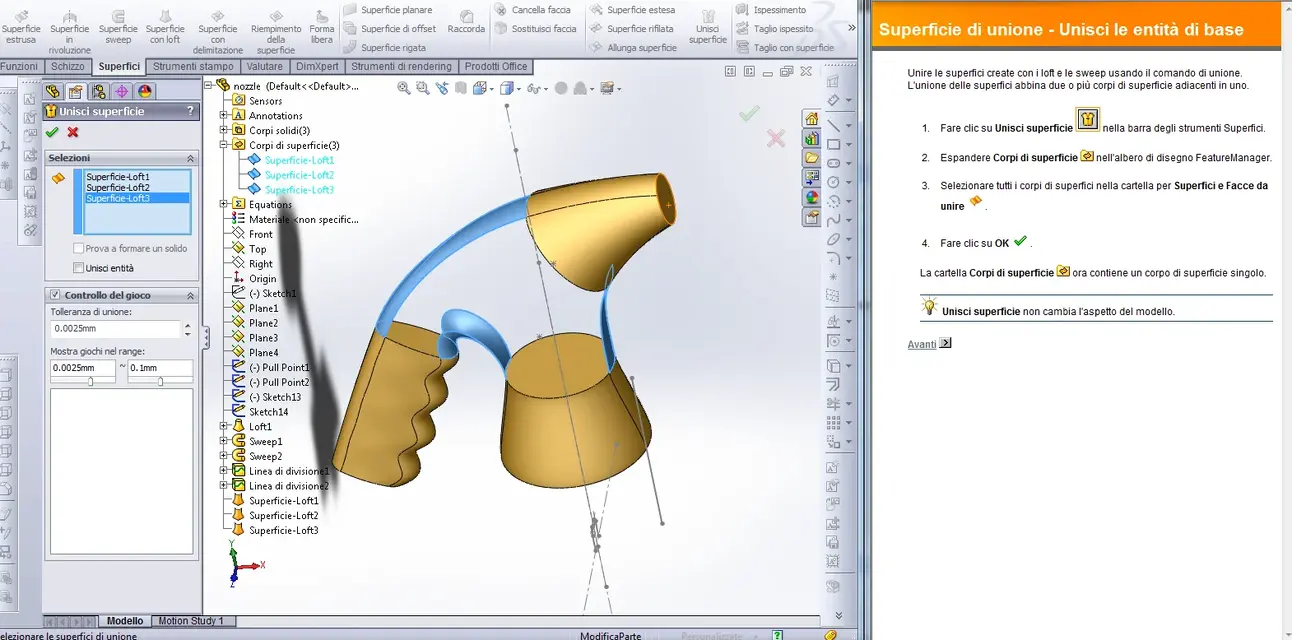
if I follow the indication I do not join the surfaces.. What's wrong? and be patient because it's all new to me..
Attachments
marcof
Guest
mistakes that actually non are following the indications, or rather the indications are related to a different phase (probably later) of the modeling compared to what you are doingif I follow the indication I do not join the surfaces.. What's wrong?
how can you expect to combine three surfaces that are disconnected with each other?
I repeat, when a command fails you click on the " icon?" and read the relative help. in your case you would have found written, just at the beginning, that (citely):"the edges of the surfaces must be adjacent and not overlapped. "http://help.solidworks.com/2011/ita...e.htm?id=29fcad5225f34f6184090b43302c0e5f#pg0if you use the forum as a help desk at the first difficulty without seeking help premium in the preposed places (the online help), in addition to using it badly, you will only lose great time unnecessarily. Today you're greedy that there's someone answering you, otherwise you'd be stuck last night for a bischer.
panormus
Guest
Sure for kindness and welcome you are not at the top I see,.. look for the surface tutorial and you will find the error.mistakes that actually non are following the indications, or rather the indications are related to a different phase (probably later) of the modeling compared to what you are doing
how can you expect to combine three surfaces that are disconnected with each other?
I repeat, when a command fails you click on the " icon?" and read the relative help. in your case you would have found written, just at the beginning, that (citely):"the edges of the surfaces must be adjacent and not overlapped. "http://help.solidworks.com/2011/ita...e.htm?id=29fcad5225f34f6184090b43302c0e5f#pg0if you use the forum as a help desk at the first difficulty without seeking help premium in the preposed places (the online help), in addition to using it badly, you will only lose great time unnecessarily. Today you're greedy that there's someone answering you, otherwise you'd be stuck last night for a bischer.
As for the answer (for which I thank you anyway), I really had already solved by myself (clicking on the appropriate icon inserts me the missing commands, but very rarely I used it because I find them easily).
I was just saying if you read the tutorial carefully (I don't want it, but if these are your tones, don't expect otherwise) you will realize that the same proposes me to join surfaces that he himself cited me the need to be adjacent (which was not, and it was obvious and I was stranizzava) and as I limit myself to follow step by step the directions thinking that everything is correct then place and I ask you thinking it is wrong.
Is humility repaid?
marcof
Guest
depends very much on the context and also on what your expectations are.Sure for kindness and welcome you are not at the top I see
do not forget that of all the answers you received the only one who explained to you in two posts that you first wrong command (solids instead of surfaces) and then you used the command wrongly was me. If you want to stick to the shape rather than the substance goes on, then I decide what and how to respond.
There is no error in that tutorial. You make the mistake. I see now that from the images of your model you see that you are doing a tutorial dedicated to the surfaces using at first the loft commands and sweep of the solids that after you connect with surfaces and that you tend unnecessarily to join.look for the surface tutorial and you will find the error.
Prego...regarding the answer (for which I thank you anyway)
If you solved it yourself before receiving an answer you might be worthy to come here and write that you solved and how you did. to this serve the forums, not only to receive kind answers.Well really I had already solved by myself (clicking on the appropriate icon inserts me the missing commands, but very rarely I used it because I find them easily).
quietly, I do not break up and do not demand anything, whatever language you decide to use; I simply direct my answers accordingly. But I think you'd better focus on your problem, or the tutorial.(I don't want to, but if these are your tones, don't expect otherwise)
I have to repeat myself: tu that must read the tutorial carefully, not me.I was just saying if you read carefully the tutorial [...]you will realize that the same proposes me to combine surfaces that he himself cited me the need to be adjoining (which was not, and it was obvious and strange)
It's a surface tutorial, it tells you I'd use the surface controls, and you left using sweep and solid lofts. make three separate solid bodies, merge them with three loft surfaces and may claim to merge three separate surfaces. if you do everything with the surfaces the command merges, selecting all surface bodies (as specified with precision in the tutorial at point 3 of the page relative to that part), it works perfectly.
Actually, as I explained, you didn't follow it carefully, for what you can't do.and as I limit myself to follow step by step directions thinking that everything is correct.
actually you wrote that the tutorial is wrong, adding that I have to read it well...then place and I ask you thinking that I am wrong in something
Well, you wrote that the tutorial prepared by solidworks is wrong because you don't succeed, then you advised me to read it carefully so that I can confirm that you can't because it's wrong. as an example of humility there is no evil:wink:Is humility repaid?
If you want to go back to technical issues for what little I can do I gladly do.
if instead you want to continue to disregard questions related to humility, kindness and other bitter issues like that that do not have a pipe with the dissolution of a tutorial that you started with the wrong commands, we move in the area ot.
panormus
Guest
I assure you that there is an error of setting in the pages and in my opinion you have noticed but noble to say it.
I ask you not to insert yourself into my posts if such must be your attitude all but constructive. I'm very sorry if you have problems and use the forum to blur, I hope some moderators notice it.
I do not lower myself to your level, but the error c is (the dassault is not god and can wrong the page), read rather than sow zizzania. .
(also from my print screen it was seen that I followed the directions,... what kind.
I ask you not to insert yourself into my posts if such must be your attitude all but constructive. I'm very sorry if you have problems and use the forum to blur, I hope some moderators notice it.
I do not lower myself to your level, but the error c is (the dassault is not god and can wrong the page), read rather than sow zizzania. .
(also from my print screen it was seen that I followed the directions,... what kind.
marcof
Guest
I didn't notice. Why don't you tell me where the mistake is so I learn something, too?I assure you that there is an error of setting in the pages and in my opinion you have noticed but noble to say it.
in the tutorial at first read:"in this lesson, we will begin with an existing sketch consisting of lines, arches, splines and sketches. then the following will be applied surface functions to create a beccuccio"
then list surface functions. you are lost in the tutorial using three solid functions and that's why the tutorial doesn't succeed. I don't know how to write it anymore.
where the tutorial asks you to: "
"click on surface with loft in the surface toolbar." you clicked estrusione /base con loft.
Do I have to make you a vide with audio, soundtrack, headlines and queue titles or is that clear enough?
Look, that tutorial to the point where you block it in a few minutes and it manages perfectly by closing the sides of the sprayer with the filling surface. if you like to argue that my attitude is not constructive do as well, but to me, following not my advice but the tutorial, the model succeeds.I ask you not to insert yourself into my posts if such must be your attitude all but constructive.
Here, we are, comes the classic overturning of frittata so it is the interlocutor that indicates where it is wrong that it has problems, it has to vent etc and follows the cry of asylum with "I tell the teacher". .I'm very sorry if you have problems and use the forum to blur, I hope some moderators notice it.
You don't get a model, I'll explain that you can't because you're wrong, I'll tell you where you're wrong, and as a result you're resenting my alleged problems. but rotfl!.
My impression, since you're pulling me out of my hair, is that you're the humility you're going to cling to, you don't even know where she is and somehow annoys you to be a simple modelling like that dispenser and annoys you that this depends on a trivial job setting error. you did at the beginning of the model three solid functions instead of surface. whistles for whistles... There's nothing wrong, it happens to everyone, but please don't take care of who makes you notice and so allows you to fix and finish the tutorial.
But I ask you to tell me precisely, if you are able to do so, where the mistake is. I'm always willing to change my mind.I do not lower myself to your level, but the error c is (the dassault is not god and can wrong the page), read rather than sow zizzania. .
Wake up! !(also from my print screen it was seen that I followed the directions,...
is right from your print screen of the first post you see non follow the indications then please lower the crest, check your model and remake the first three functions (loft1, sweep1, sweep2) as surfaces and not as solids and you will see that then you will be able to combine all the surfaces as required by the tutorial.
already, a guy who manages the tutorial you're wrong. The same guy who's explaining how to solve your modeling problem.What kind.
panormus
Guest

This is the last I write for you.. because you are not constructive at all, point your finger with yours .. you.. you don't. And whoever reads realizes that, so you're wasting words like a desperate one.
then as for your
But I ask you to tell me precisely, if you are able to do so, where the mistake is. I'm always willing to change my mind.if you go get the only capture file3 posted and read carefully, it is asked to select 3 surfaces (from him not from me) that are not adjacent. . .
and now stop shooting at chicchessia, avoid judging as you did from the beginning, never take anything for granted and think that those who read may have difficulties for many reasons; first listens to what comes from others without judgment and tries to understand, then, with grace and respect for intervening people.
Whoever reads I think will be with me.
We have closed, I hope that at least this discussion will be served to understand how it behaves
marcof
Guest
Look, I'm writing for you, not the opposite. I'll tell you what you're talking about and I'll show you.
This is the last I write for you.. because you are not constructive at all, point your finger with yours .. you.. you don't. And whoever reads realizes that, so you're wasting words like a desperate one.
Marcof said:But I ask you to tell me precisely, if you are able to do so, where the mistake is. I'm always willing to change my mind.
if you go get the only capture file3 posted and read carefully, it is asked to select 3 surfaces (from him not from me) that are not adjacent. . .
can you read or do you have visions?in the capture3.png file you posted there is clearly written to select All the surfaces, there is no reference to the number "3"!!! of which you vane. also says that they should be selected from the surface body folder. Do you understand or not? you have to select AllI mean,
Total I know superficiency. your problem as I wrote you until exhaustion is that you mistaken at first the model having used three solid functions instead of surface then in your model the surfaces are only three, but there is no written to select three, it is written to select all (repetita juvant)! I have already written to remake the first three features as surfaces.
to me the tutorial comes perfectly. Are you saying that my swx version is tailored to me or that I'm following the instruction of the tutorial?
I hope you're clear now who's wasting words like a desperate man and begins to give in escandescences after doing bar psychoanalysis towards his interlocutor. I have limited myself to technical facts.and now stop shooting at chicchessia, avoid judging as you did from the beginning, never take anything for granted and think that those who read may have difficulties for many reasons; first listens to what comes from others without judgment and tries to understand, then, with grace and respect for intervening people.
Whoever reads I think will be with me.
calm down and read the tutorial then look at your model and you will see that you have three solids as the first three features. but caxxo, do you see or not that the handle, the bottom and the spout are stuck at the top?! do you see or not that the icons of the features of your model are different from those you see in the tutorial?! yours are solid, those of the tutorial are All di superfici !!!
We say that it must serve you to understand how you behave with someone who is giving you a hand, but you will understand it when you realize that you are wrong with modeling by making mistakes I have described to you several times. If you want to piss me off because I tell you that you read wrong the tutorial go ahead. It's not hot or cold.We have closed, I hope that at least this discussion will be served to understand how it behaves