• This forum is the machine-generated translation of www.cad3d.it/forum1 - the Italian design community. Several terms are not translated correctly.

impossible to calculate interference

  • Thread starter Thread starter volaff
  • Start date Start date

volaff

Guest
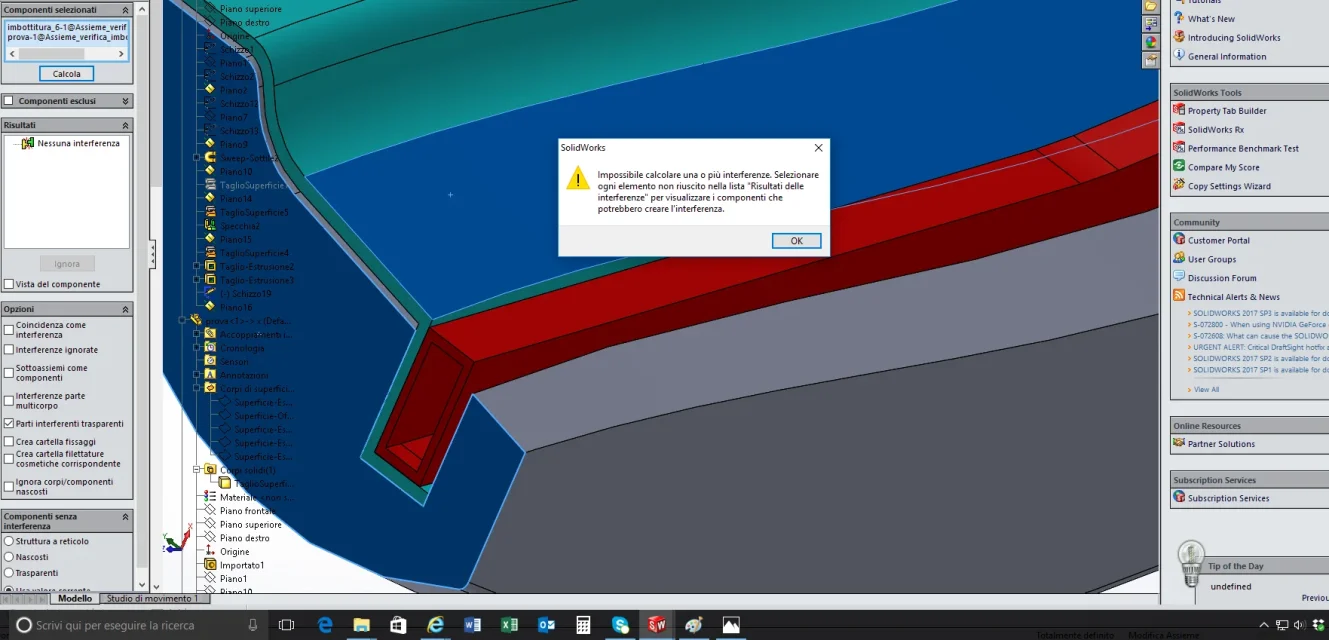
Good morning, I wanted to calculate any interference between three parts in a set, but selecting two, I see the following message.
I tried to search the forum but found nothing.

Does anyone know how I can solve or what the problem is?
thanks to all for any answers.

Greetings.

fly
 

Attachments

  • Immagine.webp
    Immagine.webp
    130.1 KB · Views: 11
You should first recreate the condition that creates the message, which is not easy.
for example there are some things that are not clear from the image:
- you have two parts in the component pane, but are not highlighted in the feature tree. to me instead are highlighted both that preselections, and screen selections through faces
- in the results pane, however, gives you no interference value) as if the check was made even if the calculated key is still active. to me if I still have to check, active key, the result of the pane is non calcolato, while if I check and get no interference the key is inhibited.

It goes without saying that in order to achieve that specific condition of the image you need to know the sequence of the process you used. It is not said to serve, but perhaps yes.
 
Thank you very much for the answer.
- point 1: the result does not change in the sense that it is identical even if they select the parts in question from the tree (I hid the other parts to evaluate the interferences between the components in question).

- point 2: It's just like you said.

If I check with other parts of the axieme the thing goes "lixe" just as it happens to you.
 
Unfortunately:
you can't put files
recreating the condition of the notice takes more ass than making a tern

in practice you have the chance to find someone who has just had the same situation or has a granitic memory that remembers all warning messages and their solution
I throw there a hypothesis so much to fill a little space; could depend on the fact that one of the parts is made from only surfaces
 
problems of this type are due to geometric errors such as self-intersections of faces or solids not perfectly closed. I see in fact from the image that is not a simple cube but a particular with surfaces. try to post the parasolid that if I have time I give an eye.
Hi.
 
Well, here we go.
we hope well, surely there will be some geometric error as I often used the function "face mail"

Thank you very much.
 

Attachments

Unfortunately:
you can't put files
recreating the condition of the notice takes more ass than making a tern

in practice you have the chance to find someone who has just had the same situation or has a granitic memory that remembers all warning messages and their solution
I throw there a hypothesis so much to fill a little space; could depend on the fact that one of the parts is made from only surfaces
there are superstores but then there is also the solid body.
I used the surfaces to make solid part cuts in synthesis.
 
was a hypothesis made by taking a look at the tree of the parts from which you can not understand what it is
I opened the parasoloid and only has the body without surfaces.
to exclude my hypothesis do the same process; open the parasolid, save it and replace it to the original file. if you continue to make a mistake, you excluded a possible cause.
 
I have the feeling that you actually have some geoemtric problem in the construction of the lonesome, but I don't even know where everything seems to be regular
 
If he posted the assist, even in parasolid and only two parts that give notice, it would be too nice. and too easy
 

Forum statistics

Threads
44,997
Messages
339,767
Members
4
Latest member
ibt

Members online

No members online now.
Back
Top