
• This forum is the machine-generated translation of www.cad3d.it/forum1 - the Italian design community. Several terms are not translated correctly.

impossible to edit a dwg file and paste it into a new file

  • Thread starter Thread starter johnny53
  • Start date Start date

johnny53

Guest
hello greeting, everyone is new to the forum
I hope you protect me about a dwg design that I keep that I can't change and not even select in a fluid way, even if the slid in different format the result does not change,instead if I select it, then paste it on a new page does not carry it:! I hope you will be able to help me, I press that I use autocad 2008
I try to attach drawing maybe you will understand the problem better,
Thank youView attachment torretta tornio dwg.dwg
 
I don't understand what the problem is...however it works.
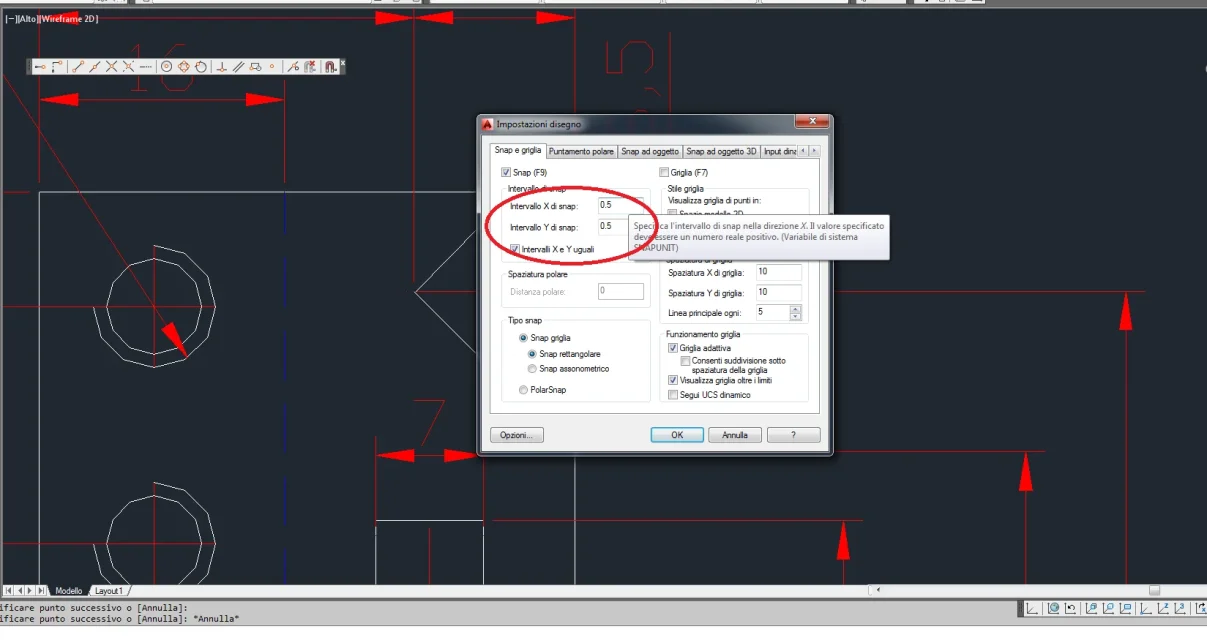
I think you have to set the object snap if I didn't get it wrong.
go to snap- settings mode and put the 0.5 value to the snap range.
I use 2014.
I attach image:
Immagine.webp
 
hi xfast thanks for interest, I tried but not that the pointer moves at 45° step and does not make me select point by point what I want as a normal design,
Maybe you can medify the design and send it back. . Thank you.
 
You must turn off the grid. f9 seems to me. and caps lock when writing messages
 
ok I try and I let you know thanks for now!!:-) but also with windows xp active /disactive f7
 
problem solved in part was the snap was 10, but I still can't copy and paste on my sheet where I cover all the forgiving quota styles, why? to select it makes me select everything but then it doesn't paste me on other sheet
 
which commands do you use to copy from one sheet to another?
did you do ctrl+c and ctrl+v?
 
no really no I have always used icons on the bar next to the open one and save there is paste copy and size
 
the commands are the same.
What's the sequence?
if you first launch the copy command and then select it you have to send, otherwise if you first select and then launch the copy command go directly to the other sheet and drop the paste command and click on the sheet.
Maybe if you describe the steps instead of letting us guess and easier to figure out if you're wrong something (you're the first weapons so it's likely) or if there's a software problem. I cover and take off without problems and have not found entities that can give that problem.
 
In fact I have always done so, select what I want to copy, launch the command, then I go on the other sheet launch paste, it is already I should see what I am moving, placing the as best you believe you click on the muse and remained fixed is copied on new sheet, instead with these drawings always doing the same procedure, how much throw glue you do not see anything even if I click the
muses
 
Then you have to go to attempts to figure out what makes problems.
two things to do first of all: remove the padlock to the ashade layer and make a cleaning of the design (purge control)!
First attempt:, make a quick selection (Qselect command) and set as block reference selection then delete them (they are empty blocks and should not be them the problem but you never know). try to copy
if it doesn't work.. .
second attempt: deletes all quotas (sometimes if the drawing is made with another program can give problems). try to copy.
if it doesn't work.. .
third attempt: progressively select parts of the drawing and see if you can copy. if already selecting a few entities that are not quotas does not make you close everything and open the drawing by making a recover (from the command file menu)
if it doesn't work.. .
fourth and last attempt because I don't know where to climb that I finished the mirrors: insert the design as a block inside your model and explore it.
 
Sorry you can tell me the steps I have to do with pictures because I'm not very practical, thank you
 
You make a video of how you make the copy paste because if it succeeds me with 2005 lt it must succeed you with 2008.
because if I have to explain all the passages with images without knowing what you know, what you don't know, if you've tried at least one of the attempts and in case you've done it if and where you're stuck I put a life on it.
also you haven't said if ctrl+c and ctrl+v works for you?
 
Sorry the layer unlocked it but the purge command where it is located does not see it?:-) however with ctrl it is not equal also having unlocked the layer exits the hourglass but then does not copy anything even selecting only a small design!
 
those in brackets are the commands to write in the command line (it is that white zone under the design where the writings appear); then write purge or Knockout and send.
you did the ctrl test by selecting one entity (maybe one line) because if you are loser for how small you make the selection maybe you do it right where you have what creates problems.

I understand that he has no familiarity with the program, but make various attempts, even the most astronauts and then report here the results because if you do it you do one and then write you take a life. I can only guess because I have no more information than I can extort you.

your file is small, even with deleteable entities via purge, so it can not be a problem of heaviness or management of entities
inside has a couple of blocks that are empty so you can't select them except with the targeted selection
There's nothing for me that can cause problems.

if you make a video (qui a light program that does not require installation) maybe you can exclude an execution error
 
then I just did a test, followed purge command, then I ran cups and paste, and it doesn't copy anything though... if I step to the layout mode1 (on white sheet it copied) I click on model and you don't see anything as ever?
Anyway even copying only one line before it didn't copy anything!
 

Forum statistics

Threads
44,997
Messages
339,767
Members
4
Latest member
ibt

Members online

No members online now.
Back
Top